Workout Log Book
Pick the columns and rows for your workout log, from a short sheet to a 60-row gym book page, then print it or download it as a CSV file.
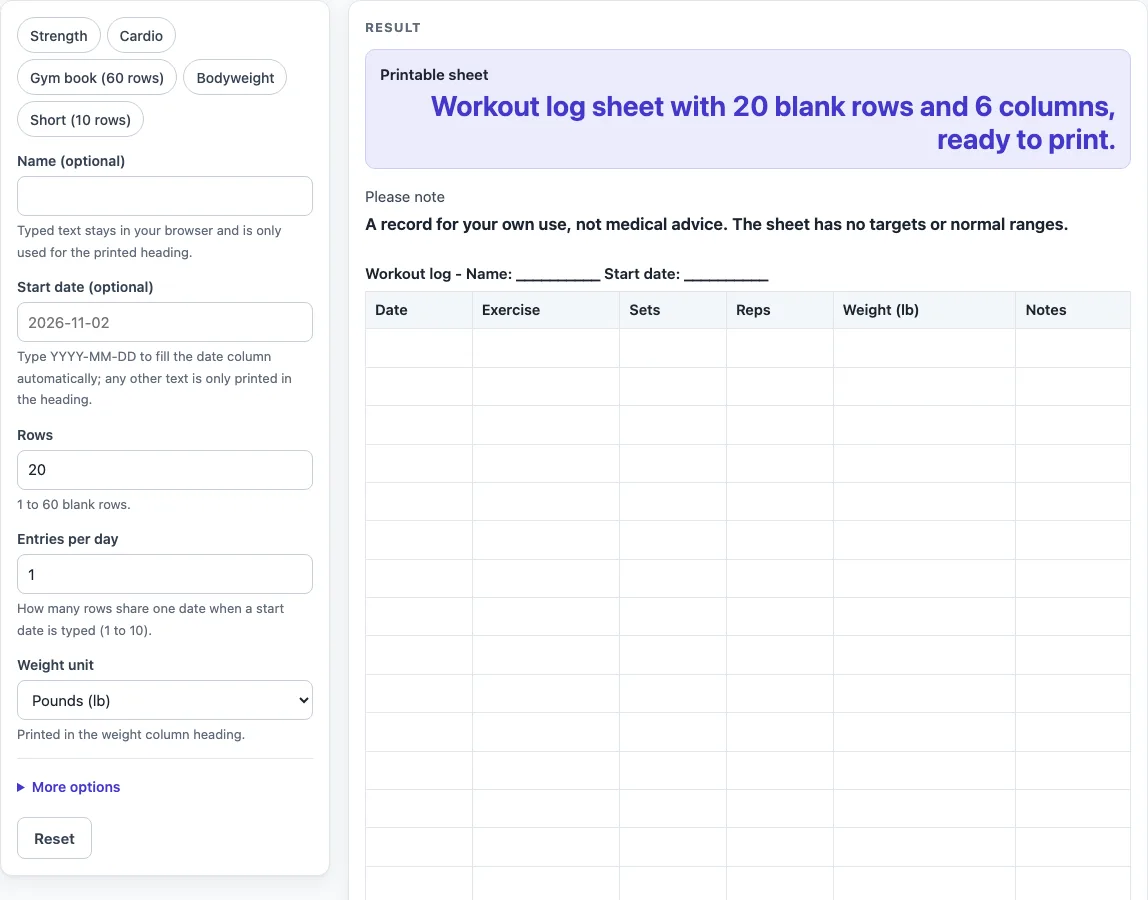
How to use the Workout Log
- Type a name in “Name (optional)” if you want it in the heading.
- Type a start date in “Start date (optional)” as YYYY-MM-DD, for example 2026-11-02, to fill the date column with calendar dates. Any other text is printed only in the heading, and the date column stays blank.
- Set “Rows” from 1 to 60. The default is 20. Numbers above 60 are cut to 60. Zero, a negative number, text or an empty field gives an error.
- Set “Entries per day” from 1 to 10 if you want several rows to share one date. The default is 1.
- Choose a “Weight unit”: Pounds (lb), Kilograms (kg) or Write it in (lb / kg). It only changes the weight column label, such as “Weight (kg)”. Nothing is converted.
- Switch columns on or off with “Column: Date”, “Column: Exercise”, “Column: Sets”, “Column: Reps”, “Column: Weight”, “Column: Time”, “Column: Distance” and “Column: Notes”, under More options. Time and Distance start off.
- More than 7 columns on gives a warning about writing space. No columns on gives a warning that the sheet is empty.
- Pick a preset if one fits: “Strength”, “Cardio”, “Gym book (60 rows)”, “Bodyweight” or “Short (10 rows)”. You can still adjust it afterwards.
- Click Print to print only the heading and the bordered table, or “Download as CSV (opens in Excel)” to save workout-log.csv.
What is a workout log book for?
A workout log book is a written record of your training. Each row is one entry, and each column is one detail you chose to track. Writing things down lets you look back at a past session without relying on memory.
The tool does not decide what matters to you. It places the columns you switch on in a fixed order: Date, Exercise, Sets, Reps, Weight, Time, Distance and Notes. Your choice of columns is the main decision, so think about what you want to see when you read the log later.
Which columns should a workout log include?
Keep the list short. A few columns are quicker to fill in than many, and the printed sheet has more writing space. The “Strength” preset uses Date, Exercise, Sets, Reps, Weight and Notes. The “Cardio” preset uses Date, Exercise, Time, Distance and Notes. Turning on more than 7 columns triggers a warning that the printed sheet will have little writing space.
Pick a weight unit before you start. The unit changes only the label on the weight column, so write your numbers in the unit you actually use.
How are dates worked out in a workout log?
The date column fills with calendar dates when the start date is typed as YYYY-MM-DD. The tool counts forward one day at a time and handles month ends, year ends and leap days. “Entries per day” decides how many rows share each date. With a start date of 2026-11-02, four rows and two entries per day give 2026-11-02, 2026-11-02, 2026-11-03 and 2026-11-03.
What do the presets set?
“Strength” gives 20 rows. “Cardio” gives 20 rows. “Gym book (60 rows)” gives 60 rows with Date, Exercise, Sets, Reps, Weight, Time and Notes. “Bodyweight” gives 20 rows with Date, Exercise, Sets, Reps, Time and Notes, and no weight column. “Short (10 rows)” gives 10 rows with the default columns. The defaults are 20 rows and six columns: Date, Exercise, Sets, Reps, Weight and Notes.
Why does the sheet give no targets or advice?
The sheet is only a place to write. It calculates nothing and shows no targets or normal ranges, so what you record and how you use it is up to you. The “Please note” output says it is a record for your own use and not medical advice. The layout is our own design.
Worked examples
| Input | Result |
|---|---|
| 20 rows, 6 columns | 20 blank rows to fill in by hand |
| 20 rows, 5 columns | 20 blank rows to fill in by hand |
| 60 rows, 7 columns | 60 blank rows to fill in by hand |
| 20 rows, 6 columns | 20 blank rows to fill in by hand |
Calculated by the tool above; open it with the same values to see each step.
Frequently asked questions
Is this workout log book free to use?
Yes. It runs in your browser, needs no sign-up and is free. Nothing you type is stored or uploaded.
Can I print the workout log?
Yes. The Print button prints only the heading and the bordered table, on US Letter or A4 portrait paper. The printed sheet is ready to write on by hand.
Can I open the log in a spreadsheet?
Yes. Click “Download as CSV (opens in Excel)” to save the table as workout-log.csv. The file holds the same table as the printed sheet.
What is the most rows I can use?
60 rows. If you enter more than 60 in “Rows”, the sheet uses 60 and shows the warning “Rows is limited to 60, so the sheet uses 60.”.
Why does the sheet show a warning about columns?
More than 7 columns switched on triggers a warning that the printed sheet will have little writing space. If no columns are switched on, the warning says the sheet is empty, so turn at least one column on.
Does the workout log tell me whether my training is healthy?
No. The sheet has no targets, normal ranges or advice. It is a record for your own use and not medical advice.
Related tools
- Food Diary Template: use it to record what you eat alongside your training.
- Reading Log: use it to track the books or pages you read.
- Sleep Log: use it to note when you sleep and wake each day.
- Weight Log: use it to record your weight over time.