Weight Log
Choose pounds or kilograms and how many rows, then print a blank weight log or download it as a CSV file. It records your own numbers and suggests nothing.
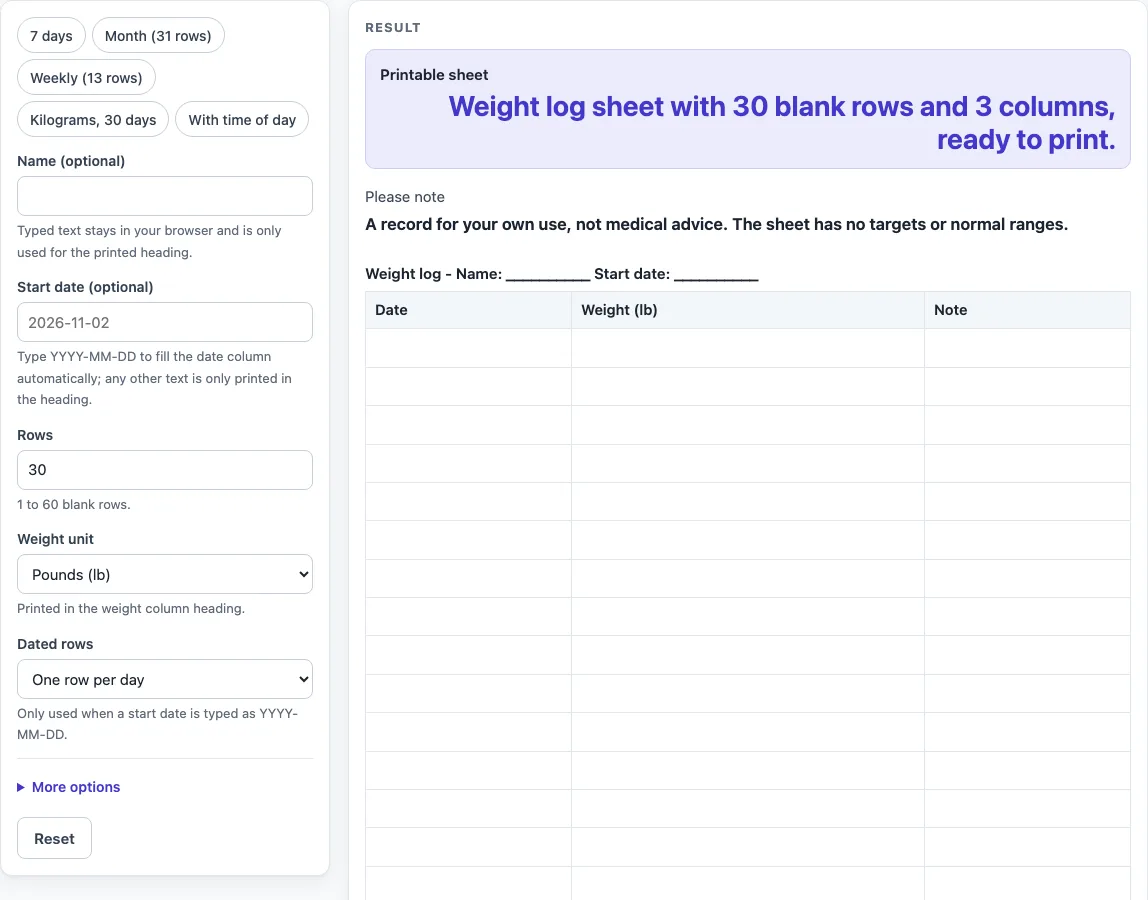
How to use the Weight Log
- Type your name in “Name (optional)” if you want it in the heading.
- Enter a start date in “Start date (optional)” as YYYY-MM-DD, for example 2026-03-01. The date column then fills with real calendar dates. Other text appears only in the heading, and the dates stay blank.
- Set “Rows” from 1 to 60. A number above 60 cuts the sheet to 60 rows with a warning. Zero, negatives, text or an empty field give an error.
- Choose “Weight unit”: Pounds (lb) or Kilograms (kg). It only changes the weight column label; nothing is converted.
- Choose “Dated rows” for one row per day or one row per week. Weekly dates step by 7 days.
- Open “More options” to switch columns on or off: “Column: Date”, “Column: Weight”, “Column: Time of day” and “Column: Note”. Keep seven or fewer columns on for enough writing space, and keep at least one on.
- Turn on “Add start and goal lines” if you want blank lines for a starting weight and your own goal weight in the heading.
- Check the “Printable sheet” text, then press Print. Only the heading and table print, in US Letter or A4 portrait.
- Press “Download as CSV (opens in Excel)” to save the table as weight-log.csv.
The presets “7 days”, “Month (31 rows)”, “Weekly (13 rows)”, “Kilograms, 30 days” and “With time of day” set the rows and columns for you. You can change any setting afterwards.
What is a weight log and what goes on it?
A weight log is a record of body weight written down on dates you choose. Each row holds one entry, and the columns show when it was taken and any note you want to add. The sheet on this page is a blank version of that table, so you fill in the numbers yourself. Date, Weight and Note stay on by default, and Time of day is available if you want to write down when each weigh-in happened. Print the sheet or download the CSV, and write the weights in by hand.
How do you set up a weight log that fits your needs?
Start with the number of rows, which can be anything from 1 to 60. Then decide which columns to keep. The default is Date, Weight and Note, and you can add a Time of day column if you want to record when each entry was made. A start date typed as YYYY-MM-DD fills the date column automatically, including month ends, year ends and leap days.
Should a weight log be kept by the day or by the week?
The “Dated rows” setting offers both. One row per day gives a line for each date, while one row per week steps the dates by 7 days, such as 2026-12-20, 2026-12-27 and 2027-01-03. The choice is about layout only. The sheet does not tell you how often to record anything.
What does the weight unit setting actually change?
The “Weight unit” setting changes the label on the weight column, so it reads “Weight (lb)” or “Weight (kg)”. It does not convert any numbers. If you write a value in kilograms, pick the kilogram label so the sheet matches what you wrote. The “Kilograms, 30 days” preset does this in one step.
What does this weight log not do?
The sheet does not calculate anything. It does not add up entries, show trends or compare your numbers with any target or range. It also gives no advice. The “Please note” message on the page says the sheet is a record for your own use, not medical advice, and that it has no targets or normal ranges. The optional start and goal lines are only blank spaces for you to write your own figures, and nothing is suggested for them.
Worked examples
| Input | Result |
|---|---|
| 30 rows, 3 columns | 30 blank rows to fill in by hand |
| 31 rows, 3 columns | 31 blank rows to fill in by hand |
| 13 rows, 3 columns | 13 blank rows to fill in by hand |
| 30 rows, 3 columns | 30 blank rows to fill in by hand |
Calculated by the tool above; open it with the same values to see each step.
Frequently asked questions
Is the weight log free to use?
Yes. The tool is free and needs no sign-up. It runs in your browser.
Does the tool save or upload what I type?
No. Nothing you type is stored or uploaded. If you want a copy, use the Print button or download the CSV file, which saves the table as weight-log.csv.
Can I use kilograms instead of pounds?
Yes. Set “Weight unit” to Kilograms (kg), or use the “Kilograms, 30 days” preset. The label changes, but no numbers are converted.
What happens if I type the start date in a different format?
Only dates written as YYYY-MM-DD fill the date column. Any other text is printed in the heading, the date column stays blank, and a warning appears.
Why does the sheet show a warning about columns?
If more than 7 columns are on, the warning says the printed sheet will have little writing space. If no columns are on, the sheet is empty, and the tool asks you to turn at least one on.
Can I print the weight log on A4 paper?
Yes. The Print button prints the heading and table in portrait orientation on US Letter or A4 paper.
Related tools
- Food Diary Template: use it to write down what you eat and drink on a printed sheet.
- Reading Log: use it to record the books you read and the dates you read them.
- Sleep Log: use it to note when you go to bed and wake up each day.
- Workout Log Book: use it to track the exercise you do and the sessions you complete.