Weekly Status Report Template
Choose which sections to include and how many rows each table gets, then print the report or download it as CSV. Status is marked in plain words: On track, At risk or Blocked.
This page gives you a free weekly status report template that runs in your browser. Fill in a few fields and it builds a blank, printable weekly status report made of several tables, ready to hand-write or print. Nothing is calculated, so you type the details and the tool lays them out. Nothing you type is stored or uploaded, and there is no sign-up.
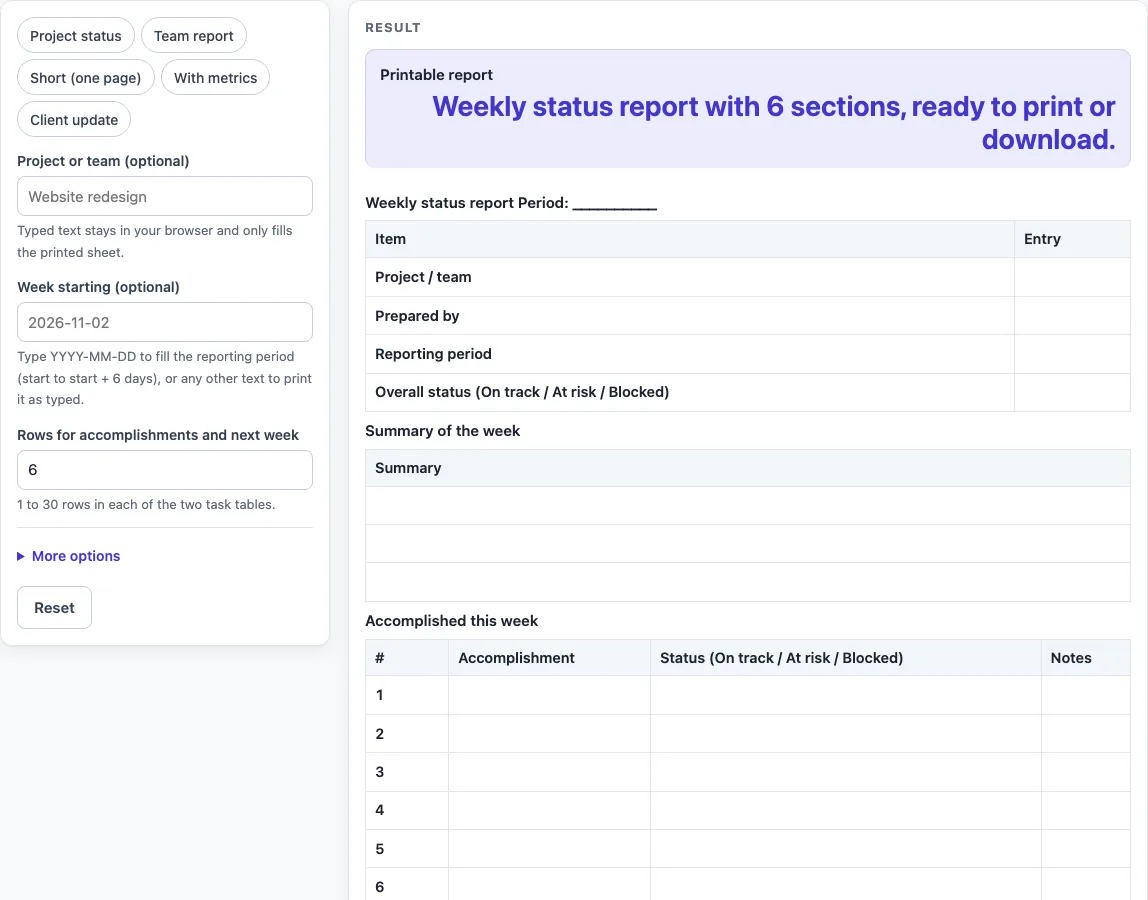
The default report includes a details form, a summary of the week, tables for accomplishments and next week’s plans, blockers and risks, and metrics. You can change the title, set how many rows each table has, and switch the optional sections on or off. The layout is a general-purpose design for ordinary people and small teams, so you can adapt it to your own work.
How to use the Weekly Status Report Template
- Type a name in “Project or team (optional)”. It is placed in the details form. Leave it empty to keep that field blank for handwriting.
- Type the week start in “Week starting (optional)” as YYYY-MM-DD, for example 2026-11-02. The Reporting period then fills in as that date through the date six days later.
- Set “Rows for accomplishments and next week” to a number from 1 to 30. The default is 6.
- Open “More options” and type a “Report title (optional)” and a “Prepared by (optional)” name. The default title is “Weekly status report”.
- Use the “Summary box”, “Blockers and risks table” and “Metrics table” options to switch those sections on or off. The two task tables always stay.
- If the blockers and risks table or the metrics table is on, set “Rows for blockers and risks” (default 4) and “Rows for metrics” (default 4).
- Check the “Printable report” output, which reads “Weekly status report with 6 sections, ready to print or download.”
- Select Print to print the report, or select “Download as CSV (opens in Excel)” to save the same tables as a file that opens in Excel.
You can also start from a preset: “Project status”, “Team report”, “Short (fewer rows)”, “With metrics” or “Client update”. You can change any setting afterwards. Print fits US Letter and A4 portrait paper in black and white.
What is a weekly status report?
A weekly status report is a short written summary of what a team or project finished in one week, what is planned next, and what is getting in the way. This template divides that information into separate tables, so a reader can find each part quickly.
What does each section of the report cover?
The details form records the project or team, who prepared the report, the reporting period and an overall status of On track, At risk or Blocked. The Summary of the week has three blank rows for a short overview. Accomplished this week lists each finished item with its own status word and notes. Planned for next week lists the items for the coming week, each with an owner and a due date. Blockers and risks records what is stopping progress or could stop it, the action needed, the owner and the due date. Metrics records numbers you choose to track, with columns for target, this week, last week and notes.
How does the reporting period get worked out?
When the week start is typed as YYYY-MM-DD, the Reporting period runs from that date to the date six days later, using real calendar dates. For example, 2028-02-26 gives 2028-02-26 to 2028-03-03, because 2028 is a leap year. If the week text is not in that form, the tool prints it as typed and shows a warning, so you can correct it.
Why are the status words typed by hand?
The status labels in Accomplished this week (On track, At risk, Blocked) are plain labels you choose yourself. The tool does not work them out from dates, owners or other entries. Deciding a status is a judgement for the person writing the report, so the sheet leaves that choice to you.
How many rows does a report need?
The default is six rows for accomplishments and next week, and four each for blockers and risks and for metrics. Each count can be set from 1 to 30. Rows above 30 are cut to 30 with a warning, and 0, negative or text values give an error. The presets use different counts: Team report has 8 rows and no metrics table, and Short (fewer rows) has 4 rows and 2 risk rows with no summary box and no metrics table.
Worked examples
| Input | Result |
|---|---|
| 6 rows per task table | 6 sections |
| 6 rows per task table | 6 sections |
| 4 rows per task table | 5 sections |
| 8 rows per task table | 6 sections |
Calculated by the tool above; open it with the same values to see each step.
Frequently asked questions
Is this weekly status report template free to use?
Yes. It is free, runs in your browser, and needs no sign-up.
Is my report stored or uploaded anywhere?
No. Nothing you type is stored or uploaded. It stays in your browser.
Is this a standard or approved report format?
No. The layout is our own design and does not use an external standard, rule or figure. It is a general-purpose sheet, so check it against any requirements your own team or organisation has.
Can I use this as a weekly project status report template?
Yes. Select the “Project status” preset, which sets the title to “Weekly project status report”. You can also type your own title under “More options”.
Can I hide the summary, blockers and metrics sections?
Yes. Use the “Summary box”, “Blockers and risks table” and “Metrics table” options under “More options” to switch each one off. The two task tables always stay.
Why do I see a warning about my week date?
The week start must be typed as YYYY-MM-DD, such as 2026-11-02. Any other text is printed as typed in the period cell and the heading, with a warning that it is not in that form.
Related tools
- Incident Report Template: Use it to record a single event in detail, rather than a week’s progress.
- Meeting Minutes Template: Use it to write up the decisions and actions from a meeting.
- One-on-One Meeting Agenda Template: Use it to plan a regular meeting between two people.
- Meeting Agenda Template for Excel: Use it to plan the topics for a team meeting in a spreadsheet file.
- Call Log Template: Use it to keep a simple record of calls made and received.