Visitor Log
Choose the columns for your visitor log, such as ID checked or badge number, set the rows, then print it blank or download it as a CSV.
How to use the Visitor Log Template
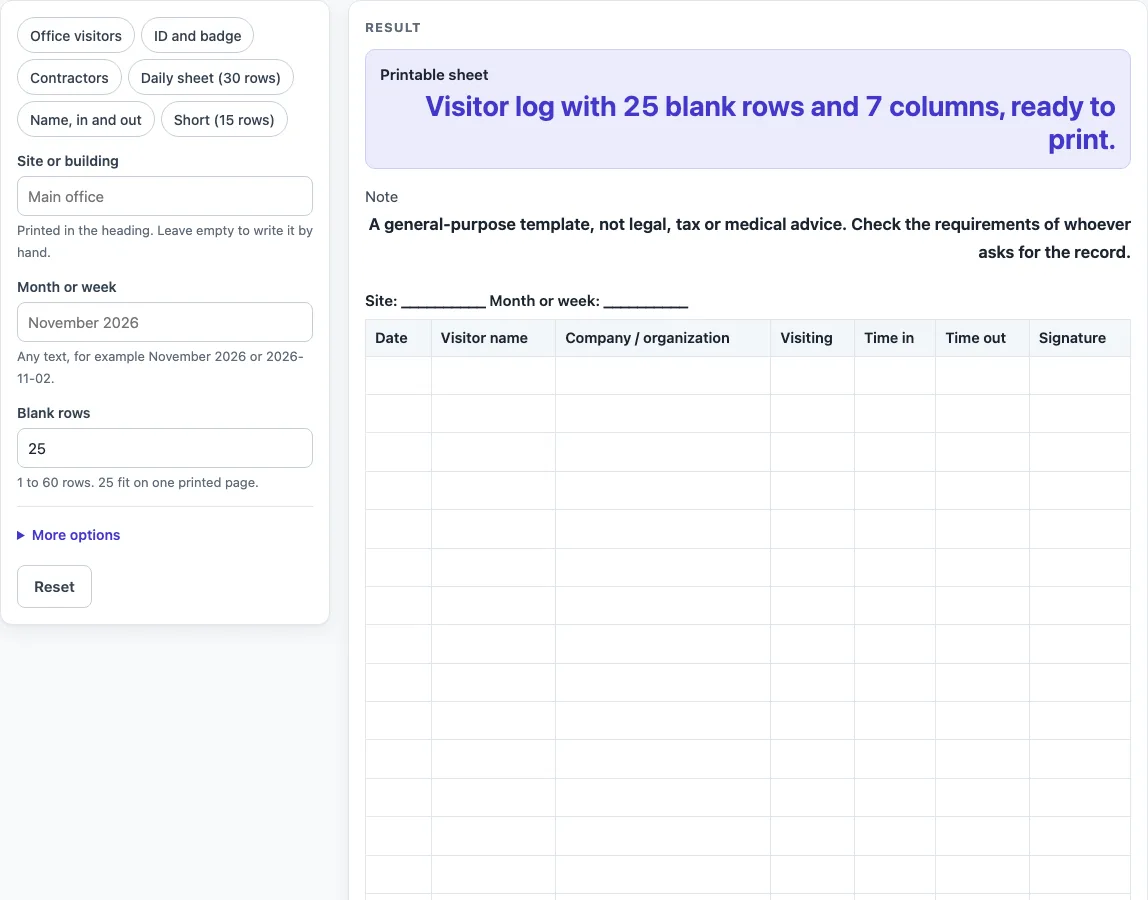
- Choose a starting point from the presets. “Office visitors” is the default. “ID and badge”, “Contractors”, “Daily sheet (30 rows)”, “Name, in and out” and “Short (15 rows)” each set a different mix of columns and rows. “Contractors” sets the title to “Contractor log”.
- Type a name into the site or building field and a period into the month or week field. Any empty field prints as a line of underscores, so you can leave it blank and write by hand.
- Set the number of blank rows from 1 to 60. The default is 25. Numbers above 60 are cut to 60 with a warning. Zero, a negative number or text gives an error.
- Open “More options” to switch columns on or off. “Visitor name” is always on. Turning on more than 7 columns prints them small, and the tool shows a warning when this happens.
- Check the heading line. It reads “Site:
Month or week: ”. - Print the sheet from your browser. The print view shows only the heading and the bordered table, in black and white, on US Letter or A4 portrait.
- Or click “Download as CSV” to save the heading line, the column names and the blank rows as a .csv file.
The “ID checked?” and “Badge no.” columns are only blank headings for the person at the desk to fill in. The page does not check any ID.
What is a visitor log and what does it record?
A visitor log is a written list of people who entered a place, usually with the time they arrived and left. Each row is one visit. The log gives the person at the desk a simple record to look back on when they need to know who was on site and when. This template sets up that list as a blank sheet for you to fill in by hand.
Which columns should a visitor log include?
Start with the details you actually need. The default sheet uses seven columns: Date, Visitor name, Company / organization, Visiting, Time in, Time out and Signature. Turn on “No.” if you want numbered rows, or “ID checked?” and “Badge no.” if staff confirm identity or hand out badges. Every column except the row numbers is empty and has room for handwriting, so you can add or remove columns to match your situation. Fewer columns usually means a clearer sheet.
The presets are starting points of our own design. “ID and badge” drops Date and Company and adds ID checked? and Badge no. “Contractors” sets the title to “Contractor log”, turns ID checked? on and Signature off. “Daily sheet (30 rows)” numbers the rows and drops Date. “Name, in and out” keeps only Visitor name, Time in and Time out.
Why do the number of rows and print size matter?
The number of blank rows decides how many visits fit on one sheet. A “Daily sheet (30 rows)” suits a busy day, while “Short (15 rows)” suits a quiet desk. Print size matters too. Once a sheet has more than 7 columns, the text prints small, which makes handwriting harder to read. If you need more visits than one sheet holds, print a new sheet and keep the same heading so the pages stay together.
When is a blank visitor log template enough?
A blank template is enough for keeping a simple paper record. It is a general-purpose template, not legal, tax or medical advice. If someone asks you for a visitor record, check what they need before you use the sheet, because their requirements decide which columns and details to include.
Worked examples
| Input | Result |
|---|---|
| 25 rows | 25 rows, 7 columns |
| 25 rows | 25 rows, 7 columns |
| 30 rows | 30 rows, 7 columns |
| 25 rows | 25 rows, 7 columns |
Calculated by the tool above; open it with the same values to see each step.
Frequently asked questions
Does the Visitor Log Template save what I type?
No. Everything runs in your browser, and nothing is stored or uploaded. The sheet is blank, so visitors write on the printout, not on the page. The site or building name you type can become part of the page link, so keep that in mind before you share it.
Can I use this visitor log for a daycare or an open house?
Yes, you can use the columns and rows in any setting where you need a simple sign-in record. For sign-in sheets made for those settings, see the related pages below.
Why does my sheet print with very small text?
When more than 7 columns are switched on, the table prints small, and the tool shows a warning. Turn off the columns you do not need under “More options” to make the text larger.
What happens if I enter 80 rows?
The tool cuts the number to 60 and shows a warning. The maximum is 60 blank rows per sheet.
Does this visitor log follow any legal rule?
No. The layout and columns are a general design choice, and the page does not claim to meet any external standard or legal requirement. Check what the person asking for the record needs.
Related tools
- Daycare Sign In Sheet: Use it when you need a sign-in sheet for children arriving and leaving a daycare.
- Open House Sign In Sheet: Use it when you want guests to sign in at an event or open house.
- Sign In and Out Sheet: Use it when you need a simple record of arrival and departure times.
- Sign In Sheet: Use it when you only need a basic list of names and signatures.