Temperature Log
Pick °F or °C and the columns you want, then print the temperature log or download it as CSV. You write your own limit; the sheet states none.
A temperature log is a sheet where you write down temperature readings, the time, who took them, and any action taken. This free temperature log tool builds one in your browser. Set the title, location, temperature unit and number of rows, then print the sheet or download it as a CSV file. It needs no sign-up, and nothing you type is stored or uploaded.
The sheet is a general-purpose template. It prints no temperature limits. If your own rules or local authority set a limit, type it into “Limit to print (your own)”, or leave the field blank and write the limit by hand. The tool does not convert or calculate readings.
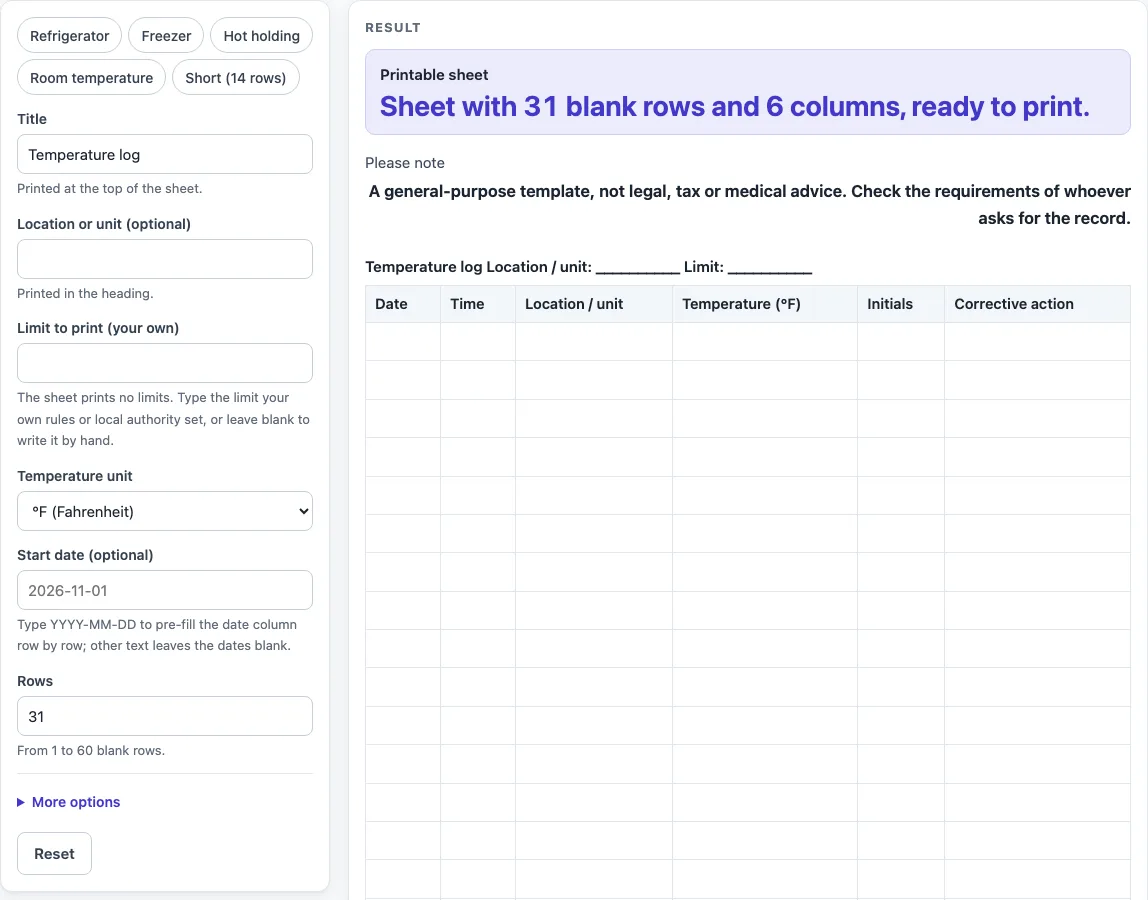
How to use the temperature log
- Pick a preset if one fits: “Refrigerator”, “Freezer”, “Hot holding”, “Room temperature” or “Short (14 rows)”. You can still change any field afterwards.
- Type a “Title”. It prints at the top of the sheet.
- Type a “Location or unit (optional)”. It prints in the heading.
- Type your own limit in “Limit to print (your own)”, or leave it blank to write it by hand.
- Choose a “Temperature unit”: “°F (Fahrenheit)” or “°C (Celsius)”. The temperature column heading changes to match.
- If you want dates filled in, type a “Start date (optional)” as YYYY-MM-DD. Other text leaves the date cells blank, and a warning explains why.
- Set “Rows” from 1 to 60. Larger numbers are cut to 60 with a warning. Zero, negative numbers or text show an error.
- Open “More options” and switch columns on or off: “Time column”, “Location / unit column”, “Thermometer ID column”, “Initials column” and “Corrective action column”. Date and Temperature are always shown; by default Thermometer ID is off and the other three are on.
- Check the “Printable sheet” below the form, then choose “Print / save as PDF”.
- To save the table as a spreadsheet file, select “Download as CSV (opens in Excel)”. The file is named temperature-log.csv.
The “Please note” line under the output says this is a general-purpose template, not legal, tax or medical advice, so check what the person asking for the record needs.
What is a temperature log for?
A temperature log is a written record of readings, showing when each one was taken and by whom. Its purpose is to keep a dated history that someone can look back over. A log records what happened. It does not decide whether a reading is acceptable.
What should each row of a temperature log record?
Each row is one reading. The date and time show when it was taken, and the location or unit column shows where. The temperature column holds the number, and the initials column shows who took it. The corrective action column is for writing down what was done when a problem was noticed.
The “Thermometer ID column” links a reading to the instrument used. This is useful when more than one thermometer is in use, or when a thermometer is replaced.
Why does the sheet leave the limit blank?
The sheet prints no temperature limits and no safe range. Any limit should come from your own rules, your local authority, or the person who asks for the record. The “Limit” field only prints the text you type, or a blank line for writing by hand.
Leaving the limit to you keeps the form a general-purpose template. It does not set targets for anything.
How does the temperature unit affect the sheet?
The temperature column heading shows the unit you chose, such as “Temperature (°F)” or “Temperature (°C)”. The tool does not convert values between units and does not calculate anything. Write readings in the unit shown on the heading.
Using one unit throughout a sheet makes the readings easier to compare when you read the page later.
How are dates and blank rows handled?
Rows are blank so you can write each entry by hand. The “Start date (optional)” fills the date column one row at a time, counting forward from the date you type. The date must be in YYYY-MM-DD form. If it is not, the date cells are left blank for you to fill in.
Rows you do not need can stay empty. The “Rows” setting only controls how many lines appear.
Which columns can I switch off?
The Date and Temperature columns are always on. Time, Location / unit, Initials and Corrective action are on by default and can be switched off under “More options”, and Thermometer ID is off until you switch it on. With every column on, the sheet has 7 columns. Switching off columns you do not use leaves more room for each entry when you write by hand.
Worked examples
| Input | Result |
|---|---|
| 31 rows | 31 table rows, 6 columns |
| 30 rows | 30 table rows, 7 columns |
| 20 rows | 20 table rows, 5 columns |
| 14 rows | 14 table rows, 4 columns |
Calculated by the tool above; open it with the same values to see each step.
Frequently asked questions
Is this temperature log free to use?
Yes. The tool runs in your browser, is free, and needs no sign-up. Nothing you enter is stored or uploaded.
Does the temperature log tell me if a reading is too high or too low?
No. The sheet prints no temperature limits and does not calculate anything. If you have a limit from your own rules or local authority, type it into “Limit to print (your own)”. Otherwise, leave it blank and write it by hand.
Can I use Celsius instead of Fahrenheit?
Yes. Choose “°C (Celsius)” under “Temperature unit”, and the column heading changes to Temperature (°C). No conversion is done, so enter readings in the unit you chose.
How many rows can I print?
You can choose from 1 to 60 blank rows. A number above 60 is cut to 60 with a warning. Zero, a negative number or text gives an error.
Why are my date cells empty?
Dates only fill in when “Start date (optional)” is typed as YYYY-MM-DD. Any other text leaves the date cells blank, and a warning tells you so. You can then write the dates by hand.
Can I save the log as a file instead of printing it?
Yes. Select “Download as CSV (opens in Excel)” to save temperature-log.csv. The same table is saved. You can also print the sheet or save it as a PDF with “Print / save as PDF”.
Related tools
- Fridge Temperature Log: use it when you only need a record of fridge readings.
- Daily Log: use it to record a general list of entries for each day.
- Equipment Maintenance Log: use it to track checks and repairs on equipment.
- Restroom Cleaning Log: use it to record cleaning visits and who completed them.
- Daily Report Template: use it to write up a summary at the end of the day.