Sleep Log
Pick the columns and the number of nights for your sleep log, then print the blank sheet or download it as a CSV file. It is a record for your own use.
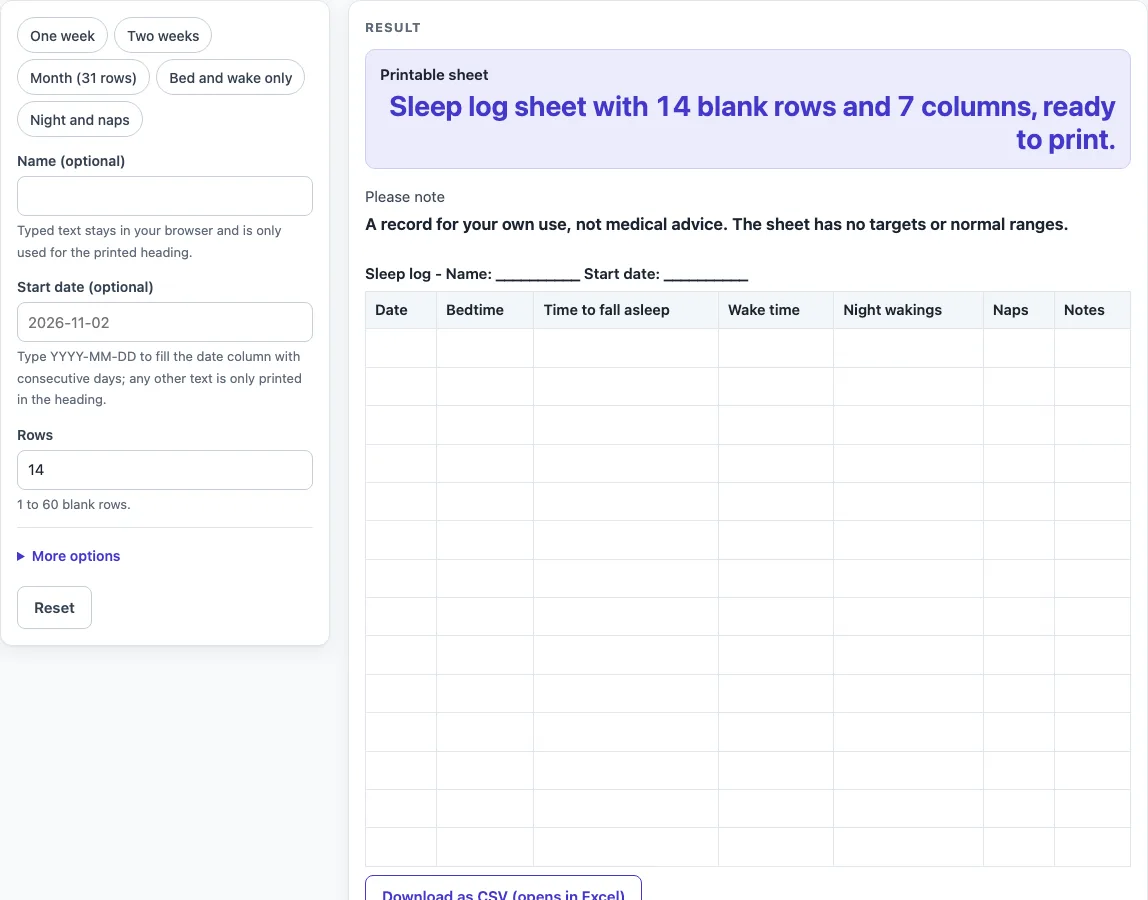
How to use the Sleep Log
- Type a name in the “Name (optional)” field if you want one. It appears in the heading.
- Type a “Start date (optional)” in YYYY-MM-DD form, such as 2025-03-01. The Date column then fills with real calendar dates. Any other text is printed in the heading only, the Date column stays blank, and a warning appears.
- Pick a preset: “One week”, “Two weeks”, “Month (31 rows)”, “Bed and wake only” or “Night and naps”. The default is 14 blank rows and 7 columns.
- Set “Rows” to a number from 1 to 60. Above 60, the sheet is cut to 60 and a warning appears. Zero, a negative number, text or an empty field gives an error.
- Open “More options” and switch columns on or off: “Column: Date”, “Column: Bedtime”, “Column: Time to fall asleep”, “Column: Wake time”, “Column: Night wakings”, “Column: Naps”, “Column: Total sleep” and “Column: Notes”. “Column: Total sleep” is off by default.
- Check the message under “Printable sheet”. It states the number of rows and columns on the sheet.
- Click Print, or click “Download as CSV (opens in Excel)” to save the same table as a file named sleep-log.csv.
Print sends only the heading and the bordered table to your printer, in US Letter or A4 portrait. Read the “Please note” message before you use the sheet: it is a record for your own use, not medical advice.
What should a sleep log record?
A sleep log records the times and events of your sleep, written down as they happen. Each column holds one piece of that record, and you fill in what actually occurred rather than what you think should have occurred.
“Bedtime” is the time you got into bed. “Time to fall asleep” is how long it took you to drop off after that. “Wake time” is the time you woke for the day. “Night wakings” is how many times you woke during the night. “Naps” is any sleep during the day. “Notes” gives you room for anything else that seems worth remembering, such as a late meal or a noisy night.
“Total sleep” is the only column that asks you to add up numbers. The tool does not calculate it for you, so if you switch that column on, work out the total yourself and write it in. Keeping the same method each day makes the rows easier to compare later.
How does a sleep log template stay useful over time?
A sleep log template stays useful when every row is filled in the same way and the rows cover the period you want to review.
Choose the preset that matches your goal. “One week” and “Two weeks” suit a short check on your routine. “Month (31 rows)” covers a full month. “Bed and wake only” keeps the record simple with Date, Bedtime, Wake time and Notes over 14 rows. “Night and naps” keeps Date, Bedtime, Wake time, Naps and Notes over 14 rows, so the focus stays on night-time and daytime sleep.
The start date helps you keep the rows in order. If you type it as YYYY-MM-DD, the Date column fills with real calendar dates, including month ends, year ends and leap days, so you do not have to write them by hand. Rows can go up to 60, which is useful for longer runs of records. If you want to keep a digital copy, the CSV download gives you the same table, which you can open in a spreadsheet program. If you switch on more than 7 columns, the tool warns that the printed sheet will have little writing space.
Worked examples
| Input | Result |
|---|---|
| 14 rows, 7 columns | 14 blank rows to fill in by hand |
| 14 rows, 7 columns | 14 blank rows to fill in by hand |
| 31 rows, 7 columns | 31 blank rows to fill in by hand |
| 14 rows, 4 columns | 14 blank rows to fill in by hand |
Calculated by the tool above; open it with the same values to see each step.
Frequently asked questions
Is this sleep log free to use?
Yes. The tool is free, and it runs in your browser. There are no prices to pay.
Do I need to create an account?
No. There is no sign-up, so you can open the page and start filling in the sheet straight away.
Does the tool tell me whether my sleep is normal?
No. The sheet has no targets, normal ranges or advice. It is only a blank record for your own use, and it is not medical advice.
Is what I type saved or uploaded?
No. Nothing is stored or uploaded. The sheet is built and printed or downloaded in your browser. A name or start date you type can appear in the page link, so keep that in mind before you share it.
Can I make a blank sleep log for a whole month?
Yes. Choose “Month (31 rows)” to get a sheet with 31 rows and the standard columns. You can also set “Rows” yourself, up to 60.
Why is my Date column blank?
The Date column only fills when the start date is typed as YYYY-MM-DD. Any other text is printed in the heading instead, and a warning explains this.
Related tools
- Food Diary Template: use it to record what you eat and drink on a printable sheet.
- Reading Log: use it to track the books or pages you read over a set period.
- Weight Log: use it to keep a simple written record of your weight over time.
- Workout Log Book: use it to note your exercise sessions in one place.