Sign Up Sheet Template
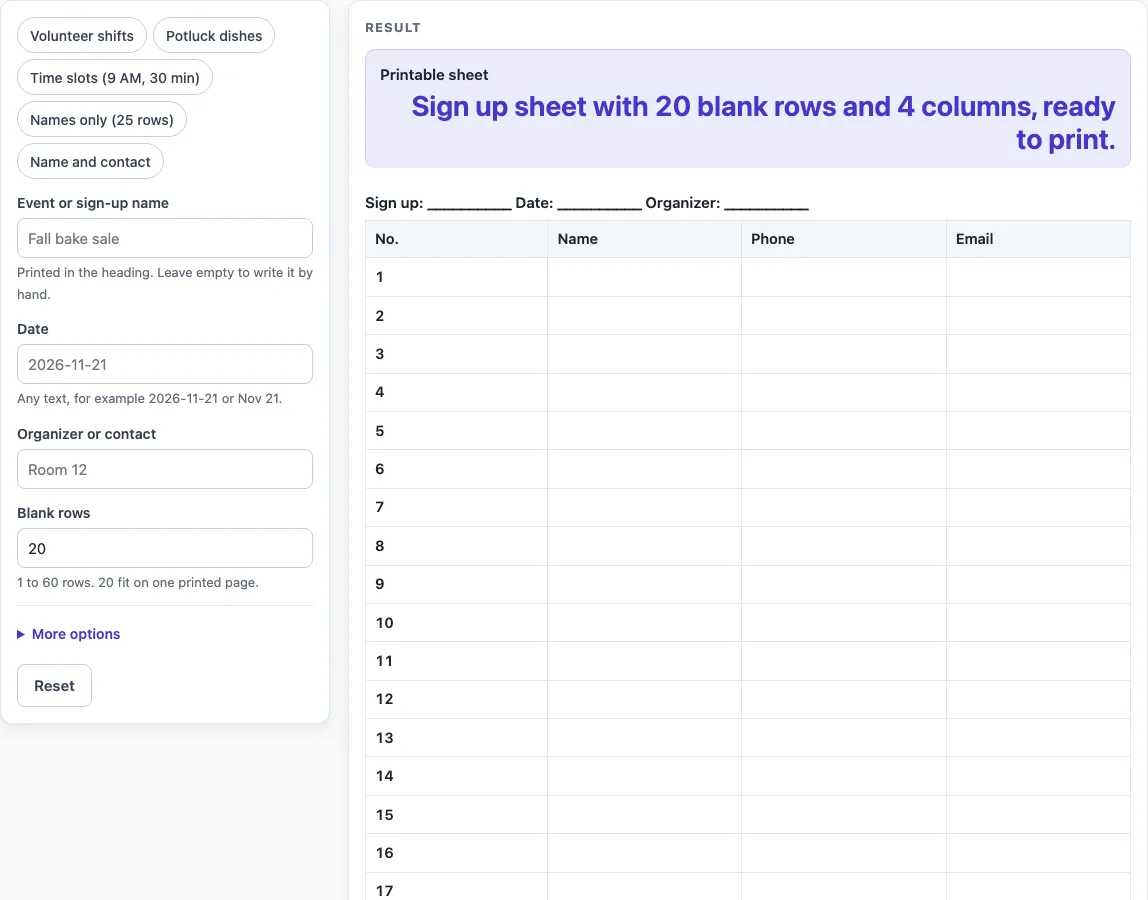
Name the event, choose the columns and the number of rows, add time slots if you need them, then print the sign up sheet or download it as a CSV file.
Sign Up Sheet Template is a free tool that makes a blank, printable sign-up table for people to fill in by hand. You enter an event name, a date and an organizer contact, choose how many blank rows you need, and print the sheet. It works well as a volunteer sign up sheet, a potluck sign up sheet, or any list where people claim a place, a shift, a dish or a time.
The tool runs in your browser and needs no sign-up. The Name column is always included, and you can add or remove other columns to suit your list.
How to use the Sign Up Sheet Template
- Type the name of your event or sign-up in Event or sign-up name.
- Enter a date in Date. Any text works, such as 2026-11-21 or Nov 21.
- Enter a name or contact in Organizer or contact. If you leave it empty, that line prints blank.
- Set Blank rows to a number from 1 to 60. The default is 20.
- Open More options and switch on the columns you need, such as Task or shift column, Item to bring column or Time slot column.
- For time slots, switch on Time slot column, type the start in First time slot (optional) and set Minutes per slot. Each row then shows the next slot.
- Click Print to send only the heading and the bordered table to your printer, or click Download as CSV (opens in Excel) to open the table in a spreadsheet.
You can also click one of the preset buttons above the form: Volunteer shifts, Potluck dishes, Time slots (9 AM, 30 min), Names only (25 rows) or Name and contact. Each preset sets the columns and row count for that kind of sheet.
Typed text can appear in the page link (the ?s= address). Before you share that link, remove any private details from the form.
How do I make a sign up sheet?
Start by deciding what people are signing up for, then give the sheet only the columns that help them choose and confirm a spot. A sign-up sheet works best with a heading that says what it is for and a Name column for people to write in.
The Name column is always there. By default the sheet also has a number, a Phone and an Email column. Turn off any you don’t need, and turn on extra columns only when a person has to pick something, such as a task, a time or a dish. More than 7 columns switched on gives a warning that the printed sheet will be cramped.
Then set the number of blank rows. Use at least as many rows as people you expect to sign up. The limit is 60; a number above 60 gives a warning, and 0, text or an empty rows field gives an error.
What is the difference between a sign up sheet and a sign in sheet?
A sign up sheet is used before or during planning so people can claim a place, a shift, a dish or a time. A sign in sheet is used at the event to record who actually showed up.
The difference is the purpose, and that changes the columns. A sign-up sheet asks “Will you take this?”, so it usually needs a task, item or time column. A sign-in sheet asks “Did you come?”, so it usually needs only a name and perhaps a contact.
What should a potluck sign up sheet include?
A potluck sheet needs a Name column so people can claim a spot and an “Item to bring” column so the dishes can be seen at a glance. The Potluck dishes preset also adds a Notes column and the title Potluck, and it drops Phone and Email to leave more room to write. Switch the contact columns back on in More options if you want a way to reach each person. Fifteen rows is the preset’s starting size; change Blank rows to match the number of guests you expect.
Worked examples
| Input | Result |
|---|---|
| 20 rows | 20 rows, 4 columns |
| 15 rows | 15 rows, 4 columns |
| 16 rows | 16 rows, 3 columns |
| 30 rows | 30 rows, 6 columns |
Calculated by the tool above; open it with the same values to see each step.
Frequently asked questions
What should a volunteer sign up sheet include?
Include the event name, date and organizer contact in the heading, plus a Name column and a Task or shift column so people know which job they are taking. The Volunteer shifts preset also adds Phone and Email columns, which help you reach people if plans change.
How do I make a potluck sign up sheet?
Click the Potluck dishes preset, which gives you a Potluck title and 15 rows with No., Name, Item to bring and Notes columns. Use Item to bring for the dish and Notes for details such as whether it is vegetarian.
How do I make a sign up sheet with time slots?
Switch on Time slot column in More options. Type a start such as 9:00 AM, 9 am or 13:30 in First time slot (optional), then set Minutes per slot from 1 to 240. Each row gets the next slot, printed in AM/PM form. Times past midnight wrap around to 12:00 AM. If the start is not a time of day, the column stays blank and a warning appears. Leave the start empty to get a blank column for writing times by hand.
How many rows fit on one page?
Twenty rows fit on one printed page, which is also the default. You can set Blank rows anywhere from 1 to 60. If you choose more than 20, print one copy first to check whether the table runs onto a second page.
Can I use the sheets I make for work or to sell?
Yes. The sheets are free to print and use anywhere, including at work, in class, for a club, or to sell or give away. No credit is needed.
Related tools
- Sign-In Sheet: use it at an event to record who attended.
- Sign In and Out Sheet: use it when you also need time in and time out for each person.
- Visitor Log: use it to record visitors to a building or site.
- Open House Sign-In Sheet: use it when guests arrive at an open house and need to sign in.
- Daycare Sign-In Sheet: use it for drop-off and pick-up times at a daycare.
- Sign-In Sheets and Visitor Logs: see all the sign-in sheets and visitor logs in one place.