Restroom Cleaning Log
Choose the task columns, the area and the number of rows, then print the restroom cleaning log or download it as a CSV file.
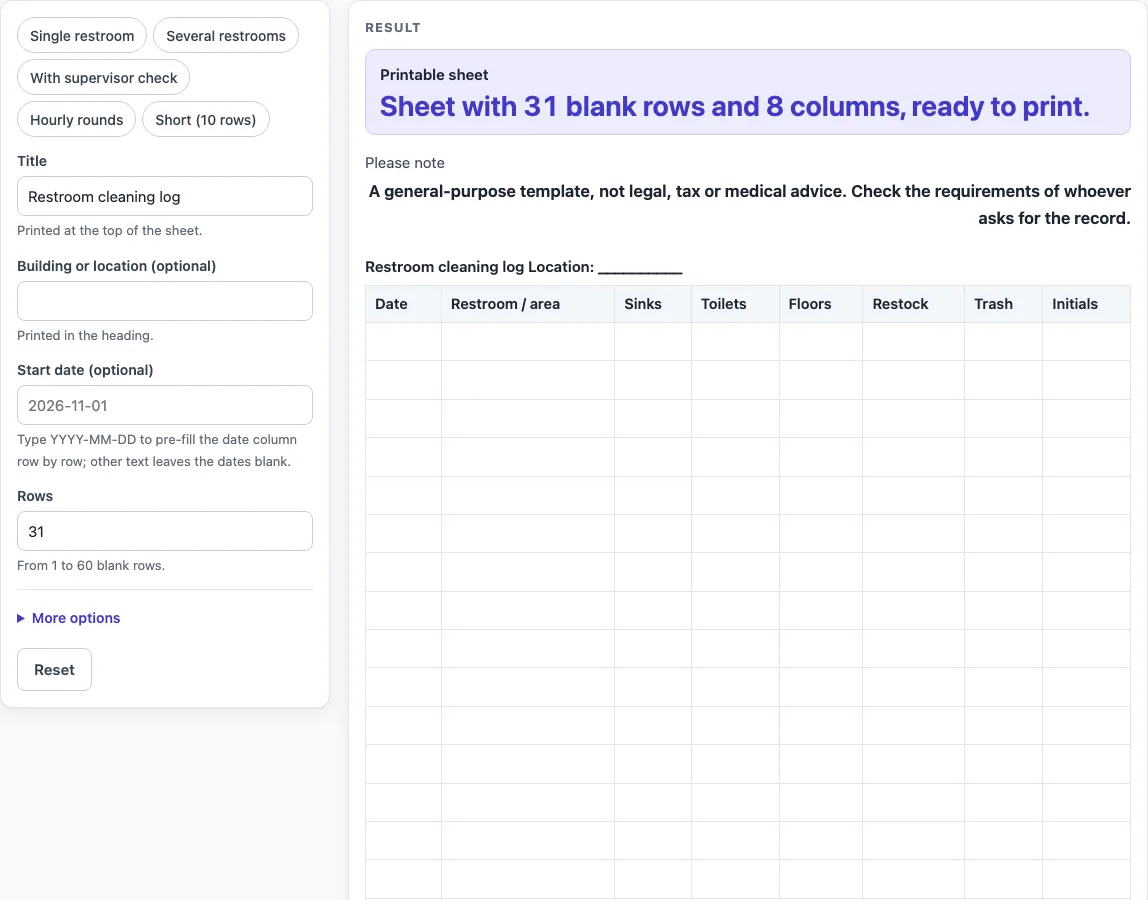
How to use the restroom cleaning log
- Type a name in “Title”. The default is “Restroom cleaning log”, printed at the top of the sheet.
- Type a place in “Building or location (optional)”. It prints in the heading as “Location”; if empty, a line of underscores is printed to write on.
- Type a start date as YYYY-MM-DD in “Start date (optional)” to fill in the date column row by row. Other text leaves the dates blank, with a warning.
- Set “Rows” to a number from 1 to 60. The default is 31. Larger numbers are cut to 60 with a warning; 0, negatives or text give an error.
- Open “More options” to switch columns on or off. “Restroom / area column”, “Sinks column”, “Toilets column”, “Floors column”, “Restock column”, “Trash column” and “Initials column” are on by default. “Time column” and “Supervisor check column” are off by default.
- A warning appears if more than 8 columns are on, because printed columns get narrow.
- Or choose a preset: “Single restroom”, “Several restrooms”, “With supervisor check”, “Hourly rounds” or “Short (10 rows)”. A preset sets columns and rows for you (“Hourly rounds” also changes the title), and you can still change them.
- Check the “Printable sheet” output, then print it or use Print / save as PDF.
- Select “Download as CSV (opens in Excel)” below the table to save restroom-cleaning-log.csv.
The “Please note” line says this is a general-purpose template, not legal, tax or medical advice.
What is a restroom cleaning log?
A restroom cleaning log is a written record of cleaning and checking tasks for a toilet room or group of toilet rooms. Each row is one entry, usually one date or time, and each column is one task or detail. The log shows that someone wrote down the work, and it gives you a single place to look back at what was recorded.
What should each column record?
Each task column is a blank cell for a tick or a set of initials, so the person who did the task marks it. The default sheet has “Sinks”, “Toilets”, “Floors”, “Restock” and “Trash”, which are common tasks for a restroom. “Restroom / area” lets you record which room was done when you cover more than one, and “Time” lets you record when each round was done. “Initials” shows who completed the row. “Supervisor check” gives a separate cell for someone else to confirm the work.
The sheet does not say how often a task should be done or how to do it. Those choices belong to your team or your building’s own rules. If you need a column for a task that is not listed, you can print the sheet and write it in by hand, or use the CSV file in a spreadsheet program.
How do you keep a restroom cleaning log useful?
Use the same title, location and columns every time (the presets “Single restroom”, “Several restrooms” and “Hourly rounds” give three ready layouts), so entries from different days can be compared. Fill in the row at the time the task is done, not later from memory. Keep the printed sheets or the saved CSV file in one place, and note the start date and location at the top so the record is easy to find.
Only include columns you will actually fill in. For one room, the “Single restroom” preset drops the area column and adds a time column; for several rooms, “Several restrooms” keeps the area column and sets 40 rows. More than 8 columns on a printed page makes each one narrow, which makes handwriting harder to read. If the record is needed by someone else, such as a manager, an inspector or a client, ask them what format and details they expect before you start.
Worked examples
| Input | Result |
|---|---|
| 31 rows | 31 table rows, 8 columns |
| 30 rows | 30 table rows, 8 columns |
| 20 rows | 20 table rows, 8 columns |
| 12 rows | 12 table rows, 6 columns |
Calculated by the tool above; open it with the same values to see each step.
Frequently asked questions
Is the restroom cleaning log free to use?
Yes. The tool is free and runs in your browser. There is no sign-up step.
Does the tool save or upload my log?
No. Nothing is stored or uploaded. The sheet exists only in your browser until you print it or download the CSV file.
Can I save the log as a PDF?
Yes. Use the browser’s Print / save as PDF option on the “Printable sheet” output. The sheet is laid out for printing.
How many rows can I add?
You can set “Rows” from 1 to 60. The default is 31. A number above 60 is cut to 60 with a warning.
Why do I see a warning about columns?
The tool warns you when more than 8 columns are on, because printed columns get narrow. Switch off the columns you do not need under “More options”.
Does the sheet tell me how often to clean?
No. The task columns are blank cells for a tick or initials. The sheet does not set a cleaning schedule or method.
Can I hand this log to someone who asked for a record?
The tool is a general-purpose template and not legal, tax or medical advice. Check the requirements of whoever asks for the record before you use it for that purpose.
Related tools
- Daily Log: Use it for a general record of what happened each day, outside restroom tasks.
- Equipment Maintenance Log: Use it to record checks and upkeep for equipment rather than rooms.
- Daily Report Template: Use it when you need a written summary of a day’s work rather than a task checklist.
- Expense Log: Use it to record money spent, such as restroom supplies, in one table.