Reading Log
Choose the columns and number of rows for your reading log, then print it blank or download it as a CSV file to fill in on a computer.
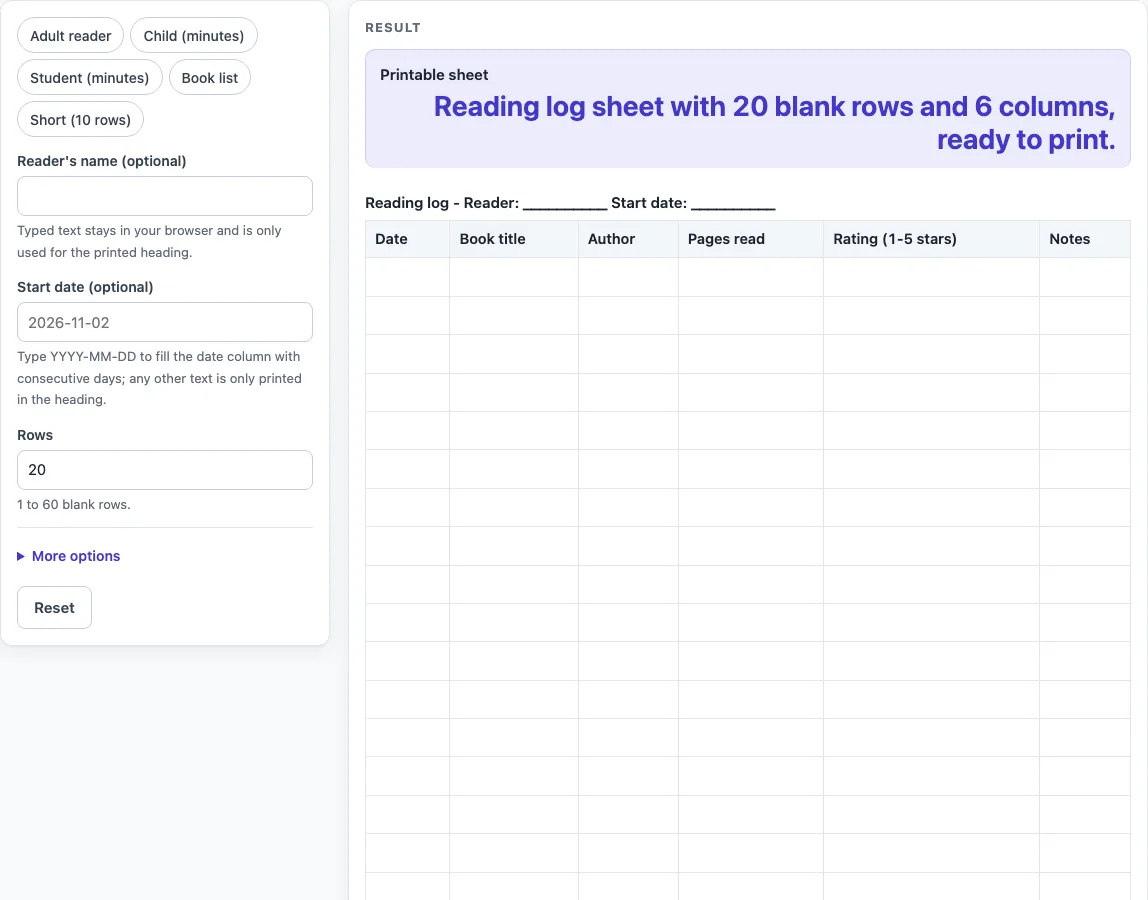
How to use the Reading Log
- Type a name in “Reader’s name (optional)” if you want it shown in the heading. Leave it empty for a blank line.
- Type a start date in “Start date (optional)” using YYYY-MM-DD, for example 2025-09-01. The date column then fills with real calendar dates.
- If you type a start date in any other form, the date column stays blank and your text appears only in the heading. A warning tells you this.
- Set “Rows” to a number from 1 to 60. Anything above 60 is cut to 60, and a warning explains why. Zero, negative numbers, text or an empty field give an error.
- Open “More options” to switch columns on or off: “Column: Date”, “Column: Book title”, “Column: Author”, “Column: Pages read”, “Column: Minutes read”, “Column: Rating (1-5 stars)”, “Column: Notes” and “Column: Signature (parent / teacher)”.
- Or pick a preset: “Adult reader”, “Child (minutes)”, “Student (minutes)”, “Book list” or “Short (10 rows)”.
- Read the output line “Printable sheet” and any warnings. Keep 7 or fewer columns for more writing space, and keep at least one column on.
- Click Print to print the heading and the bordered table on US Letter or A4 portrait.
- Or click “Download as CSV (opens in Excel)” to save the same table as reading-log.csv.
Printing and CSV both use only the heading and the table.
What should a reading log record?
A reading log records what you read and when, using plain facts such as the date, the book title, the author and how much you read. This tool only sets up the empty table, so the entries are always yours to write.
You choose the measure. The “Child (minutes)” preset uses the Minutes read column, the “Adult reader” and “Short (10 rows)” presets use Pages read, and the “Student (minutes)” preset has both Pages read and Minutes read. The sheet does not convert between minutes and pages.
The rating column uses a 1-5 star scale, and the notes column leaves room for a sentence about the book. The signature column, labelled “Signature (parent / teacher)”, gives an adult a place to sign off the entries. None of these columns sets a goal or judges the reading.
How do rows, columns and dates fit together?
Each row is one reading entry, and each column is one detail about that entry. The grid holds the record, and you fill it in by hand after printing or in a saved file.
The sheet allows from 1 to 60 rows. Switching on more than 7 columns leaves little room to write, so the tool warns you when you go past that number. Switching on no columns leaves an empty sheet, which the tool also flags.
The start date works in one specific way. A date typed as YYYY-MM-DD fills the date column with real calendar dates, and the tool handles month ends, year ends and leap days correctly. Any other text is printed only in the heading, and the date column stays blank. Use the YYYY-MM-DD form whenever you want the dates filled in.
The layout is our own design, and no outside source or figure appears on the sheet. The heading shows the reader’s name and start date, if you typed them, and the table below it is ready for writing. Presets only change the number of rows and which columns are on, so you can still adjust any control after choosing one. The “Book list” preset, for example, gives 40 rows with Date, Book title, Author, Rating (1-5 stars) and Notes, and leaves the page and minute columns off.
Worked examples
| Input | Result |
|---|---|
| 20 rows, 6 columns | 20 blank rows to fill in by hand |
| 30 rows, 5 columns | 30 blank rows to fill in by hand |
| 15 rows, 6 columns | 15 blank rows to fill in by hand |
| 40 rows, 5 columns | 40 blank rows to fill in by hand |
Calculated by the tool above; open it with the same values to see each step.
Frequently asked questions
Is the reading log printable?
Yes. Click Print and the tool prints the heading and bordered table on US Letter or A4 portrait paper. Nothing else from the page is included.
Can I use this as a children’s reading log?
Yes. The “Child (minutes)” preset gives 30 rows with the columns Date, Book title, Author, Minutes read and “Signature (parent / teacher)”. You can also turn columns on or off in “More options” to suit a child.
Is there a reading log template I can change?
The tool builds a blank sheet that you shape with the controls, including the rows, the columns and the start date. Click “Download as CSV (opens in Excel)” to save the same table as reading-log.csv.
Does the tool save what I type?
No. Everything runs in your browser, nothing you type is stored or uploaded, and there is no sign-up. The tool is free to use.
Why did I see a column warning?
The tool warns you when more than 7 columns are switched on, because the printed sheet will have little writing space. It also warns you when no columns are on, because the sheet is then empty.
Does the reading log tell me how much I should read?
No. The tool calculates nothing and gives no targets, ranges or advice. It only provides the blank table for you to record your own reading.
Related tools
- Food Diary Template: use it to record what you eat as a plain log, with no targets or advice.
- Sleep Log: use it to record your sleep times as a plain record.
- Weight Log: use it to keep a simple record of weigh-ins over time.
- Workout Log Book: use it to record your exercise sessions in a printable book.