
Pregnancy Journal
Pick the columns and the number of rows, type a start date and due date to fill in the pregnancy week, then print the journal or download it as a CSV file.
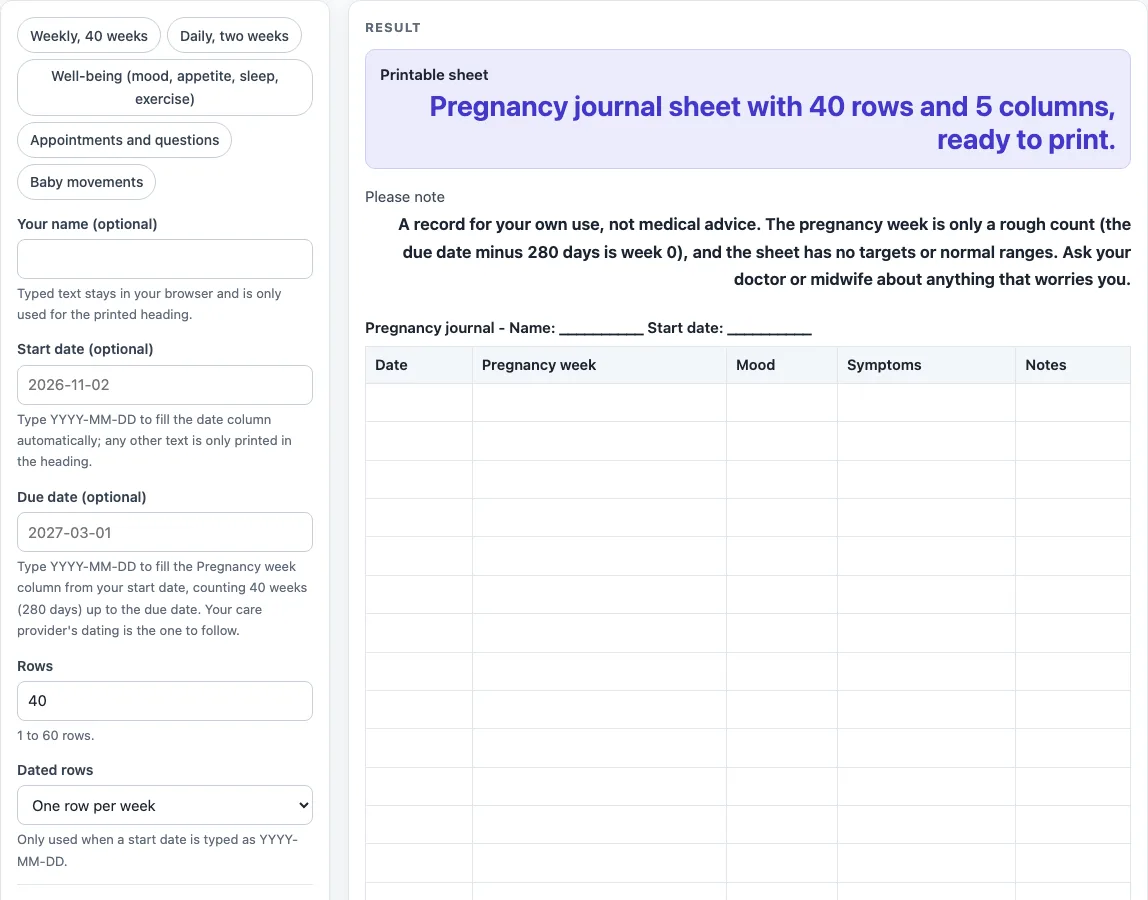
How to use the Pregnancy Journal
- Type your name in “Your name (optional)” if you want it in the heading.
- Enter a start date in “Start date (optional)” as YYYY-MM-DD, such as 2026-12-01.
- Enter a due date in “Due date (optional)” as YYYY-MM-DD.
- Set “Rows” to a number from 1 to 60. The default is 40.
- Choose “Dated rows”: One row per day or One row per week. The default is weekly.
- Open More options and tick or untick each “Column:
” checkbox to decide which columns appear. - Or click a preset button, such as “Daily, two weeks” or “Weekly, 40 weeks”, to set the rows, dated rows and columns in one step. You can change any setting afterwards.
- Check the sheet for warnings. A due date or start date that is not in YYYY-MM-DD form leaves the Pregnancy week column blank and shows a warning. Then click Print, or click “Download as CSV (opens in Excel)” to save the table as a file.
The Print button prints the sheet. The “Download as CSV (opens in Excel)” button saves the same tables as a .csv file. Typed text and settings can appear in the page link (the address after ?s=), so remove any private details from the form before you share the link.
What do you write in a pregnancy journal?
You write whatever helps you notice how you are feeling and what is changing over time. The default columns are Date, Pregnancy week, Mood, Symptoms and Notes. You can also switch on Appetite and food, Sleep, Exercise, Baby movements and Appointments and questions.
Keep entries short. A word or two in Mood, such as “tired” or “calm”, is often enough. In Symptoms, note what you felt and when it happened. Under Sleep and Exercise, write how you slept or what you did that day. The Baby movements column is a blank space for your own notes. The tool does not count movements or say what is normal, so write what you notice.
How do I fill in the pregnancy week?
The Pregnancy week column fills in on its own once you type both a due date and a start date, each as YYYY-MM-DD. Each dated row then shows the week in the form “27w 1d”, meaning 27 weeks and 1 day.
The count follows the usual convention of 40 weeks, or 280 days, up to the due date. The due date row shows “40w 0d”, and the row 280 days before it shows “0w 0d”. For example, a due date of 2027-03-01 with a start date of 2026-12-01 gives “27w 1d” on 2026-12-01, “28w 1d” on 2026-12-08 and “29w 1d” on 2026-12-15 when you use weekly rows.
The week cell stays blank for any row dated before day 0 or more than 300 days after it. If the due date is not in YYYY-MM-DD form, or there is no valid start date, the column stays blank and a warning explains why. The week is only a rough count from the dates you type, so use it as a guide and check your own dates with your midwife or doctor.
Worked examples
| Input | Result |
|---|---|
| 40 rows, 5 columns | 40 rows to fill in by hand |
| 12 rows, 5 columns | 12 rows to fill in by hand |
| 14 rows, 5 columns | 14 rows to fill in by hand |
| 20 rows, 4 columns | 20 rows to fill in by hand |
Calculated by the tool above; open it with the same values to see each step.
Frequently asked questions
Can I keep it daily or weekly?
Yes. Set “Dated rows” to One row per day or One row per week. The default is weekly. The “Daily, two weeks” preset gives you 14 rows with one row for each day.
Can I note questions for my appointments?
Yes. Switch on the “Appointments and questions” column under More options. The “Appointments and questions” preset gives you 20 weekly rows with Date, Pregnancy week, Appointments and questions, and Notes columns. The tool does not suggest questions, so you write your own.
Is the pregnancy journal medical advice?
No. The result shows a note that the sheet is a record for your own use and not medical advice. It has no targets or normal ranges. If anything worries you, ask a doctor or midwife.
Why is my Date column blank?
The Date column fills with calendar dates only when the start date is typed as YYYY-MM-DD. Any other text is printed in the heading only, and a warning says the Date column stays blank. Retype the start date in that format to fix it.
How many columns and rows can I have?
You can have up to 60 rows. Entering a higher number cuts the sheet to 60 and shows a warning. Switching on more than 7 columns gives a warning that the printed sheet will have little writing space. If no columns are switched on, the sheet is empty and a warning tells you to turn at least one on.
What causes an error in the Rows setting?
Rows must be a whole number from 1 to 60. A value of 0, a negative number, text or an empty field gives an error.
Related tools
- Sleep Log: Printable sleep log with bedtime, wake time, naps and notes.
- Food Diary Template: Printable food diary with meal, food and drink, amount and notes.
- Weight Log: Printable weight log in lb or kg with date and note columns.
- Gratitude Journal: Printable gratitude journal pages with daily prompts.
- Workout Log Book: Printable workout log with exercise, sets, reps, weight and time.