
Packing Checklist
Choose the sections for your trip, add a Qty column and blank lines for your own items, then print the packing checklist or download it as a CSV file.
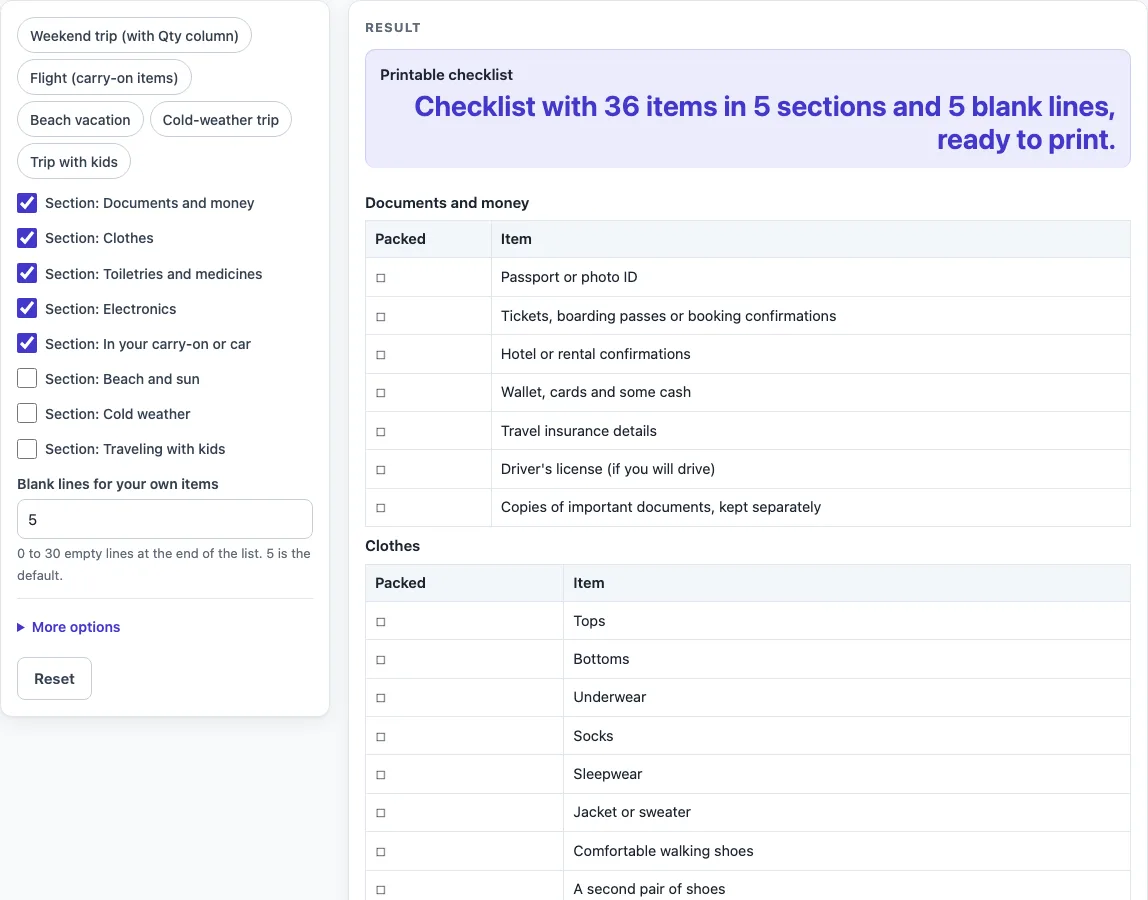
How to use the Packing Checklist
- Switch the sections you need on or off. Each section has its own switch labelled “Section:
”. Five are on by default. Switching a section on adds its whole table, and switching it off removes it. - Set “Blank lines for your own items” to the number of extra lines you want. The default is 5, and the limit is 30. Entering 0 removes the “Your own items” table.
- Open More options and switch on the “Qty column” or “Notes column” if you want them. Both are empty cells for you to write in.
- Check the sections and blank lines. If the form shows an error, fix the field it names. An empty checklist shows an error until you switch on at least one section or add blank lines.
- Press Print to print the sheet, or press “Download as CSV (opens in Excel)” to save the same tables as a .csv file.
You can also press one of the preset buttons to set the sections for a trip type, such as “Beach vacation” or “Cold-weather trip”. The “Weekend trip (with Qty column)” preset also turns on the Qty column and sets 3 blank lines. You can change anything after pressing a preset.
Typed text and settings can appear in the page link, which is the address after ?s=. Remove any private details from the form before you share that link.
What should be on a packing checklist?
A good packing checklist groups items by what you need them for, so you can check each group before you leave. This tool uses five groups that are on by default. Documents and money covers papers, tickets and cards. Clothes, Toiletries and medicines, and Electronics cover what you wear, use and charge. In your carry-on or car holds items to keep within reach on the way, such as a water bottle, snacks, a book and a neck pillow.
Trip-specific groups come next. Beach and sun, Cold weather and Traveling with kids are only useful for some trips, so the tool keeps them off by default. Switching a section on adds its items to the sheet, and switching it off takes them away, so the printed list only contains what your trip needs. The tool’s items are its own list and are a starting point, not a complete record of what you must bring.
How do I make a vacation packing list?
Start with the default sections, which cover the basics. Then switch on the trip-specific sections that match where you are going. A beach holiday needs Beach and sun, a cold-weather trip needs Cold weather, and a trip with children needs Traveling with kids. You can switch on more than one.
Next, decide how many extra items you need to write in. The “Blank lines for your own items” setting adds a “Your own items” table, so you can add things that are not on the ready-made lists, such as a particular medicine or a sports kit. Set this number before you print, because the lines are part of the printed sheet.
Last, decide whether you want a Qty column for counting, such as the number of shirts or pairs of socks, or a Notes column for reminders. The tool leaves these cells empty and does not count them, so the numbers are yours to write in. Print the sheet and go through it once before you pack.
Worked examples
| Input | Result |
|---|---|
| 5 sections | 36 items and 5 blank lines |
| 4 sections | 30 items and 3 blank lines |
| 5 sections | 36 items and 5 blank lines |
| 5 sections | 37 items and 5 blank lines |
Calculated by the tool above; open it with the same values to see each step.
Frequently asked questions
Can I add a quantity for each item?
Yes. Open More options and switch on the “Qty column”. Each row then has an empty Qty cell for you to write in by hand. The tool does not count or total anything, so the numbers are only for your own use.
Can I print a packing list for a beach trip or a cold-weather trip?
Yes. Press the “Beach vacation” or “Cold-weather trip” preset, or switch on the “Beach and sun” or “Cold weather” section yourself. Each preset gives 5 sections and 37 items. Then press Print to print the sheet.
Can I add my own items?
Yes. Set “Blank lines for your own items” to the number of lines you need, from 1 to 30. The lines appear in the “Your own items” table at the end of the sheet. If you enter a number above 30, the sheet uses 30 and shows a warning.
Is my packing list saved or shared?
Nothing you type is stored or uploaded. The page runs in your browser and needs no sign-up. Typed text and settings can appear in the page link after ?s=, so remove any private details from the form before you share the link.
How many items are on the sheet?
The default sheet has 5 sections, 36 items and 5 blank lines. With every section switched on, the sheet has 8 sections and 56 items. The presets range from 30 items in the “Weekend trip (with Qty column)” preset to 37 items in the “Beach vacation” and “Cold-weather trip” presets.
What happens if I switch everything off?
If every section is off and the blank lines are 0, the tool shows the error “Switch on at least one section or add some blank lines, otherwise the checklist is empty.” Switch on at least one section or set a number of blank lines above 0 to fix it.
Related tools
- Trip Log: Printable trip log with locations, times, odometer and purpose.
- Fuel Log: Printable fuel log with odometer, fuel amount, price and total.
- Car Maintenance Log: Printable car maintenance log with service, parts, cost and next due.
- Sign Up Sheet Template: Printable sign up sheet for volunteers, potlucks and time slots.