Open House Sign In Sheet
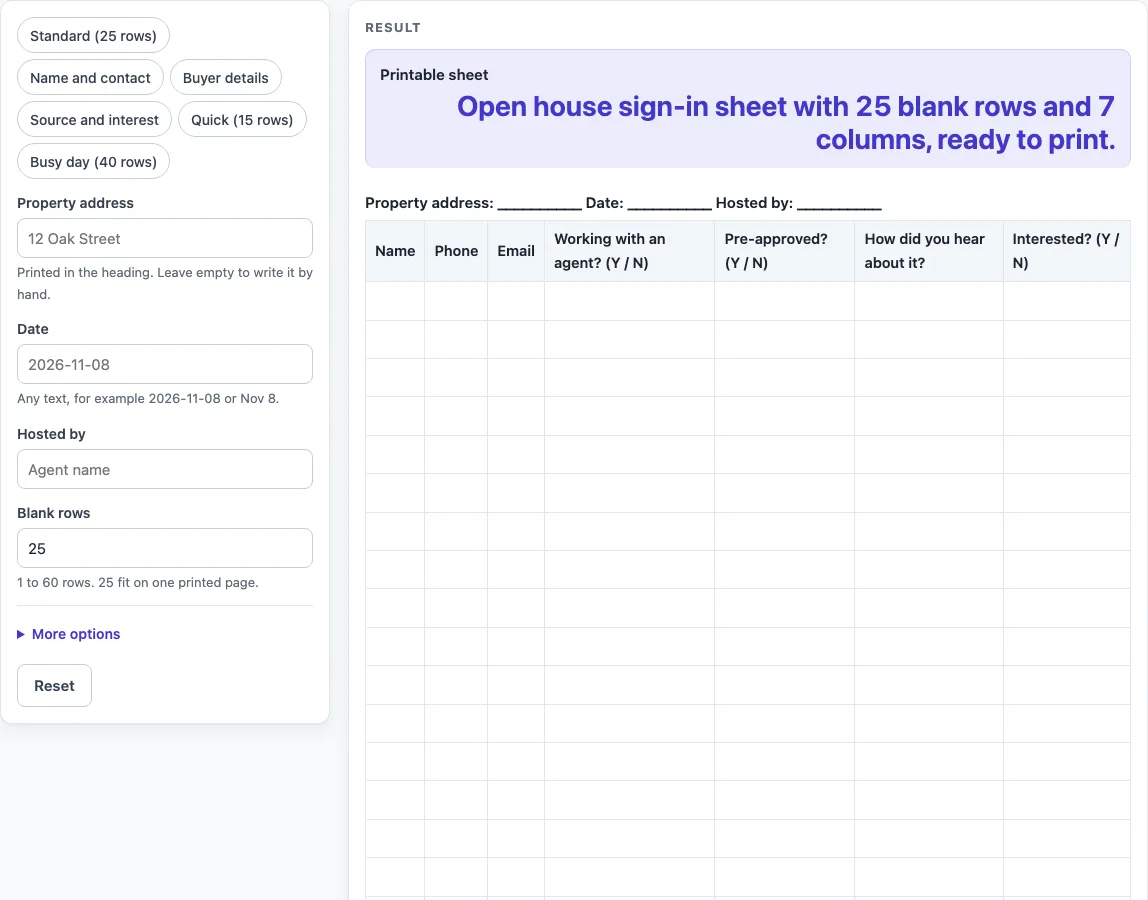
Type the property address and date, choose the visitor columns you want, then print the blank open house sign in sheet or download it as a CSV.
How to use the Open House Sign In Sheet
- Type the address into “Property address”. If you leave it empty, the heading prints a line of underscores to write on.
- Fill in “Date” and “Hosted by” the same way.
- Pick a preset from the list: “Standard (25 rows)”, “Name and contact”, “Buyer details”, “Source and interest”, “Quick (15 rows)” or “Busy day (40 rows)”. You can change a preset afterwards.
- Set “Blank rows”. The default is 25. Numbers above 60 are cut to 60 with a warning. Zero, a negative number or text gives an error.
- Open “More options” to switch columns on or off: “Phone column”, “Email column”, “Working with an agent column”, “Pre-approved column”, “How they heard column” and “Interested column”. Name is always on.
- Print. The print view shows only the heading and the bordered table, in black and white, on US Letter or A4 portrait.
- Or use “Download as CSV” to save the heading line, column names and blank rows as a .csv file that opens in a spreadsheet.
The default sheet has 25 rows and all seven columns, and 25 rows fit on one printed page. For a busy afternoon, pick “Busy day (40 rows)” and print a second sheet if you need one.
What should an open house sign in sheet include?
A useful sheet has a heading that names the property, the date and the host, plus a Name column with room to write. Those three heading fields and the Name column are the core of the layout, and the rest of the columns are optional extras.
The heading reads “Property address: … Date: … Hosted by: …”. Any field you leave empty prints as a line of underscores, so you can complete it by hand on the day. The Name column is always on, because every row needs a way to identify the visitor.
The other columns are Phone, Email, “Working with an agent? (Y / N)”, “Pre-approved? (Y / N)”, “How did you hear about it?” and “Interested? (Y / N)”. Each one is a switch in “More options”, so you only print what you need. Phone and Email give the host a way to follow up. The remaining four help the host learn more about visitors.
Every cell is empty and sized for handwriting. Keep in mind that the layout and column choices are our own design. No external standard, real estate rule or legal requirement is followed or claimed.
How do the Y / N columns work on a sign in sheet?
The Y / N columns are only headings. The visitor writes their own Y or N answer in the cell, and the page does not check, score or store what is written.
This matters for how you use the sheet. “Working with an agent? (Y / N)” and “Pre-approved? (Y / N)” are questions a visitor can answer by hand, while “Interested? (Y / N)” records a visitor’s own view. Because nothing is checked, the sheet is a record of what visitors wrote, not a verified result.
What do the presets keep?
“Name and contact” keeps Name, Phone and Email. “Buyer details” keeps those plus the agent and pre-approved columns. “Source and interest” keeps Name, Email, “How did you hear about it?” and “Interested? (Y / N)”. “Quick (15 rows)” keeps Name, Phone and “Interested? (Y / N)” with 15 rows. “Busy day (40 rows)” keeps all seven columns with 40 rows.
Worked examples
| Input | Result |
|---|---|
| 25 rows | 25 rows, 7 columns |
| 25 rows | 25 rows, 7 columns |
| 15 rows | 15 rows, 3 columns |
| 40 rows | 40 rows, 7 columns |
Calculated by the tool above; open it with the same values to see each step.
Frequently asked questions
Frequently asked questions
Is this open house sign in sheet free to use?
Yes. The tool is free and needs no sign-up. You can build the sheet, print it or download it as a CSV file without creating an account.
Does the tool save the names people write on the sheet?
No. Everything runs in your browser, and nothing is stored or uploaded. The visitor names are written by hand on the printed page, so they stay with you. Text typed into the address, date or host fields can appear in the page link if you share it.
Can I print the sign in sheet in colour or on a different paper size?
The print view is black and white and prints on US Letter or A4 portrait. If you need another size or colour, you can download the CSV file and format it in your own spreadsheet program.
How many visitors can one sheet hold?
Each row is one line for one visitor. The sheet can have from 1 to 60 blank rows, with 25 as the default. For a busy day, choose the “Busy day (40 rows)” preset.
Do the Y / N columns check the answers?
No. The Y / N columns are only headings. Visitors write their own answers, and the page does not check, score or store them.
Is an open house sign in sheet a legal requirement?
No. The layout and column choices are our own design. No external standard, real estate rule or legal requirement is followed or claimed, and this page does not give legal advice.
Related tools
- Daycare Sign In Sheet: Use this when you need a blank sign in sheet for a daycare or childcare setting.
- Sign In and Out Sheet: Use this when people need to record both arrival and departure.
- Sign In Sheet: Use this for a general blank sign in sheet for a meeting, class or event.
- Visitor Log: Use this when you want a blank log to record visitors over a longer period.