Nonprofit Board Meeting Minutes Template
Choose how many attendance, motion and action rows you need and whether to include committee reports or executive session lines, then print the blank form or download it as CSV.
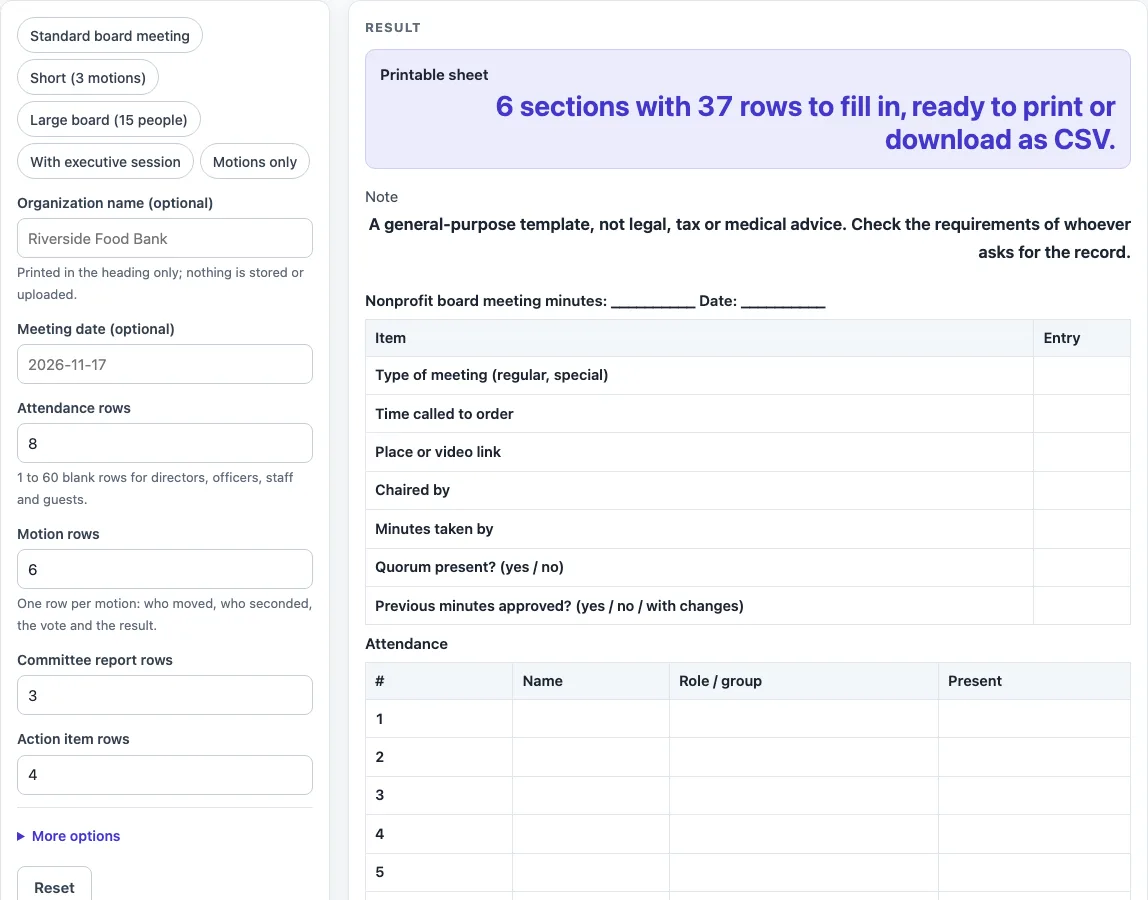
How to use the nonprofit board meeting minutes template
- Type the “Organization name (optional)” and “Meeting date (optional)” if you want them on the sheet. Both can stay empty.
- Set “Attendance rows”. The default is 8. Enter a whole number from 1 to 60. A larger number is cut to 60 with a warning; below 1 or text gives an error.
- Set “Motion rows”. The default is 6.
- Set “Committee report rows”. The default is 3. Used only while the committee rows option is on.
- Set “Action item rows”. The default is 4. Used only while the action items table is on.
- Open “More options” to switch the optional parts on or off. “Mission or program report row” and “Committee report rows in the reports table” are on by default. “Executive session lines (left blank)” is off by default. “Action items table” and “Submitted-by and approved lines” are on by default.
- Check the “Printable sheet” output. It reads, for example, “6 sections with 37 rows to fill in, ready to print or download as CSV.”
- Click Print to print the sheet in black and white on US Letter or A4. Or click “Download as CSV (opens in Excel)” to get one file with every section as its own block.
You can also choose a preset such as “Standard board meeting”, “Short (3 motions)”, “Large board (15 people)”, “With executive session”, or “Motions only” as a starting point, then adjust the fields.
What sections belong in nonprofit board meeting minutes?
The sheet has six default sections: meeting details, attendance, reports, motions and votes, action items, and closing. The details, attendance, reports, motions, and closing sections follow the items that the City of Madison City Attorney page lists for minutes. Those items are the parts this template uses as its base.
How are motions and votes recorded on the sheet?
The Motions and votes section uses these columns: #, Motion, Moved by, Seconded by, Vote (for / against / abstain), and Result. The number of rows comes from “Motion rows”, which defaults to 6. Each row holds one motion, so you can write who moved and seconded it, the vote count, and the result as it happened at the meeting.
Why do reports and action items use tables?
The Reports section has the columns #, Report, Summary, and Action taken. By default it lists a mission or program report, an executive director’s report, a finance report, and three committee lines. The Action items section has the columns #, Action, Owner, Due date, and Status. The table layout is our own design, not a format named by a source, so you can change the row counts to suit your board.
How do the executive session lines work?
“Executive session lines (left blank)” is off by default. When you turn it on, the sheet adds blank prompts for time began, time ended, and general subject. These lines are prompts only. The tool does not fill them in, and it does not decide what belongs in an executive session.
How do row counts change the size of the sheet?
Each row count adds rows to its section, and the output line updates the total. For example, the defaults of 8 attendance rows and 6 motions give 6 sections and 37 rows. With 12 attendance rows, 8 motion rows and the executive session lines switched on, the sheet has 7 sections and 46 rows. With 5 attendance rows, 3 motion rows and 3 action item rows, and with the mission row and the committee rows switched off, it has 6 sections and 26 rows. Setting all four row counts to 60 gives 6 sections and 256 rows.
Is the sheet a legal document?
No. The sheet is a general-purpose template, and it is not legal, tax, or medical advice. Check the requirements of whoever asks for the record before you use the sheet in place of a required format.
Sources (checked 15 October 2026): cityofmadison.com
Worked examples
| Input | Result |
|---|---|
| 8 attendance rows, 6 motions | 6 sections, 37 rows |
| 12 attendance rows, 8 motions | 7 sections, 46 rows |
| 5 attendance rows, 3 motions | 6 sections, 26 rows |
| 60 attendance rows, 60 motions | 6 sections, 256 rows |
Calculated by the tool above; open it with the same values to see each step.
Frequently asked questions
Frequently asked questions
Is this nonprofit board meeting minutes template legal advice?
No. It is a general-purpose template, not legal, tax, or medical advice. Check the requirements of whoever asks for the record.
Does the tool save what I type?
No. Nothing is calculated, decided, or stored. The tool builds a blank sheet, and you keep your entries by printing it or downloading it as a CSV file.
Is anything I type uploaded anywhere?
No. Nothing you type leaves your browser.
Do I need an account to use it?
No. There is no sign-up, and the tool is free to use.
Can I use it for a large board?
Yes. Set “Attendance rows” up to 60, or pick the “Large board (15 people)” preset as a starting point.
Which presets are there?
The presets are “Standard board meeting”, “Short (3 motions)”, “Large board (15 people)”, “With executive session” and “Motions only”. Each one sets several fields at once, and you can change them afterwards.
Can I record an executive session?
Switch on “Executive session lines (left blank)” under More options. The sheet then adds blank lines for the time the session began, the time it ended and a general subject. They are prompts only.
What happens if I enter 70 in “Attendance rows”?
The number is cut to 60, and the sheet shows the warning “Attendance rows is limited to 60, so the sheet uses 60.”
Related tools
- Board Meeting Agenda Template: use it to plan the items you will cover before the meeting starts.
- Call Log Template: use it to record incoming and outgoing calls as a simple printable log.
- Incident Report Template: use it to write up a single event in a structured, printable form.
- Meeting Agenda Template for Excel: use it when you want an agenda laid out as a spreadsheet you can download.
- Meeting Minutes Template: use it for minutes from a general meeting that is not a board meeting.
- Nonprofit Board Meeting Agenda Template: use it to build a nonprofit board agenda to match these minutes.
- One-on-One Meeting Agenda Template: use it to plan a short meeting between two people.
- Weekly Status Report Template: use it to report progress on tasks each week.