Nonprofit Board Meeting Agenda Template
Choose a 30, 60 or 90 minute meeting and which items to include, such as a mission highlight, committee reports or a blank executive session line, then print or download as CSV.
How to use the nonprofit board meeting agenda template
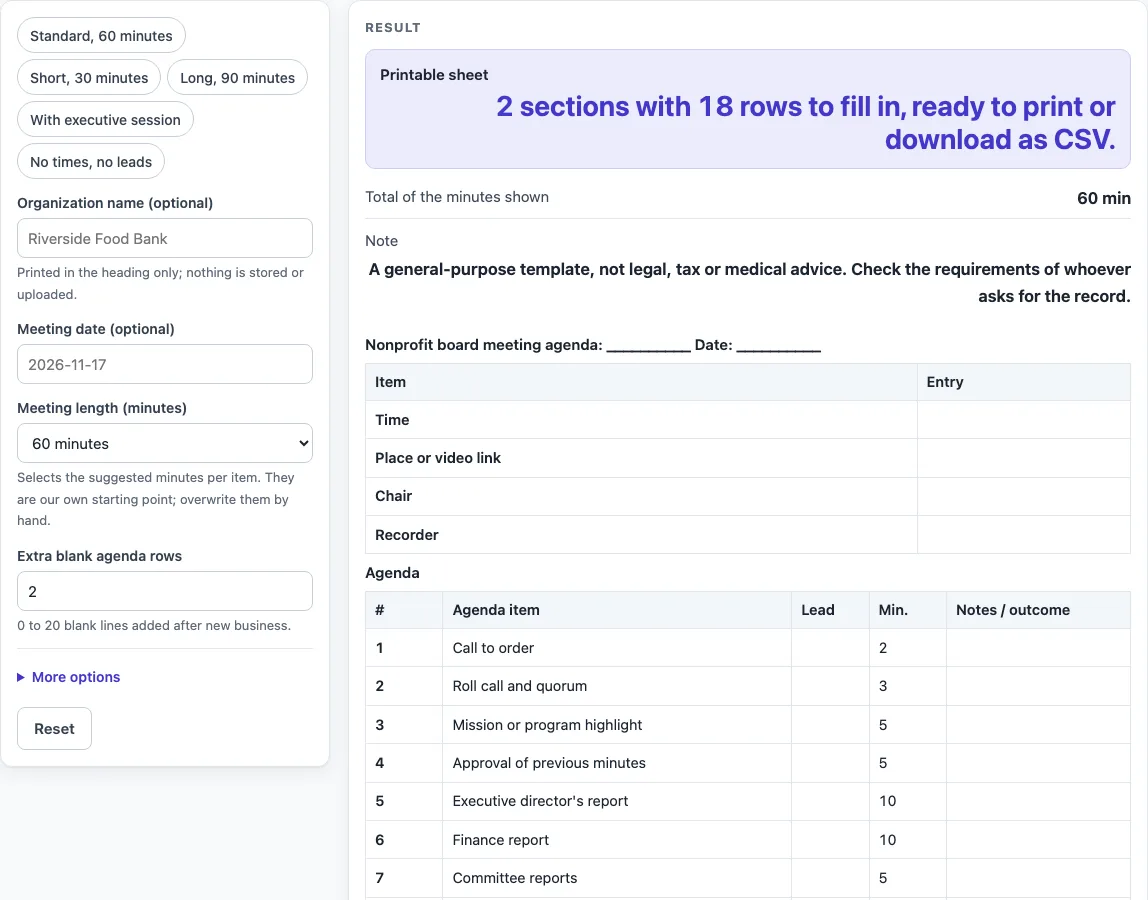
- Type your organization name in “Organization name (optional)” and the date in “Meeting date (optional)” if you want them on the sheet.
- Choose a value for “Meeting length (minutes)”: 30, 60 or 90. Any other value gives the error “Choose a meeting length of 30, 60 or 90 minutes.”
- Set “Extra blank agenda rows” to a whole number from 0 to 20. A larger number is cut to 20 with a warning, and text or a negative number gives an error.
- Open “More options” to switch on or off the checkboxes for the “Time, place and chair block”, “Minutes column and total”, “Lead column”, “Mission or program highlight item”, “Committee reports item” and “Unfinished business item”. All of these start on.
- Switch on “Executive session line (left blank)” only if you want a blank line for it. It starts off.
- Check the “Printable sheet” output, then read the “Total of the minutes shown” line.
- Press Print to print the sheet in black and white on US Letter or A4, or press “Download as CSV (opens in Excel)” to save every section as one CSV file.
The presets “Standard, 60 minutes”, “Short, 30 minutes”, “Long, 90 minutes”, “With executive session” and “No times, no leads” set several controls at once. Start with a preset, then adjust the controls to fit your meeting.
What order should a nonprofit board meeting agenda follow?
The sheet lists approval of previous minutes, reports, unfinished business and new business in the order given by Robert’s Rules order of business, as quoted on the Wikipedia agenda page. Call to order and roll call come near the start, and adjournment comes last, so the meeting moves from opening formalities to business and then to closing.
Which agenda items come from Robert’s Rules, and which are our own layout?
Approval of previous minutes, the reports, Unfinished business and New business follow the Robert’s Rules order of business. The mission or program highlight, Executive director’s report, Finance report, Committee reports and Executive session lines are our own layout, and so is every suggested minute count. The column names, wording and order of the sections are also our own design, because the nonprofit-specific agenda sample could not be fetched and no nonprofit source is cited. Treat the minute counts as starting points and change them to suit your board.
How does the total minutes row work?
The total row adds up only the minutes shown on the sheet. With the default items, 30, 60 and 90 minutes each list 13 agenda rows and total exactly 30, 60 or 90 minutes. An item you switch on that is off by default adds its minutes on top: with the executive session line on, 60 minutes lists 14 rows and totals 70, and 90 minutes totals 105. Switching an item off removes its minutes, so 30 minutes without the mission highlight and with no extra rows lists 10 rows and totals 28. Check the total before you print so it matches the time you have.
How do the presets differ?
Each preset gives a different layout. “Standard, 60 minutes” gives 2 sections and 18 rows, with a total of 60 minutes. “Short, 30 minutes” gives 2 sections, 18 rows and 30 minutes. “Long, 90 minutes” gives 2 sections, 18 rows and 90 minutes. “With executive session” gives 2 sections, 19 rows and 70 minutes. “No times, no leads” gives 2 sections and 17 rows.
What does the executive session line do?
The executive session line is only a blank row on the sheet. It gives you a row labelled Executive session to fill in yourself, and nothing more. The page says nothing about what may be discussed in executive session, so check your own bylaws or the rules that apply to your board for that.
Sources (checked 15 October 2026): en.wikipedia.org
Worked examples
| Input | Result |
|---|---|
| 60 minutes | 13 agenda rows, 60 minutes |
| 90 minutes | 14 agenda rows, 105 minutes |
| 30 minutes | 10 agenda rows, 28 minutes |
| 60 minutes | 31 agenda rows, - minutes |
Calculated by the tool above; open it with the same values to see each step.
Frequently asked questions
Is the sheet a legal agenda?
No. It is a general-purpose template, not legal, tax or medical advice, and the page does not say what a rule, bylaw or law requires. Check the requirements of whoever asks for the record before you rely on it.
Can I change the agenda items after the sheet is built?
The sheet is built from the controls on the page, so change the options and the sheet updates. The item names and minute counts are set by the layout, so use the “Extra blank agenda rows” control to add room for your own items.
Why does the total show more minutes than my meeting length?
The total adds up the minutes of every row shown. The default items add up to the length you chose, but the “Executive session line (left blank)” item, which starts off, adds its own minutes when you switch it on, as in the “With executive session” preset (70 minutes at 60). Switch it off, or change its minutes by hand on the printed sheet, so the total matches your meeting.
How many extra blank rows can I add?
You can add from 0 to 20 extra blank agenda rows. If you enter a larger number, the sheet uses 20 and shows the warning “Extra blank agenda rows is limited to 20, so the sheet uses 20.”
What paper sizes can I print on?
The Print button prints the sheet in black and white on US Letter or A4. The same sheet can also be downloaded as CSV, which opens in Excel.
Does the tool save what I type?
No. Nothing you type is calculated, decided or stored, and nothing typed leaves the browser. Download the CSV or print the sheet before you close the page if you want to keep it.
Related tools
- Board Meeting Agenda Template: use it for a general board agenda that is not specific to a nonprofit.
- Nonprofit Board Meeting Minutes Template: use it to record what the board decided after the meeting.
- Meeting Agenda Template for Excel: use it when you want an agenda in a spreadsheet layout.
- Meeting Minutes Template: use it to write up the notes and actions from any meeting.
- One-on-One Meeting Agenda Template: use it to plan a short meeting between two people.
- Weekly Status Report Template: use it to report progress on work each week.
- Call Log Template: use it to record phone calls with a blank log sheet.
- Incident Report Template: use it to write up an event with a blank report sheet.