Incident Report Template
Choose the sections your report needs, such as injury questions, property damage, cause analysis and corrective actions, then print the blank form or download it as CSV.
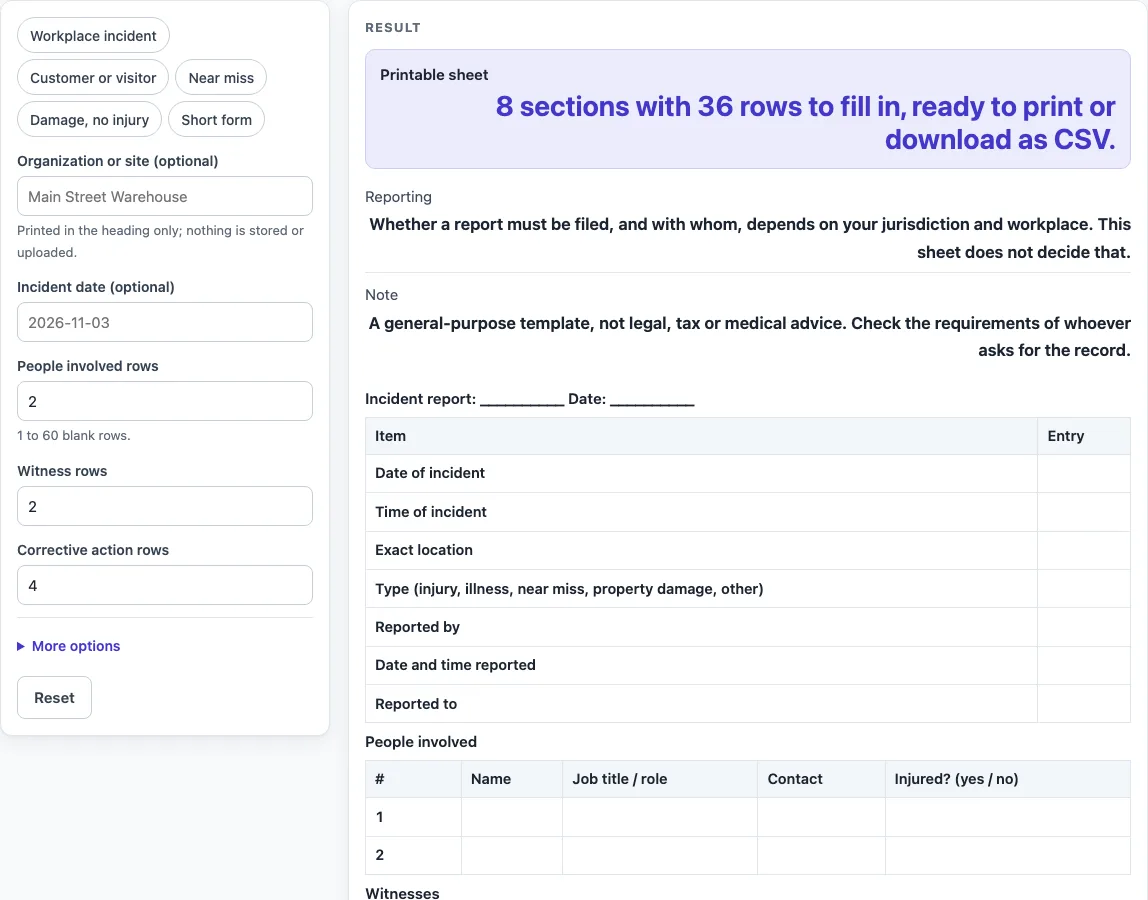
How to use the Incident report template
- Open the tool at the top of this page. If you want them on the sheet, type into “Organization or site (optional)” and “Incident date (optional)”. Leave them empty if you don’t.
- Choose a preset: “Workplace incident” (the default), “Customer or visitor”, “Near miss”, “Damage, no injury” or “Short form”. A preset sets the sections and row counts for that type of event.
- Set “People involved rows”, “Witness rows” and “Corrective action rows”. Enter whole numbers from 1 to 60. A larger number is cut to 60 with a warning, and a number below 1 or any text gives an error.
- Open “More options” to switch “Injury or illness questions”, “Property or equipment damage”, “Immediate action section”, “Cause analysis section” and “Signature and review lines” on or off. The first, third, fourth and fifth are on by default, and “Property or equipment damage” is off.
- Read the output line. For the default sheet it says “8 sections with 36 rows to fill in, ready to print or download as CSV.”
- Click the Print button to print the sheet in black and white on US Letter or A4.
- Or click “Download as CSV (opens in Excel)” to save every section as one file.
Your entries stay in the browser. Print or download the sheet before you close the page, because nothing is kept for you to come back to.
What does each section of this incident report template record?
The default sheet has eight sections: Incident report, People involved, Witnesses, What happened, Immediate action, Cause analysis, Corrective actions and Completed by. Each section has its own columns. The two-column sections use Item | Entry, while People involved uses # | Name | Job title / role | Contact | Injured? (yes / no). The Incident report section asks for the date, time, exact location, type (injury, illness, near miss, property damage, other), who reported the event, when it was reported and who it was reported to. The Time of incident row follows the “time of event” item on OSHA Form 301.
The What happened section asks what the person was doing just before the incident, what happened, the injury or illness, the object or substance that directly harmed the person, where treatment was given away from the worksite, and whether the person was treated in an emergency room or hospitalized overnight as an in-patient. These questions use the field names of OSHA Form 301 items 14, 15, 16, 17, 7, 8 and 9, with shortened wording. The sheet is not OSHA Form 301 and does not replace it.
Form 301 items 14 to 17 do not ask for personal identifiers. This sheet’s People involved and Witnesses tables do include names, because it is a general incident report and not Form 301.
Why does an incident report need cause analysis and follow-up?
A cause analysis asks what happened and why, so that any fix targets the reason and not only the event. The Cause analysis section has three rows: Contributing factors (equipment, procedures, training, other), Why did it happen? Ask why again for each answer, and Root cause or causes. These rows paraphrase the OSHA incident investigation page.
Asking “why” again for each answer moves the review from the visible event toward the conditions behind it.
The Corrective actions table has the columns action, owner, due date and date done. This layout is our own design. It keeps a record of who is responsible for each fix and when it was finished. The sheet does not decide which actions are needed.
Filing rules are outside this template. The page’s reporting note says: “Whether a report must be filed, and with whom, depends on your jurisdiction and workplace. This sheet does not decide that.” The layout, wording and section order are a general-purpose design, not legal, tax or medical advice.
Sources (checked 15 October 2026): osha.gov · osha.gov · osha.gov
Worked examples
| Input | Result |
|---|---|
| 2 people involved, 2 witnesses | 8 sections, 36 rows |
| 1 people involved, 3 witnesses | 8 sections, 38 rows |
| 1 people involved, 2 witnesses | 8 sections, 30 rows |
| 60 people involved, 60 witnesses | 8 sections, 210 rows |
Calculated by the tool above; open it with the same values to see each step.
Frequently asked questions
Is this incident report template an OSHA form?
No. The What happened questions use field names from OSHA Form 301 items 14, 15, 16, 17, 7, 8 and 9, with shortened wording. The sheet is not OSHA Form 301 and does not replace it.
Is this a legal or reporting document?
No, and the tool makes no such claim. Its note says: “A general-purpose template, not legal, tax or medical advice. Check the requirements of whoever asks for the record.” Whether a report must be filed, and with whom, depends on your jurisdiction and workplace.
Is my incident information saved or uploaded?
No. Everything runs in your browser, and nothing you type is calculated, decided, stored or uploaded. Print or download the sheet before you close the page.
Can I use this as a workplace incident report template for a small team?
Yes. The default “Workplace incident” preset gives eight sections and 36 rows. Also searched as incident report template word, the sheet works as a printed form or as a CSV file saved with the “Download as CSV (opens in Excel)” button.
Why is the row limit 60?
Row-count fields accept whole numbers from 1 to 60. A larger number is cut to 60 with a warning: “People involved rows is limited to 60, so the sheet uses 60.” For example, 60 people involved, 60 witnesses, 60 corrective action rows and the property damage questions on gives 8 sections and 210 rows.
What paper sizes does the printed sheet use?
The Print button prints the sheet in black and white on US Letter or A4, so you can choose the size that matches your printer.
Related tools
- Board Meeting Agenda Template: Use it to plan the items and time slots for a board meeting.
- Call Log Template: Use it to record incoming and outgoing calls in a simple table.
- Meeting Agenda Template for Excel: Use it when you want an agenda in a spreadsheet layout.
- Meeting Minutes Template: Use it to record decisions and actions from a meeting.
- Nonprofit Board Meeting Agenda Template: Use it for agendas for a nonprofit board.
- Nonprofit Board Meeting Minutes Template: Use it to write up minutes for a nonprofit board meeting.
- One-on-One Meeting Agenda Template: Use it to prepare topics for a meeting between two people.
- Weekly Status Report Template: Use it to summarize progress and blockers each week.