
Hospital Bag Checklist
Switch on the sections you need, add blank lines for your own items, then print the hospital bag checklist or download it as a CSV file.
The Hospital Bag Checklist is a free tool that builds a printable packing checklist for a hospital bag. It uses ready-made sections of items, including papers and admin, labor and delivery, things for you after the birth, things for the baby, and things for your partner or support person. You switch sections on or off, choose how many blank lines to add for your own items, then print the sheet or download it as a CSV file to open in Excel.
Everything runs in your browser. It needs no sign-up. The items are general ideas, not a list from any particular hospital, so use the sheet as a starting point and check with your doctor, midwife or hospital about what to bring.
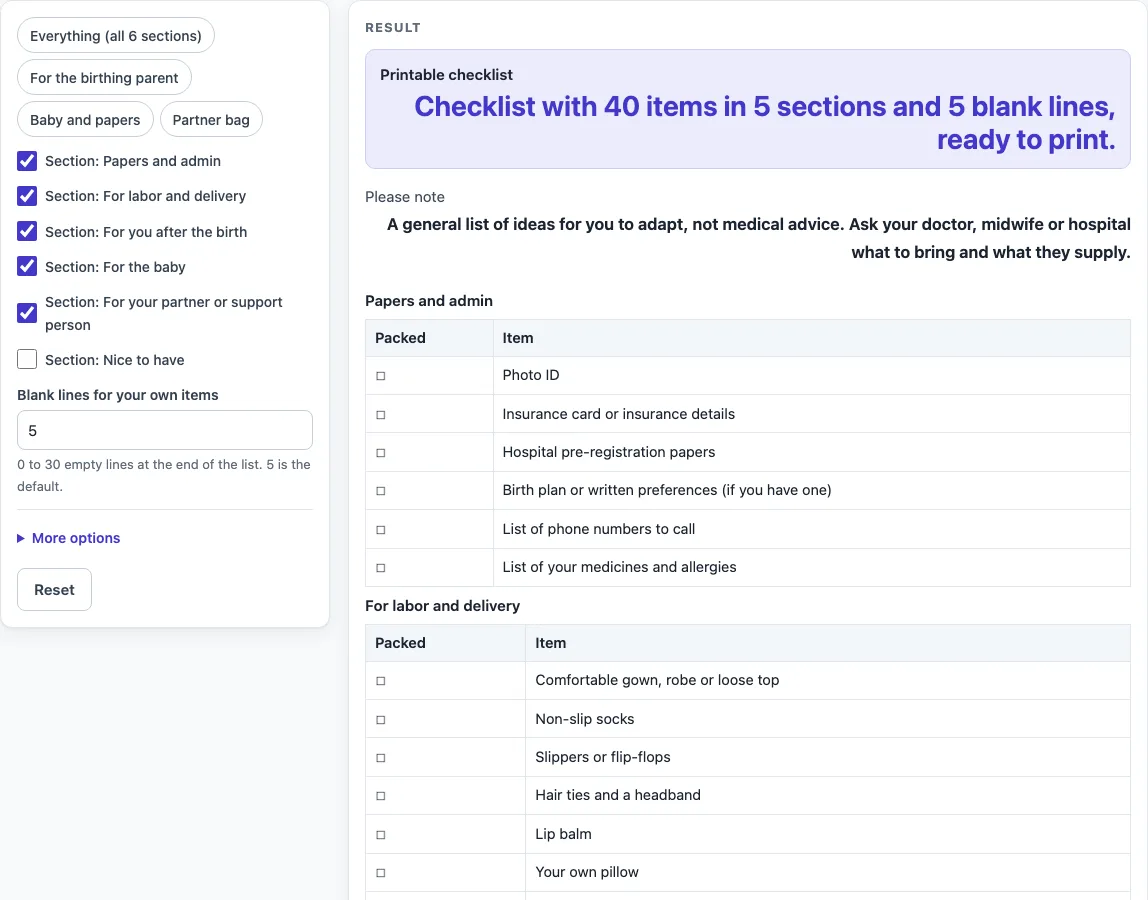
How to use the Hospital Bag Checklist
- Choose your sections. Each section has a switch labelled “Section:
”. Five sections are on by default, and “Nice to have” is off. Switch on the sections you want and switch off the ones you do not need. - Or start from a preset. The buttons “Everything (all 6 sections)”, “For the birthing parent”, “Baby and papers” and “Partner bag” set which sections are on. You can change any switch after pressing one.
- Set the blank lines. Enter a number in “Blank lines for your own items”. The default is 5. Enter 0 to remove the “Your own items” table. Numbers above 30 are cut to 30 with a warning.
- Add columns if you want them. Under More options, tick “Qty column” or “Notes column”, or both. These are empty cells for you to write in by hand.
- Check the sheet. Each section is a table with a “Packed” box column and an “Item” column, so you can tick items off as you go.
- Print or download. Press Print to print the sheet. Or press “Download as CSV (opens in Excel)” to save the same tables as a .csv file.
Typed text and settings can appear in the page link (the address after ?s=). Before you share that link, remove any private details from the form.
What should I pack in my hospital bag?
The tool groups general ideas into six sections: papers and admin, labor and delivery, things for you after the birth, things for the baby, things for your partner or support person, and nice-to-have extras. Five sections are on by default, which gives a sheet of 40 items. With all six on, the sheet has 47 items.
Each section is a separate table, so you can see which group each item belongs to. Papers and admin is for documents and paperwork. Labor and delivery covers things you may want close by while you are in labor and giving birth. For you after the birth is for your comfort and recovery. The baby section is for the newborn’s needs, and the partner or support person section is for the person coming with you. Nice to have is for extras you may enjoy but do not strictly need.
Treat the sections as a starting point. Start with the default sheet, remove anything your hospital supplies, and add your own items in the blank lines. The tool does not know what your hospital provides or allows, so the final list should come from your own plans and the advice you receive.
Do I need to pack things for the baby and my partner?
You do not have to pack for both, because the sections can be switched on or off. The “For the baby” section has 8 items and the “For your partner or support person” section has 7 items. Both are on by default, so they appear on the sheet unless you turn them off.
The presets show how the groups fit together. “Baby and papers” gives 2 sections and 14 items. “Partner bag” gives 2 sections and 13 items. “For the birthing parent” gives 3 sections and 25 items. If someone else is packing the baby’s things or your partner’s bag, switch off the matching section and print only the sections you need.
Check with your hospital what it supplies for babies and for support people. Some items in these sections may be provided, so you may not need to bring them.
Worked examples
| Input | Result |
|---|---|
| 5 sections | 40 items and 5 blank lines |
| 6 sections | 47 items and 5 blank lines |
| 3 sections | 25 items and 5 blank lines |
| 2 sections | 14 items and 5 blank lines |
Calculated by the tool above; open it with the same values to see each step.
Frequently asked questions
Can I print only the sections I need?
Yes. Switch off any section you do not need before you press Print. Only the tables that are on appear on the printed sheet.
Can I add my own items?
Yes. The “Your own items” table at the end gives empty lines for anything that is not on the list. Set the number in “Blank lines for your own items” from 1 to 30 (0 removes the table), then write your extra items in by hand.
Is the hospital bag checklist medical advice?
No. The result shows this message: “A general list of ideas for you to adapt, not medical advice. Ask your doctor, midwife or hospital what to bring and what they supply.”
Why does the tool show an error when my checklist is empty?
This happens when every section is switched off and “Blank lines for your own items” is set to 0. The tool shows: “Switch on at least one section or add some blank lines, otherwise the checklist is empty.” Switch on a section or enter a number of blank lines to fix it.
What are the Qty and Notes columns for?
They are empty cells to write in by hand, for example how many of an item to pack or a reminder. The tool does not count or total anything in them. Switch them on under More options.
Related tools
- Sleep Log: Printable sleep log with bedtime, wake time, naps and notes.
- Food Diary Template: Printable food diary with meal, food and drink, amount and notes.
- Gratitude Journal: Printable gratitude journal pages with daily prompts.
- Daily Log: Printable daily log with date, time, activity, notes and initials.