Gratitude Journal
Pick the number of days and the lines you want, add daily prompts if you like, then print your gratitude journal pages or download them as a CSV file.
A gratitude journal is a written list of things you feel thankful for, and this free Gratitude Journal tool makes a blank, printable table that you fill in by hand. It runs in your browser and needs no sign-up. You choose a start date, the number of rows (days) from 1 to 60, and which columns to include, such as the gratitude columns, a daily prompt or a best-moment column.
The sheet is a plain record with nothing added. It gives no advice and no scores, and it makes no claims about what keeping a journal does for you. You can use the built-in gratitude journal prompts or write freely. Either way, you decide what you are thankful for. You can print the heading and table, or download it as a CSV file that opens in Excel. Nothing you type is uploaded.
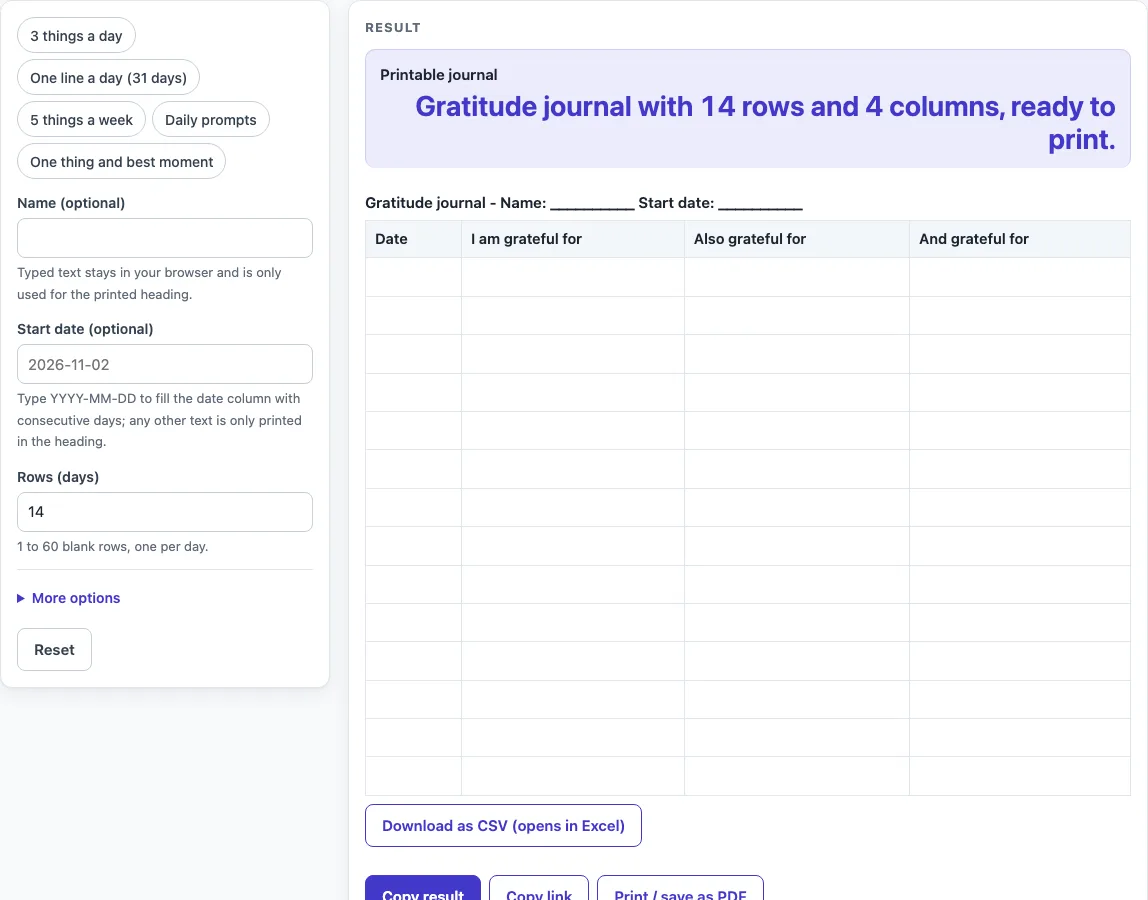
How to use the Gratitude Journal
- Type a name in Name (optional) if you want it printed in the heading.
- Type a start date in Start date (optional) as YYYY-MM-DD, for example 2026-11-02. The Date column then fills with consecutive calendar days. Any other text is printed in the heading only, the Date column stays blank and a warning appears.
- Set Rows (days) to a number from 1 to 60. The default is 14. Numbers above 60 cut the sheet to 60 and show a warning. Zero, negative numbers, text or an empty field give an error.
- Optionally click a preset button above the form: ‘3 things a day’, ‘One line a day (31 days)’, ‘5 things a week’, ‘Daily prompts’ or ‘One thing and best moment’.
- Open More options to switch columns on or off. Date and the first three gratitude columns are on by default. If more than 7 columns are on, a warning says the printed sheet will have little room to write. If none are on, the sheet is empty and a warning says so.
- Click Print, or click Download as CSV (opens in Excel).
Presets set the row count and columns in one click, and you can still change them afterwards. Print sends only the heading and the bordered table to the printer. Before you share the page link, remember that typed text can appear in the address after ?s=.
What do you write in a gratitude journal?
You write things you feel thankful for, in your own words. Anything you count as a good thing can go in, from a meal or a kind message to a quiet moment outside, because you decide what counts.
The main gratitude columns are labelled “I am grateful for”, “Also grateful for” and “And grateful for”. “Another thing” and “One more thing” are extra columns you can switch on. Write one short, specific item in each cell, such as “the bus came on time” or “a friend called back.” Short entries fit the printed boxes well.
If you want to write more than a list, switch on “Best moment of the day” for a single highlight. You can also switch on “Daily prompt (filled in)” and “My answer (blank)” and reply to each question by hand.
How many things should I list each day?
The tool does not set a number. The default sheet has three gratitude columns, so you have room for three items per row. The presets offer one line a day, three things a day, and ‘5 things a week’, which gives seven rows with five gratitude columns.
Pick a number that suits you and keep it the same across the pages. Switch columns off if you want less space to fill, or on if you want more, but keep an eye on the warning that appears above 7 columns, which means little room to write on the printed sheet.
How do the daily prompts work?
Switch on “Column: Daily prompt (filled in)” and each row is printed with a question of ours, in order: the first row gets prompt 1, the second row prompt 2, and so on. There are 30 prompts, and after the 30th they start again from the first, so a 60-row sheet uses each prompt twice. Write your reply in the “My answer” column, which stays empty for handwriting. The prompts are short questions about people, places and small things that went well, so there is no wrong answer to put down.
Worked examples
| Input | Result |
|---|---|
| 14 rows, 4 columns | 14 rows to fill in by hand |
| 31 rows, 2 columns | 31 rows to fill in by hand |
| 14 rows, 3 columns | 14 rows to fill in by hand |
| 7 rows, 6 columns | 7 rows to fill in by hand |
Calculated by the tool above; open it with the same values to see each step.
Frequently asked questions
What if I cannot think of anything to be grateful for?
Switch on the “Daily prompt (filled in)” column, or use the “Daily prompts” preset. Each row gets a question such as “What small thing went well today?” to start your thinking. You can also write something very small, like a warm drink or a clear sky. The sheet does not judge the entries.
Do I have to write every day?
No rule comes from the tool. The sheet has one row for each day, and any row you leave empty simply stays blank. The tool does not track or check your entries, so you can fill in the days that suit you.
Are the gratitude journal prompts fixed?
Yes. There are 30 prompts, and each row gets the next one in order. After the 30th, the list starts again from the first. You cannot type your own prompts or reshuffle them. If you want your own wording, leave the prompt column off and write your own questions on the printed sheet by hand.
Can I make a month of pages at once?
Yes. Set Rows (days) to 31, enter a start date as YYYY-MM-DD, and the Date column fills with consecutive days, including month ends. You can also use the ‘One line a day (31 days)’ preset. Then click Print to get the sheet on paper.
Can I print the sheets and use them at work or in class?
Yes. The sheets you make are free to print and use anywhere, including at work, in class, for a club, or to sell or give away. No credit is needed.
Related tools
- Sleep Log: use it when you want a printed table to record when you went to bed and got up.
- Food Diary Template: use it to log what you eat and drink, row by row, in a printable sheet.
- Reading Log: use it to keep a simple record of the books you read and when you finished them.
- Workout Log Book: use it to note your exercise sessions in one printable table.
- Weight Log: use it to keep a written record of your own weight in lb or kg.
- Daily Log: use it for a day-by-day record with date, time, activity and notes.