Fridge Temperature Log
Print a month of AM and PM readings for the refrigerator and freezer, or switch to dated rows from any start date.
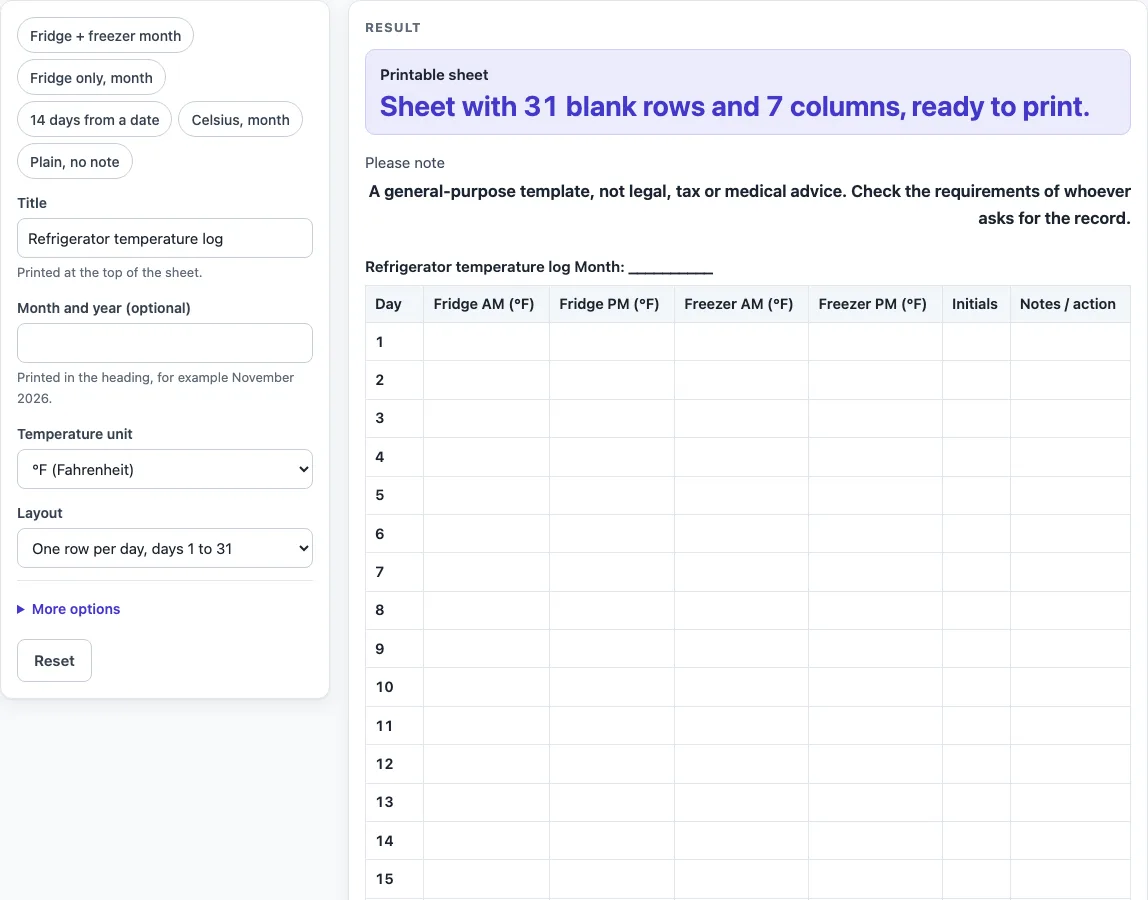
How to use the Fridge Temperature Log
- Type a title in “Title”. The default is “Refrigerator temperature log”. The text is printed at the top of the sheet, and anything longer than 80 characters is cut.
- In “Month and year (optional)”, type a value such as November 2026. It is printed in the heading. Leave it empty to print a blank line for the month.
- Choose a “Temperature unit”: “°F (Fahrenheit)” or “°C (Celsius)”.
- Choose a “Layout”: “One row per day, days 1 to 31” or “Dated rows from a start date”.
- If you chose dated rows, type a “Start date” as YYYY-MM-DD. Any other text leaves the date cells blank. Then set “Number of days” from 1 to 60. The default is 14.
- Under More options, switch “Include freezer columns”, “Initials column”, “Notes / action column” and “Print the USDA reference note” on or off.
- Check the “Printable sheet” shown below the tool.
- Click Print, or click “Download as CSV (opens in Excel)” to save fridge-temperature-log.csv.
Presets are quick starting points: “Fridge + freezer month”, “Fridge only, month”, “14 days from a date”, “Celsius, month” and “Plain, no note”. You can still change any setting after choosing one. Start from the preset closest to your appliances, then switch columns on or off until the sheet matches how often you check the temperature.
What belongs on a fridge temperature log?
A fridge temperature log is a record of the readings you take and when you took them. The tool gives you a row for each day and columns for fridge readings, with AM and PM columns as the default. Freezer columns are optional, so you can leave them out if you only record the fridge.
What does the USDA reference note say?
The optional reference note states the guidance from USDA food safety materials: keep the refrigerator at 40 °F or below. It also adds “Check your local rules.” Apart from the unit in the column headings, the note is the only place the tool prints a temperature figure. It is for reference only, and the tool does not set targets for your own readings.
Why are the readings left blank?
The fridge and freezer columns are blank boxes for you to write in. The tool does not calculate anything, and it does not mark any reading as high or low. This keeps the sheet a plain record. You decide what to write and what to do if a reading needs action, and the “Notes / action” column gives you space to write that down.
How do the month layout and the dated layout differ?
The month layout uses “Day” as the first column and numbers the rows 1 to 31. The “Start date” and “Number of days” fields are hidden in this layout. The dated layout uses “Date” as the first column. It fills the rows with real calendar dates, one per day, starting from the start date you type. It uses the “Number of days” value to set how many rows appear. If the start date is not typed as YYYY-MM-DD, the date cells stay blank and a warning says so, so you can write the dates by hand.
What do the presets change?
“Fridge + freezer month” is the default month sheet with 31 rows. “Fridge only, month” removes the freezer columns. “14 days from a date” switches to dated rows with 14 rows. “Celsius, month” changes the column headings to °C. “Plain, no note” switches off the reference note and the “Notes / action” column. With every optional column on, the default sheet has seven columns: Day, Fridge AM, Fridge PM, Freezer AM, Freezer PM, Initials and Notes / action.
Sources (checked 15 October 2026): fsis.usda.gov
Worked examples
| Input | Result |
|---|---|
| 31 rows | 31 table rows, 7 columns |
| 31 rows | 31 table rows, 4 columns |
| 14 rows | 14 table rows, 7 columns |
| 7 rows | 7 table rows, 6 columns |
Calculated by the tool above; open it with the same values to see each step.
Frequently asked questions
Is this fridge temperature log free to use?
Yes. It is free, and it runs in your browser. You do not need to sign up.
Does the tool save what I type?
No. Nothing is stored or uploaded, although text typed into the title or month fields can appear in the page link if you share it. When you are finished, print the sheet or download the CSV file, because the tool does not keep your entries for you.
Can I use Celsius instead of Fahrenheit?
Yes. Choose “°C (Celsius)” under “Temperature unit”, or use the “Celsius, month” preset. The column headings change to match, such as “Fridge AM (°C)”.
Can I leave out the freezer columns?
Yes. Under More options, switch off “Include freezer columns”. You can also use the “Fridge only, month” preset to start with the freezer columns already removed.
How many rows can I have?
The dated layout allows from 1 to 60 rows. If you type a larger number, the tool cuts it to 60 and shows a warning. Zero, negative numbers and text give an error.
Is this log a legal or compliance record?
It is a general-purpose template, not legal, tax or medical advice. Check the requirements of whoever asks for the record before you rely on it.
Related tools
- Temperature Log: use it when you need a general log of readings that is not specific to a fridge.
- Daily Log: use it to note what happened each day alongside other records.
- Restroom Cleaning Log: use it to record cleaning visits and their initials.
- Equipment Maintenance Log: use it to track checks and work on equipment over time.