Food Diary Template
Choose the columns and how many entries per day, then print a blank food diary or download it as a CSV file. It is a record for your own use.
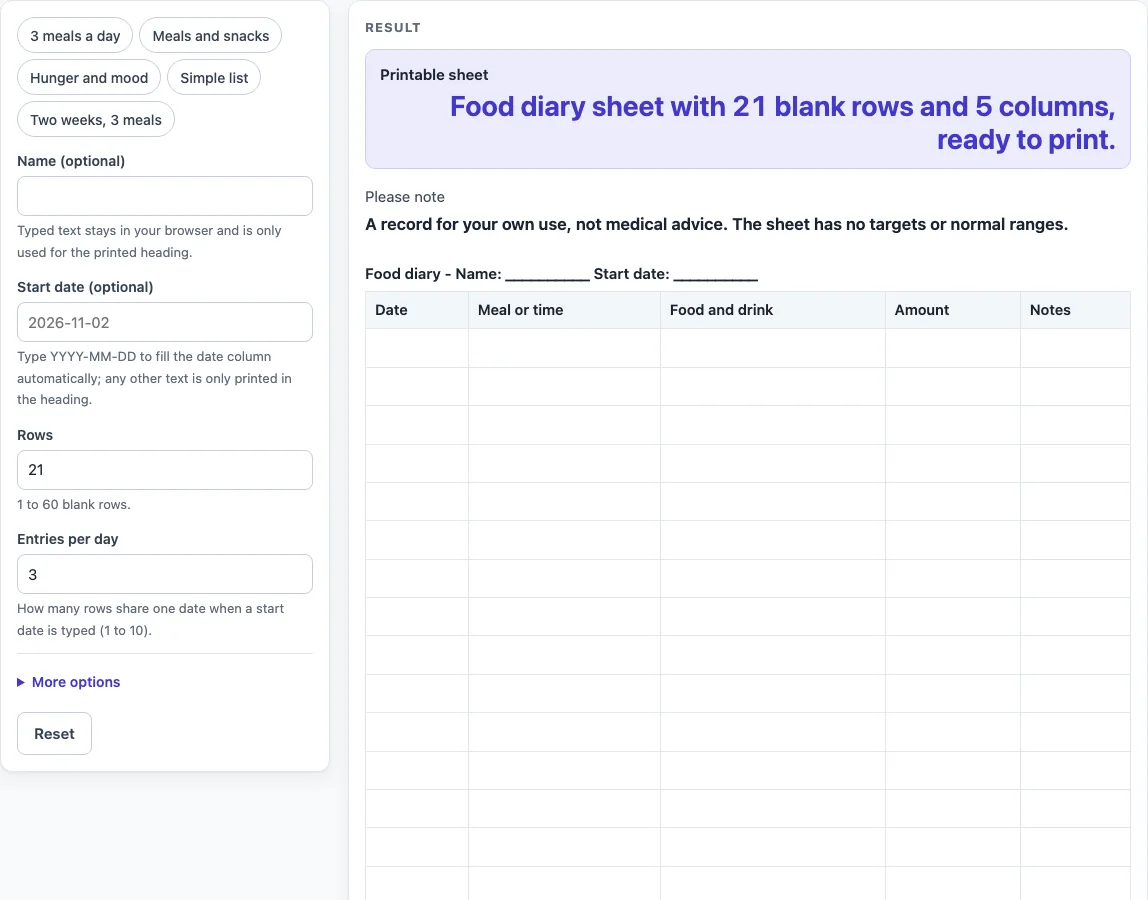
How to use the Food Diary Template
- Type your name in “Name (optional)” if you want it in the heading. Leave it blank for a sheet with no name.
- Type a start date in “Start date (optional)” as YYYY-MM-DD, for example 2026-11-02, to fill the date column with calendar dates. Any other text only appears in the heading, and a warning says the date column stays blank.
- Set “Rows” to a number from 1 to 60. The default is 21. Numbers above 60 are cut to 60 with a warning. Zero, a negative number, text or an empty field gives an error.
- Set “Entries per day” from 1 to 10 (default 3) so that several rows share one date. With a start date of 2026-11-02, 4 rows and 2 entries per day, the dates are 2026-11-02, 2026-11-02, 2026-11-03 and 2026-11-03.
- Pick a preset: “3 meals a day”, “Meals and snacks”, “Hunger and mood”, “Simple list” or “Two weeks, 3 meals”. Each one sets the rows, entries per day and columns.
- Switch columns on or off with the “Column: Date”, “Column: Meal or time”, “Column: Food and drink”, “Column: Amount”, “Column: Hunger before / after”, “Column: Mood” and “Column: Notes” controls under More options. More than 7 columns on gives a warning about little writing space. No columns on gives an empty sheet.
- Check the “Printable sheet” output. For the defaults it reads “Food diary sheet with 21 blank rows and 5 columns, ready to print.”
Press Print to print only the heading and the bordered table, or press “Download as CSV (opens in Excel)” to save the same table as food-diary-template.csv.
What is a food diary used for?
A food diary is a written record of what you eat and drink, often with the time and the amount. People keep one to see their own eating on paper. The record only shows what was written, so it works best when every entry is filled in the same way.
How does the date column work?
The date column is filled only when the start date is typed as YYYY-MM-DD, such as 2026-11-02. The sheet then counts forward one calendar day at a time, and it handles month ends, year ends and leap days. If the start date is any other text, that text is printed only in the heading and the date column stays blank. In that case you can write the dates in by hand.
Why do several rows share one date?
“Entries per day” lets several rows share one date, from 1 to 10 rows per day. Use 1 if you want one row for each day. Use a higher number if you record each meal and snack on its own line. With a start date of 2026-11-02, 4 rows and 2 entries per day, the dates are 2026-11-02, 2026-11-02, 2026-11-03 and 2026-11-03.
What do the columns record?
Each column is a space for one kind of detail. “Meal or time” holds when you ate, “Food and drink” holds what you had, and “Amount” holds how much. “Hunger before / after” and “Mood” are off by default, and “Notes” holds anything else you want to add. Fewer columns leave more room to write. With more than 7 columns on, the printed sheet has little writing space, so turn some off for a roomier sheet.
Why does the sheet contain no targets or ranges?
The sheet is a record, not a measure. It calculates nothing, sets no targets and shows no normal ranges, so it cannot tell you whether an entry is good or bad. The “Please note” output says the sheet is a record for your own use and not medical advice.
Worked examples
| Input | Result |
|---|---|
| 21 rows, 5 columns | 21 blank rows to fill in by hand |
| 35 rows, 5 columns | 35 blank rows to fill in by hand |
| 21 rows, 6 columns | 21 blank rows to fill in by hand |
| 30 rows, 3 columns | 30 blank rows to fill in by hand |
Calculated by the tool above; open it with the same values to see each step.
Frequently asked questions
Is the food diary template free to use?
Yes. It runs in your browser, is free and needs no sign-up. Nothing you type is stored or uploaded, so the sheet only exists on your screen until you print or download it.
Can I print the food diary template?
Yes. The Print button prints only the heading and the bordered table, on US Letter or A4 portrait paper. Check the preview of the sheet before you print so the number of rows and columns is the one you want.
Can I save the sheet to a spreadsheet?
Yes. Press “Download as CSV (opens in Excel)” to save the same table as a file named food-diary-template.csv. The file contains the table only, so you can type entries into it later.
How many days can one sheet cover?
Rows go from 1 to 60, so one sheet can hold up to 60 entries. The “Two weeks, 3 meals” preset uses 42 rows, which gives room for three meals a day over two weeks. Use “Entries per day” to change how many rows share each date.
Can I track hunger and mood too?
Yes. Use the “Hunger and mood” preset, which uses Date, Meal or time, Food and drink, Hunger before / after, Mood and Notes. You can also switch on those two columns yourself under More options. Keep in mind that adding columns reduces the writing space on the printed sheet.
Does the sheet tell me whether what I ate is healthy?
No. The sheet has no targets, ranges or advice, and its “Please note” output says it is not medical advice. Use it only to keep your own record.
Related tools
- Reading Log: use it to keep a record of the books you read and how far you got in each one.
- Sleep Log: use it to record when you went to bed and how you slept.
- Weight Log: use it to record weigh-ins in one place over time.
- Workout Log Book: use it to record your exercise sessions as they happen.