Expense Log
Choose the columns and number of rows you need, then print the blank expense log or download it as a CSV for a spreadsheet.
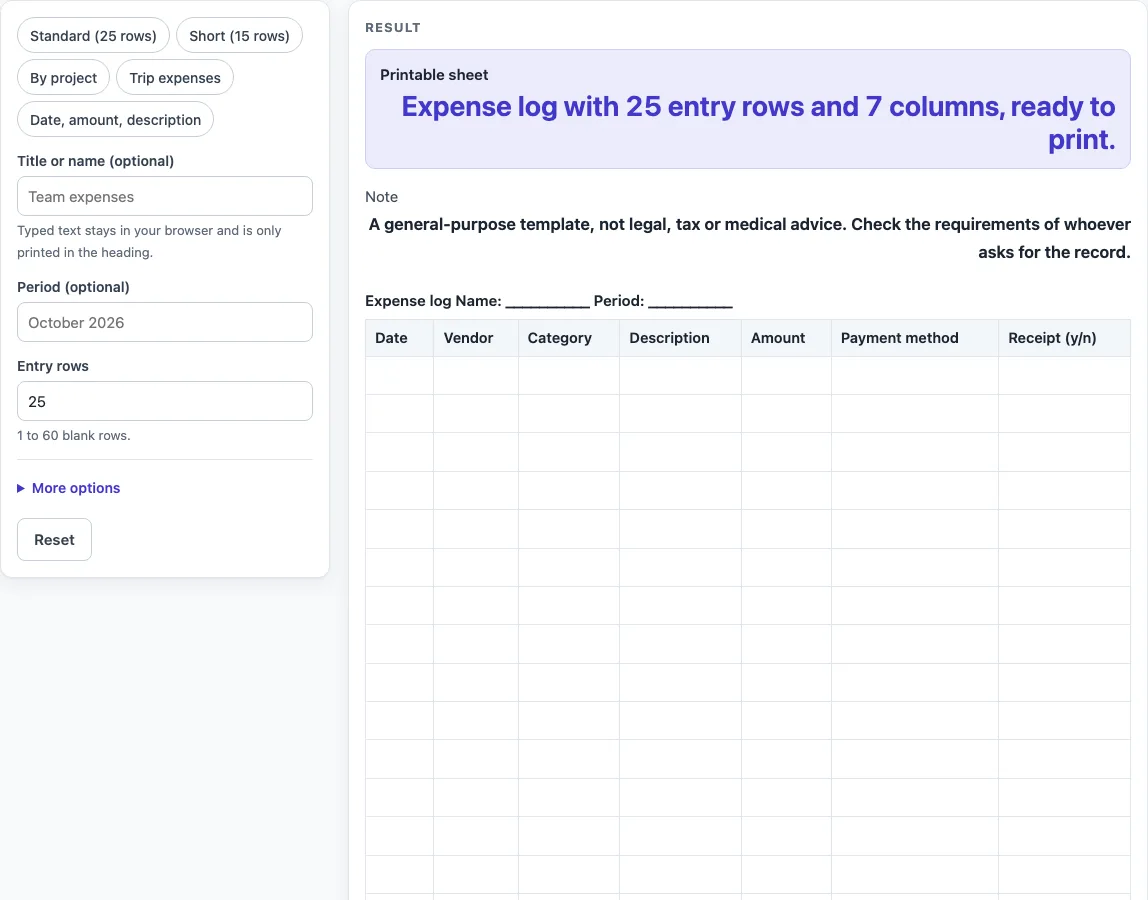
How to use the Expense Log
- Type a title or name in “Title or name (optional)”. It appears in the heading as “Expense log Name: …”.
- Type a period in “Period (optional)”, such as a month or a trip. It appears in the heading as “Period: …”.
- Set “Entry rows” to the number of lines you need. The default is 25. Enter a number from 1 to 60. Above 60 is cut to 60 with a warning, and 0 or text gives an error.
- Under More options, turn columns on or off: “Vendor column”, “Project column”, “Category column”, “Description column”, “Payment method column”, “Receipt (y/n) column”, and “Notes column”. “Project” and “Notes” start off. The others start on.
- Keep “Total row” on to add a total line at the bottom, or switch it off.
- Or click a preset chip to start from a ready layout: “Standard (25 rows)”, “Short (15 rows)”, “By project”, “Trip expenses”, or “Date, amount, description”.
- If you turn on more than 7 columns, a warning appears. Switch a column off or print in landscape.
- Click “Printable sheet” to print. Empty fields print as underscores, so you can write by hand.
- Click “Download as CSV (opens in Excel)” to get the table as a CSV file made in your browser.
You can still change the rows and columns after picking a preset.
What should each line in an expense log contain?
Each line should record one expense, so you can tell later what was paid, when, and to whom. The default layout uses seven columns: Date, Vendor, Category, Description, Amount, Payment method, and Receipt (y/n). Together they cover when the money was spent, who received it, what it was for, how much it was, and how it was paid. Project and Notes are two more columns that you can switch on.
Why do the Date and Amount columns always stay?
Date and Amount always stay on the sheet, and you cannot switch them off. Without a date, an entry cannot be placed in time, and without an amount, it does not record how much was spent. The other columns are optional, so you can remove any of them that you do not need.
How many rows does an expense log need?
The default is 25 entry rows, plus a Total row, which makes 26 rows in all. You can set “Entry rows” anywhere from 1 to 60. If you need more lines than that, use a second sheet for the rest of the period. Shorter sheets suit short periods, and the “Short (15 rows)” preset starts with 15 rows.
What does the Receipt (y/n) column record?
The Receipt (y/n) column lets you mark whether you have a receipt for an entry. You write the y or n yourself. The sheet does not check receipts or decide whether an entry is acceptable.
Does the expense log add up the amounts?
No. Nothing is calculated, so the Total row is a row labelled “Total” with empty cells for you to write the total in by hand. Check your figures before you write the total, since the sheet will not catch a mistake for you.
How do I keep a printed expense log readable?
A sheet with more than 7 columns can be hard to read on a portrait page. When you go past 7, the tool shows this warning: “This sheet has {n} columns; more than 7 can be hard to read on a portrait page. Switch off a column or print landscape.” You can switch off a column that you do not need, or print the sheet in landscape.
Note: A general-purpose template, not legal, tax or medical advice. Check the requirements of whoever asks for the record.
Worked examples
| Input | Result |
|---|---|
| 25 entry rows | 26 rows, 7 columns |
| 15 entry rows | 16 rows, 7 columns |
| 30 entry rows | 31 rows, 7 columns |
| 20 entry rows | 20 rows, 4 columns |
Calculated by the tool above; open it with the same values to see each step.
Frequently asked questions
Is this expense log free to use?
Yes. It is free, runs in your browser, and needs no sign-up. Nothing you enter is uploaded or stored.
Does the expense log calculate totals?
No. Nothing is calculated. Use the Total row to write the total yourself.
Can I use this expense log for taxes?
The sheet makes no tax claims and gives no tax advice. It is a general-purpose template. Check what the person or body asking for the record requires.
How many entries can one expense log hold?
The default is 25 entry rows. You can set “Entry rows” from 1 to 60. Values above 60 are cut to 60 with a warning.
Are my entries saved on the page?
No. Nothing is saved or uploaded, and the title and period you type are only printed in the heading. Print the “Printable sheet” or click “Download as CSV (opens in Excel)” to keep a copy.
Which columns can I switch off?
Under More options you can switch off Vendor, Category, Description, Payment method and Receipt (y/n), and switch on Project and Notes. Date and Amount always stay, so the shortest sheet has two columns.
Can I use this for small cash spending?
Yes, if you want to log small cash payments by hand. The Petty Cash Log page is set up for that kind of record.
Related tools
- Petty Cash Log: use it to record small cash payments from a fund.
- Daily Log: use it to write down what happened each day.
- Daily Report Template: use it to summarise a day’s work in one sheet.
- Equipment Maintenance Log: use it to record checks and repairs on equipment.
- Temperature Log: use it to write down temperature readings by hand.