Equipment Maintenance Log
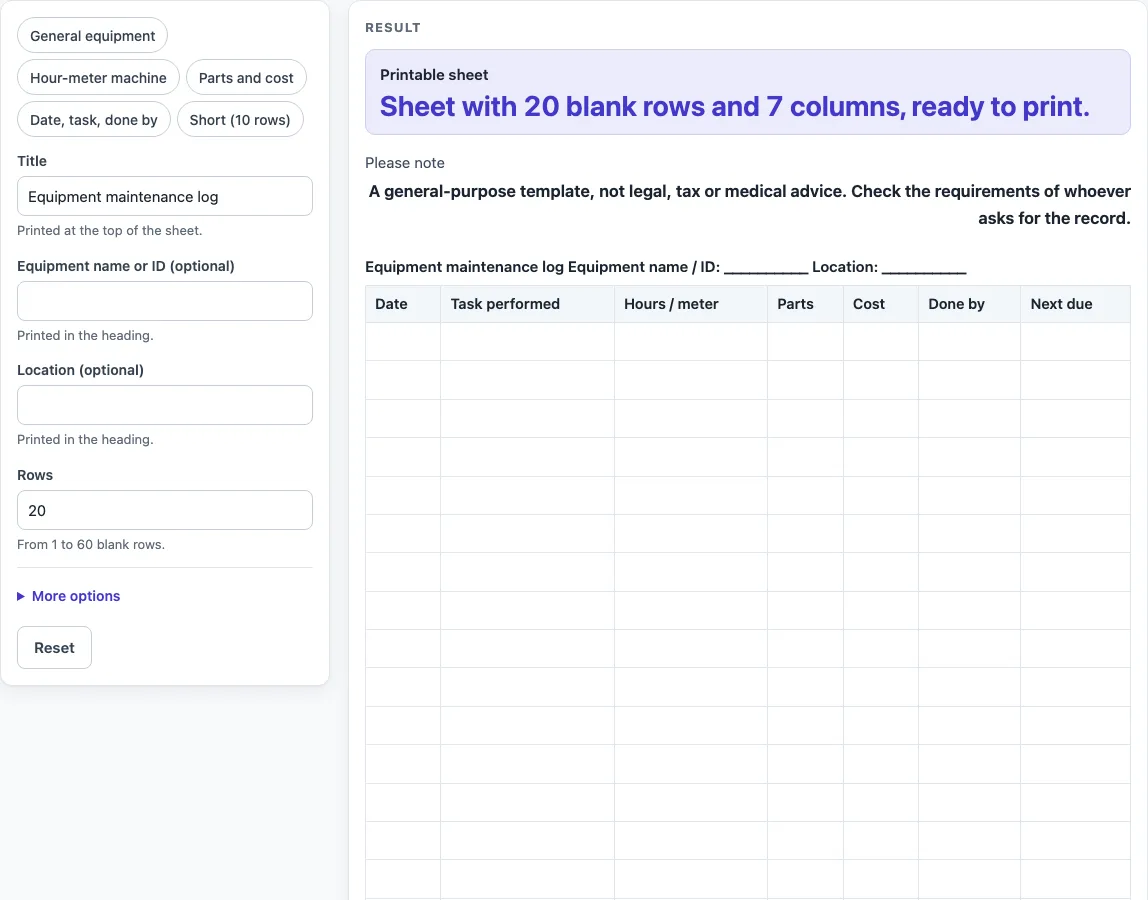
Type the equipment name or ID, choose the columns and rows, then print the maintenance log or download it as CSV (also fits a maintenance log template search).
How to use the Equipment Maintenance Log
- Type a name in “Title”. The default is “Equipment maintenance log”, and it prints at the top of the sheet.
- Enter the equipment name or ID in “Equipment name or ID (optional)” and the place it is kept in “Location (optional)”. Both print in the heading. Leave them empty if you want blank lines to write on.
- Set “Rows” to a number from 1 to 60. The default is 20. A larger number is cut to 60 with a warning. Zero, a negative number, or text gives an error.
- Open More options. Switch “Hours / meter column”, “Parts column”, “Cost column”, “Done by column” and “Next due column” on or off; all five are on by default.
- Switch on “Add a total row for cost” if you want an empty last row labelled Total. It appears only while the Cost column is on, and nothing is added up for you.
- Choose Print / save as PDF to print the sheet or save it as a PDF.
- Select “Download as CSV (opens in Excel)” below the table to save the same table as equipment-maintenance-log.csv.
You can also start from a preset: “General equipment”, “Hour-meter machine” (no Parts or Cost, 25 rows), “Parts and cost” (no Hours / meter, total row on), “Date, task, done by” (three columns) or “Short (10 rows)”. You can still change any control afterwards.
What is an equipment maintenance log for?
An equipment maintenance log is a running record of the work carried out on a piece of equipment. Each entry shows what was done, when it was done, and who did it, so anyone reading the log can see the history of that equipment at a glance.
A log is most useful when it is kept up to date at the time of the work. Writing an entry the same day is easier and more reliable than trying to remember tasks weeks later. The log also helps when someone new takes over the equipment and needs to understand what has already been done.
Which columns should a maintenance log include?
The Date and Task performed columns are the core of any equipment maintenance log, because they answer the question “what was done, and when?” They are always present on this sheet and cannot be switched off.
The other columns add detail. Hours / meter records the reading on the equipment at the time of the task. Parts lists any components used. Cost records what the work or parts cost. Done by names the person responsible. Next due leaves room for the date or meter reading when the task should happen again. You can switch any of these off if you do not need them.
Why record hours or meter readings?
Many machines show how long they have run, either as hours or as a reading on a meter. Recording that number next to each task shows how much use the equipment had when the work was done. Without it, a date alone may not tell you how hard the equipment has been working.
The Hours / meter column is on by default. Turn it off, as the “Date, task, done by” preset does, if your equipment has no meter and you only need dates.
How should you fill in the Next due column?
The Next due column is a blank cell. The sheet does not print any service intervals or manufacturer figures, so the decision about what goes in this column is yours. Write a date, a meter reading, or a short note that makes sense to you or your team.
Filling in the column at the time of each task makes the log easier to follow. Anyone who opens the sheet can then see what is planned next without searching through older entries.
Why use a maintenance log template instead of a blank page?
A maintenance log template gives every entry the same layout, so the records are easy to compare across months or across machines. The same columns in the same order also make it quicker to find a specific task.
A template also helps with consistency between people. When several people sign the same log, a shared structure means each person records the same details in the same place. This page’s layout is its own design, so you can adapt it to suit your equipment.
Worked examples
| Input | Result |
|---|---|
| 20 rows | 20 table rows, 7 columns |
| 25 rows | 26 table rows, 7 columns |
| 15 rows | 15 table rows, 4 columns |
| 10 rows | 11 table rows, 6 columns |
Calculated by the tool above; open it with the same values to see each step.
Frequently asked questions
Is this equipment maintenance log free to use?
Yes. The tool is free, it runs in your browser, and you do not need to sign up.
Does the tool save what I type?
No. Nothing is stored or uploaded. Keep your printed sheet or your downloaded CSV file safe, because the page does not keep a copy for you.
Can I use it for a vehicle or a machine with an hour meter?
Yes. Keep “Hours / meter column” on for equipment with a meter, or choose the “Hour-meter machine” preset. Use “General equipment” if you want all of the columns.
Does the sheet tell me when maintenance is due?
No. The Next due column is a blank cell for your own date or meter reading. The sheet prints no service intervals.
Can I use it as an official record?
This is a general-purpose template and not legal, tax, or medical advice. The page does not say what a contract, workplace rule or law requires you to record, so check the requirements of whoever asks for the record before you rely on it, and add any details they need.
Can I get the log as a spreadsheet file?
Yes. Select “Download as CSV (opens in Excel)” below the table to save the same table as equipment-maintenance-log.csv.
Related tools
- Construction Daily Report Template: use it to record the daily progress and conditions on a building site.
- Daily Log: use it for a simple running record of each day’s activity.
- Daily Report Template: use it when you need a day-by-day report with a standard layout.
- Expense Log: use it to list the money you spend, one line at a time.
- Fridge Temperature Log: use it to record fridge readings by date and time.
- Petty Cash Log: use it to track small cash payments and what they were for.
- Restroom Cleaning Log: use it to record when cleaning tasks were done and by whom.
- Temperature Log: use it to record temperature readings over time.