Driver's Daily Log
Pick the columns you need and the number of days, then print the drivers daily log or download it as CSV. It is a plain paper template, not an electronic logging device.
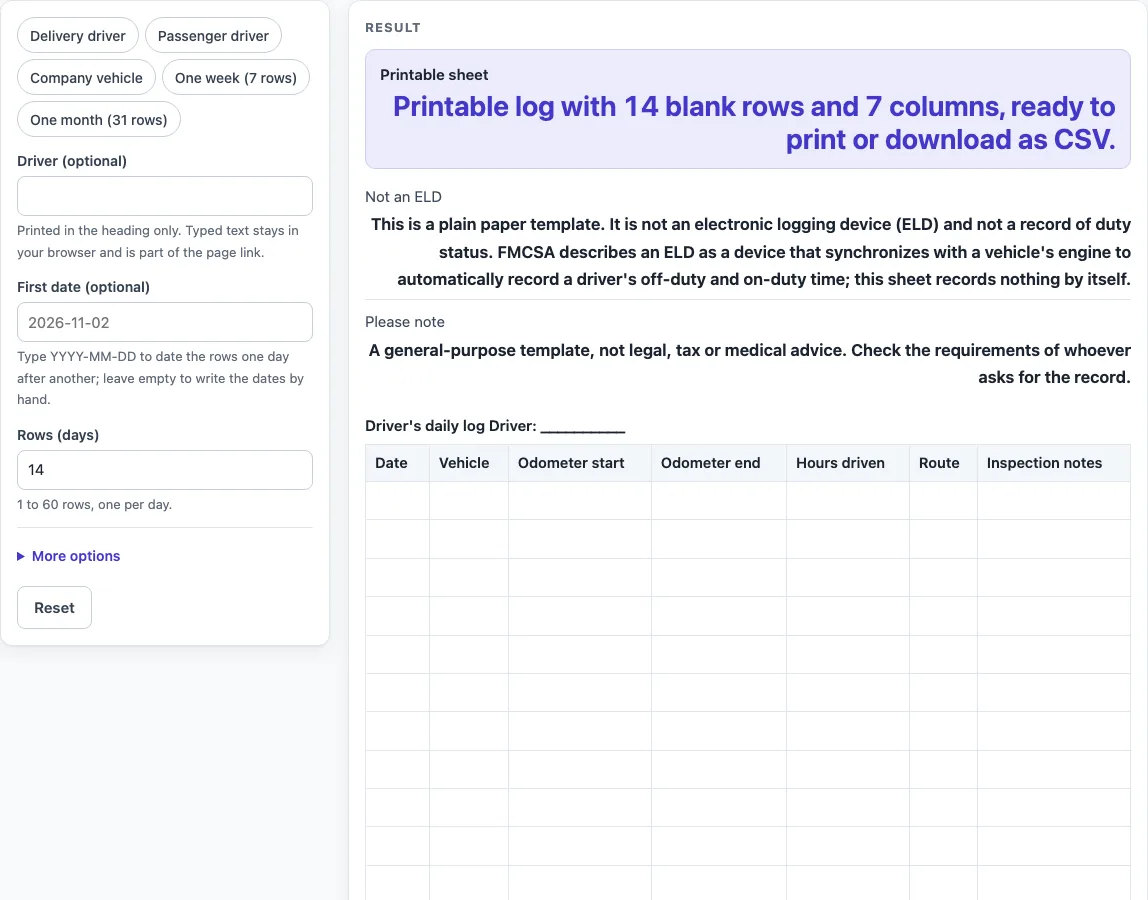
How to use the Driver’s daily log
- Type a name in “Driver (optional)”. It prints in the heading line only and stays in your browser.
- To fill the Date column automatically, type a first date as YYYY-MM-DD in “First date (optional)”. Leave it empty if you want to write the dates by hand.
- Set “Rows (days)” to a number from 1 to 60, one row per day.
- Under More options, switch the columns you need on or off: “Vehicle column”, “Odometer start column”, “Odometer end column”, “Hours driven column”, “Route column”, “Load / passengers column” and “Inspection notes column”. Load / passengers is off by default.
- If you want a starting layout, click a preset chip: “Delivery driver”, “Passenger driver”, “Company vehicle”, “One week (7 rows)” or “One month (31 rows)”. Each preset changes the columns or the number of rows, and you can still adjust them afterwards. For example, Delivery driver adds Load / passengers and drops Hours driven and Inspection notes, while Passenger driver adds Load / passengers and drops Vehicle.
- Check the result panel. “Printable sheet” gives the number of rows and columns. “Not an ELD” and “Please note” show the notices that apply to every sheet.
- Print the sheet from your browser, or select “Download as CSV (opens in Excel)” to save the same table.
What does a drivers daily log record?
A drivers daily log is a simple table where you write down one line for each day you work. The default columns cover the date, the vehicle, the odometer reading at the start and end of the day, the hours driven, the route and any inspection notes. You can add a load or passengers column when your work needs it. The sheet only holds what you write on it.
How do the date rules work?
If you type a first date in the YYYY-MM-DD form, the tool fills the Date column with consecutive calendar days. For example, 2026-11-02 for seven rows ends on 2026-11-08. The rules handle the ends of months, the ends of years and the leap day, so 2028-02-29 is treated as a real date. If the text is in another format, or the date does not exist (such as 2026-02-30), the Date column stays blank and a warning appears. The warning reads: “The start date is not in YYYY-MM-DD form, so the date column is left blank for you to fill in.”
Is a paper daily log the same as an ELD?
No. The “Not an ELD” note says that this is a plain paper template. It is not an electronic logging device and not a record of duty status. FMCSA describes an electronic logging device as a device that “synchronizes with a vehicle’s engine to automatically record a driver’s off-duty and on-duty time.” FMCSA also says the ELD records engine power status, vehicle motion status, miles driven, engine hours, and the identity of the driver, vehicle and motor carrier, and that the driver uses it to certify that the record is complete and accurate. This sheet records none of that by itself. Every entry is typed by you.
What do the row limits and warnings mean?
“Rows (days)” accepts whole numbers from 1 to 60. If you enter a number above 60, the sheet uses 60 and shows this warning: “Rows (days) is limited to 60, so the sheet uses 60.” If you enter 0, text or leave it empty, the tool shows this error: “Rows (days) must be at least 1.” A sheet with more than 60 days needs a second page, which you can make by printing the sheet again with the next set of dates.
Sources (checked 15 October 2026): eld.fmcsa.dot.gov
Worked examples
| Input | Result |
|---|---|
| 14 day rows | 7 columns |
| 7 day rows | 7 columns |
| 31 day rows | 6 columns |
| 10 day rows | 7 columns |
Calculated by the tool above; open it with the same values to see each step.
Frequently asked questions
Does this page say who has to keep a drivers daily log?
This page does not say which drivers must keep records or for how long. It is a general-purpose template and not legal, tax or medical advice. Check the requirements of whoever asks for the record.
Does the tool save what I type?
No. Everything runs in your browser, and nothing is saved or uploaded. The driver name you type stays in your browser but can become part of the page link, so leave it blank if you share the link.
Can I print the log?
Yes. The sheet is built to print. Use your browser’s print function after the sheet appears. The “Printable sheet” line in the result panel confirms the rows and columns.
Does the tool calculate hours or miles?
No. Nothing is calculated. The “Hours driven” and “Odometer” columns are blank for you to fill in, and the tool does not add up totals.
What does “Not an ELD” mean?
It means this sheet is a plain paper template. It is not an electronic logging device and not a record of duty status. The sheet records nothing on its own.
Can I download the same table?
Yes. Select “Download as CSV (opens in Excel)” to save the same table as a CSV file.
Can I use a preset and change it later?
Yes. Each preset is a starting point. After you click “Delivery driver”, “Passenger driver”, “Company vehicle”, “One week (7 rows)” or “One month (31 rows)”, you can still switch columns on or off and change “Rows (days)”.
Related tools
- Car Maintenance Log: Use it to note service and repair work for one vehicle.
- Fuel Log: Use it to record fill-ups over time.
- IRS Mileage Log Template: Use it when you want a mileage log laid out for tax-related trip records.
- Mileage Log: Use it to track the distance of each trip in a simple table.
- Trip Log: Use it to record the start, end and purpose of individual trips.