Daycare Sign In Sheet
Choose drop-off, pick-up, signature and authorized pick-up columns, set the rows, then print the blank daycare sign in sheet or download it as a CSV.
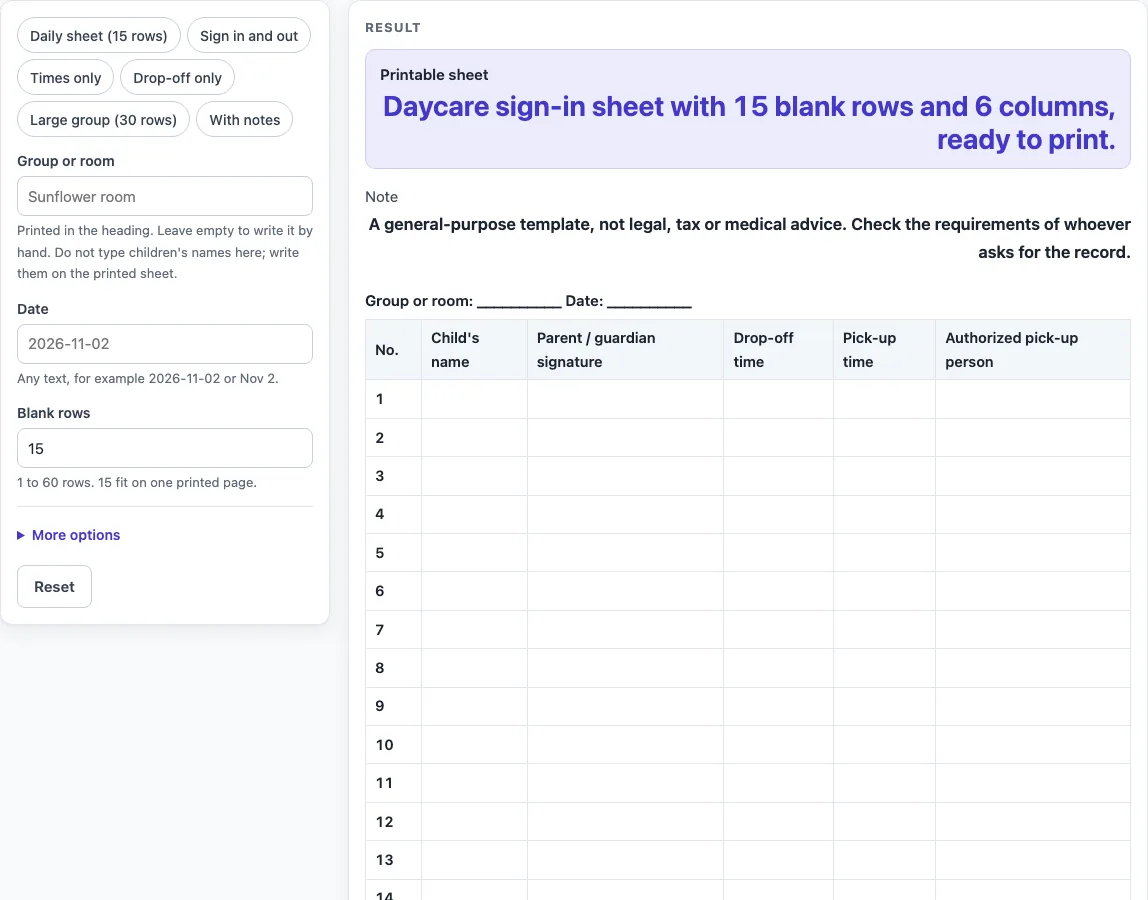
How to use the Daycare Sign In Sheet
- Type the name into the “Group or room” field. If you leave it empty, the heading prints a line of underscores instead.
- Type the date into the “Date” field. An empty date also prints as underscores.
- Set “Blank rows” to the number of lines you need, from 1 to 60. The default is 15.
- Pick a preset if one fits: “Daily sheet (15 rows)”, “Sign in and out”, “Times only”, “Drop-off only”, “Large group (30 rows)” or “With notes”. A preset is a starting point, so you can still change its settings.
- Open “More options” to switch columns on or off. “Child’s name” is always on. The others are No., Parent / guardian signature, Drop-off time, Pick-up time, Pick-up signature, Authorized pick-up person and Notes.
- Keep to seven columns or fewer. With more than seven, the tool warns you that the columns print small. Above 60 rows, the count is cut to 60 with a warning. Zero, a negative number or text gives an error.
- Print the page. The print view shows only the heading and the bordered table, in black and white, on US Letter or A4 portrait.
- Or click “Download as CSV”. The file holds the heading line, the column names and the blank rows, and it opens in a spreadsheet. It is made in your browser.
How many rows does a daycare sign in sheet need?
Set the number of blank rows to the most children you expect to sign in on one day. The default is 15 rows, which matches the “Daily sheet (15 rows)” preset. For a bigger group, the “Large group (30 rows)” preset gives 30 rows, and you can type any number from 1 to 60 yourself. The tool cuts anything above 60 down to 60 and warns you, so plan for a larger group by printing a second sheet rather than typing a higher number.
Which columns belong on a daycare sign in sheet?
The “Child’s name” column is always on, because each row needs a name to be useful. The default sheet also includes No. for row numbers, Parent / guardian signature, Drop-off time, Pick-up time and Authorized pick-up person. Pick-up signature and Notes are off by default. Turn on Pick-up signature when you want a separate line for the person collecting the child. Turn on Notes when you want space for short remarks. Each extra column makes the table narrower, so only switch on the ones you will fill in. The tool warns that the print will be small only when more than seven columns are on, which happens when you switch every column on (eight).
How do the presets change the columns?
The presets change the row count or switch columns on and off. “Sign in and out” turns on Pick-up signature and turns off No. “Times only” keeps No., Child’s name, Drop-off time and Pick-up time. “Drop-off only” keeps No., Child’s name, Parent / guardian signature and Drop-off time. “With notes” turns off No. and turns on Notes. You can still change any switch after choosing a preset.
Why are the children’s names written by hand?
The tool is built to make a blank sheet, not to hold personal details. The page has no field for names, and it stores nothing, so every cell except the row numbers is empty and ready for handwriting. This keeps the printed sheet and the downloaded CSV free of names until someone writes them in. The layout and column choices are a general design, and the page makes no claim about child safety, licensing or record-keeping rules. Check the requirements of whoever asks for the record before you use the sheet.
Worked examples
| Input | Result |
|---|---|
| 15 rows | 15 rows, 6 columns |
| 15 rows | 15 rows, 6 columns |
| 30 rows | 30 rows, 6 columns |
| 15 rows | 15 rows, 4 columns |
Calculated by the tool above; open it with the same values to see each step.
Frequently asked questions
Does the daycare sign in sheet store children’s names?
No. The tool has no field for names and stores nothing. Names are written by hand on the printed sheet, or typed into your own spreadsheet after you download the CSV.
Can I use a daycare sign in sheet as an official record?
The sheet is a general-purpose template and is not legal, tax or medical advice. The tool makes no claim about licensing or record-keeping rules, so check the requirements of whoever asks for the record.
Why does my sheet show a warning about small print?
More than seven columns trigger a warning that they will print small. Open “More options” and switch off the columns you do not need to get down to seven or fewer.
What happens if I enter 0 or 100 rows?
Zero, a negative number or text gives an error. Any number above 60 is cut to 60 and you see a warning, so the sheet will have 60 rows at most.
Can I edit the sheet in a spreadsheet?
Yes. Click “Download as CSV” to save the heading line, the column names and the blank rows as a .csv file. It opens in a spreadsheet and is made in your browser.
Do I need to sign up or pay to use it?
No. The tool is free, requires no sign-up, and runs entirely in your browser, so nothing you enter is saved or uploaded. Text typed in the group or room and date fields can appear in the page link if you share it, so keep names out of those fields.
Related tools
- Sign In Sheet: Use this for a general sign-in list when people are not children being dropped off or collected.
- Sign In and Out Sheet: Use this when you want a single sheet that tracks arrivals and departures for the same people.
- Open House Sign In Sheet: Use this for guests at an open house or event where you want a list of attendees.
- Visitor Log: Use this to keep a running record of visitors to a building or office.