Daily Log
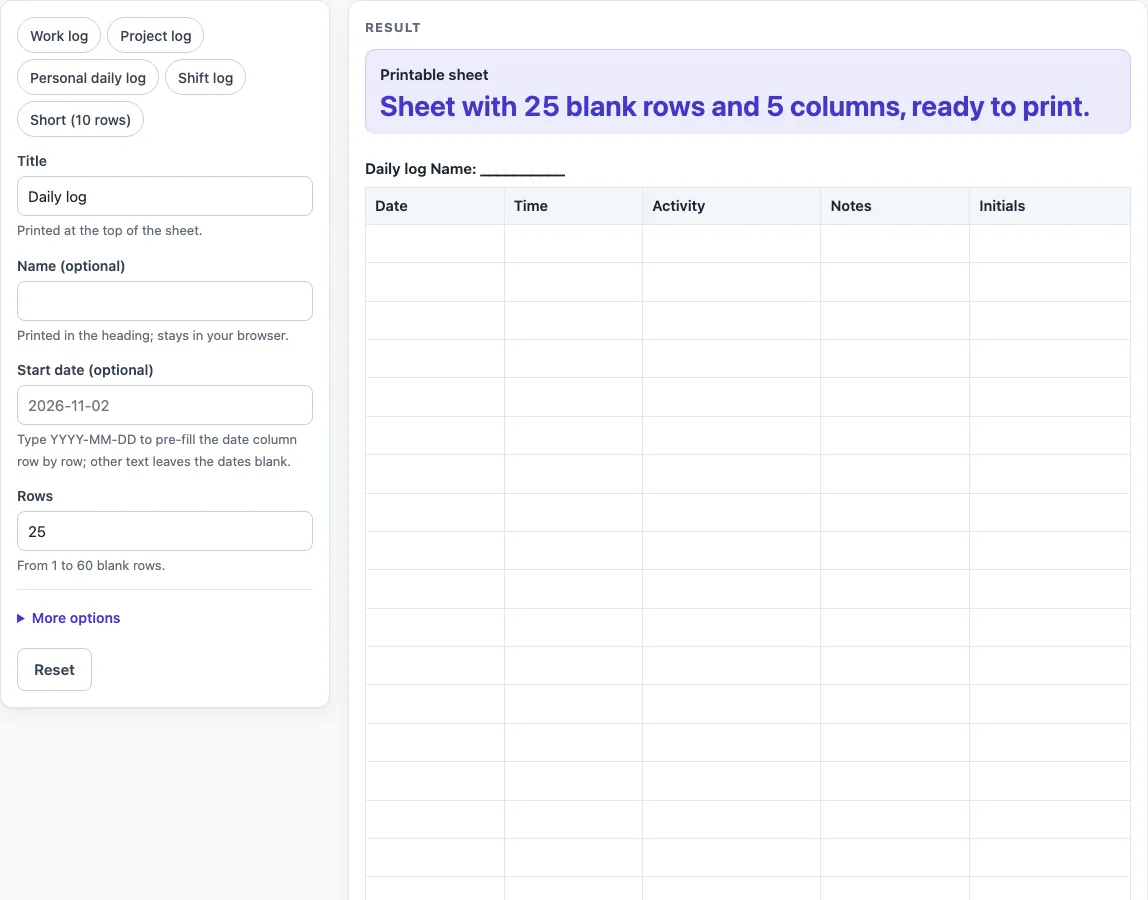
Choose the title, the columns and the number of rows, then print the daily log or download it as a CSV file for a spreadsheet.
A daily log is a blank, printable table that you customise in your browser, then print, save as PDF, or download as a CSV file. This free tool runs entirely in your browser, with no sign-up, and nothing you enter is stored or uploaded.
You set a title, an optional name and start date, and the number of rows. You can also choose which extra columns to include. Every daily log always has a Date column and an Activity column, and you can add a time, a done tick, notes, or initials as needed.
Use it to keep a personal diary of tasks, a simple work record, or a sheet that people fill in by hand. Presets are available if you want a starting layout for a work log, project log, shift log, or personal log.
How to use the Daily Log
- Type a title in “Title”. The default is “Daily log”, and it is printed at the top of the sheet.
- Optionally, type your name in “Name (optional)”. It appears in the heading and stays in your browser.
- Optionally, type a start date in “Start date (optional)” as YYYY-MM-DD. The date column fills in row by row. Other text leaves the dates blank.
- Set “Rows” to a number from 1 to 60. The default is 25. Larger numbers are cut to 60 with a warning, and zero, negative numbers or text give an error.
- Open More options. Switch “Time column”, “Done tick column”, “Notes column” and “Initials column” on or off. Time, Notes and Initials start on, and Done starts off.
- If you want a starting point, choose a preset: “Work log”, “Project log”, “Personal daily log”, “Shift log” or “Short (10 rows)”. A preset fills in the title, rows and columns (“Short (10 rows)” changes only the rows), and you can still change them.
- When the sheet is ready, choose “Printable sheet” and use Print / save as PDF to print it.
- To get the table as a spreadsheet file, select “Download as CSV (opens in Excel)” below the table.
Empty heading fields print as a line of underscores, so you can write in a name by hand. Typed text longer than 80 characters is cut short, so keep titles brief.
What is a daily log?
A daily log is a dated record of what happened each day, with one row for each entry. Its core is two columns, a Date and an Activity, which is why this tool always includes them.
A log only works if its structure stays the same from row to row. Each row holds one event, the date shows when it happened, and new entries go at the bottom of the sheet. Extra columns add detail, but they do not change that basic pattern.
What do the columns hold?
Date shows the day of an entry. If you type a start date, the first row gets that date and each later row gets the next day, so a sheet of 31 rows covers 31 consecutive days. Activity is the line where you write what was done. Time lets you note when it happened, and Done gives a box to tick when a task is finished. Notes holds extra detail and Initials shows who made the entry. All cells are blank until you write in them by hand, and the sheet prints the heading with a line of underscores after “Name” if you leave the name empty.
How should you set up a daily log?
Start by deciding what each row needs to answer, then switch on only the columns you need. Time helps when the order of entries within a day matters. Done suits a task list you tick off, Notes gives room for detail, and Initials shows who made an entry. Fewer columns leave more space for each one on paper, and the sheet shows a warning if more than 8 columns are on, though the daily log has at most six. Start with the default five columns and remove the ones you do not use.
Keep the wording of entries consistent so rows are easy to scan later. Choose the number of rows to match the period you are recording. For example, a month needs around 31 rows, and the presets offer 10, 20, 25 and 31 rows.
A log holds only what you write in it. If you use it for sleep, food, workouts, weight or fridge temperatures, it is a record only. It does not set targets, show normal ranges, or give advice. The sheet also does not check your entries or give legal, tax, medical or HR advice.
Worked examples
| Input | Result |
|---|---|
| 25 rows | 25 table rows, 5 columns |
| 14 rows | 14 table rows, 5 columns |
| 15 rows | 15 table rows, 4 columns |
| 10 rows | 10 table rows, 3 columns |
Calculated by the tool above; open it with the same values to see each step.
Frequently asked questions
Is the daily log free to use?
Yes. It runs in your browser, has no sign-up, and nothing you enter is stored or uploaded.
Can I save my daily log as a spreadsheet file?
Yes. Select “Download as CSV (opens in Excel)” below the table to save a file named daily-log.csv. The file contains the same table that appears on the sheet.
How many rows can I add?
Enter a whole number from 1 to 60 in “Rows”. Larger numbers are cut to 60 with a warning. Zero, negative numbers and text give an error.
What format should the start date use?
Type the start date as YYYY-MM-DD, for example 2025-03-01. The date column then fills in row by row. If you type another form, the date cells stay blank so you can fill them in.
Can I leave out the Time or Notes columns?
Yes. Time, Done, Notes and Initials can each be switched on or off under More options. The Date and Activity columns always stay on the sheet.
Does the daily log give advice or check my entries?
No. It is a general blank template for you to fill in. It does not check what you write, set targets, or give legal, tax, medical or HR advice.
Related tools
- Construction Daily Report Template: use it when a building site needs a daily written record of work.
- Daily Report Template: use it for a general end-of-day report on work done.
- Equipment Maintenance Log: use it to record maintenance carried out on equipment.
- Expense Log: use it to list spending as it happens.
- Fridge Temperature Log: use it to record fridge temperature readings, with no targets set.
- Petty Cash Log: use it to track small cash payments and balances.
- Restroom Cleaning Log: use it to record when restrooms were cleaned.
- Temperature Log: use it to record temperature readings over time, with no targets set.