College Dorm Checklist
Choose the sections you need, add a Qty column and blank lines for your own items, then print the college dorm checklist or download it as a CSV file.
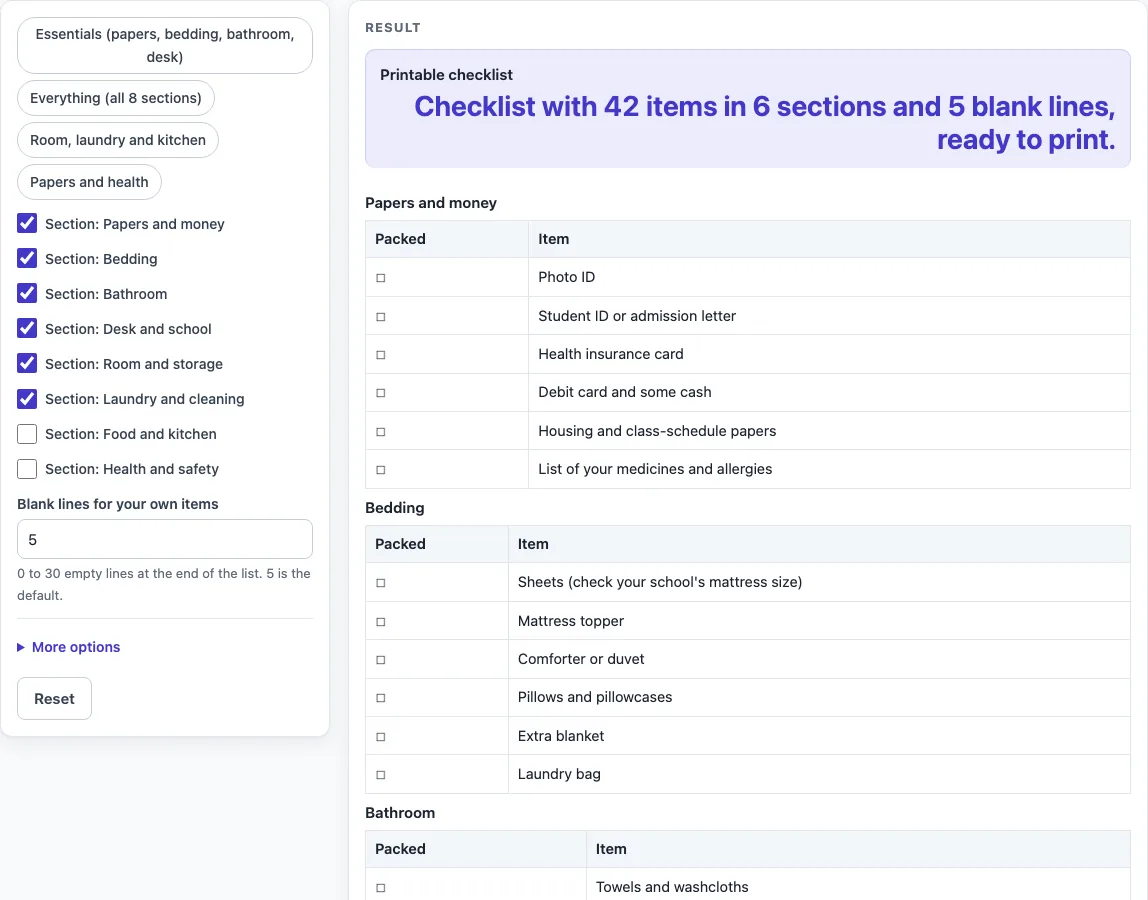
How to use the College Dorm Checklist
- Choose a preset or set the sections yourself. The preset buttons are “Essentials (papers, bedding, bathroom, desk)”, “Everything (all 8 sections)”, “Room, laundry and kitchen” and “Papers and health”. A preset only sets which sections are on, so you can change anything after clicking it.
- Switch sections on or off. Each section has its own switch labelled “Section:
”. Switching a section on adds its whole table, and switching it off removes it. “Food and kitchen” and “Health and safety” start off. - Set the blank lines. In “Blank lines for your own items”, enter a number from 0 to 30 (the default is 5). Enter 0 to remove the “Your own items” table.
- Open More options if you want extra columns. Tick “Qty column” or “Notes column” to add empty cells for writing in by hand.
- Print or save. The tool shows no totals, so check the sheet by eye before you leave home. Press Print to print the sheet, or press “Download as CSV (opens in Excel)” to save the same tables as a .csv file.
Your settings and typed text can appear in the page link (the address after ?s=). Remove any private details from the form before you share the link.
What should be on a college dorm checklist?
A useful college dorm checklist covers what you need to move in, sleep, study, wash, and stay healthy, grouped by where you use each item. The tool’s ready-made list follows that idea. It has eight sections, and the default sheet uses six of them, with 42 items and 5 blank lines.
Grouping by area makes it easier to pack and to shop. You can check the papers and money section before you leave home, then tackle the room and storage section once you see the space. Turning a section off removes its table completely, so you only print what applies to you. With every section on, the sheet has 8 sections and 54 items.
Some items are for you alone, and no list can predict them. The blank lines at the end give you space for those, and you can set anywhere from 0 to 30 of them.
What do I need for my dorm bed and bathroom?
The Bedding and Bathroom sections are on by default, so they appear on most sheets. Bedding covers what you need to make your bed comfortable and usable from the first night. Bathroom covers the everyday items you will use for washing and getting ready, whether your washroom is shared or private.
When you use the list, look at each section as a set of tasks. Ask whether you can use your bed tonight with what you have packed, and whether you can get through a morning without running out of something. Items you still need after that check can go on your own lines at the bottom of the sheet.
Worked examples
| Input | Result |
|---|---|
| 6 sections | 42 items and 5 blank lines |
| 4 sections | 27 items and 5 blank lines |
| 8 sections | 54 items and 5 blank lines |
| 3 sections | 21 items and 5 blank lines |
Calculated by the tool above; open it with the same values to see each step.
Frequently asked questions
Can I print only some sections?
Yes. Switch off the sections you do not need, and their tables are removed from the sheet. Then press Print, and only the sections that are still on will appear on the printed page.
Can I add a Qty column for each item?
Yes. Open More options and tick “Qty column”. Each item then gets an empty Qty cell for you to write in. The tool does not count or total anything, so you enter the numbers yourself.
Which items depend on my school’s rules?
Items that depend on your school are marked in the item text with “(check your school’s rules)” or “(check your school’s mattress size)”. The tool does not know any school’s rules, so check with your school before buying those items.
Why does the tool show an error that the checklist is empty?
This happens when every section is switched off and the blank lines are set to 0. Switch on at least one section or enter a number of blank lines to fix it.
Is my checklist saved or uploaded?
Nothing you type is stored or uploaded. The page runs in your browser, is free, and needs no sign-up. If you want to keep your list, print it or download the CSV file.
Related tools
- Daily Log: Printable daily log with date, time, activity, notes and initials.
- Reading Log: Printable reading log with title, author, pages or minutes and notes.
- Sleep Log: Printable sleep log with bedtime, wake time, naps and notes.
- Sign Up Sheet Template: Printable sign up sheet for volunteers, potlucks and time slots.