Board Meeting Agenda Template
Choose a 30, 60 or 90 minute meeting, or a committee meeting, and get an agenda in the usual order with suggested minutes you can overwrite. Print it or download it as CSV.
How to use the board meeting agenda template
- Type the “Organization or board name (optional)” and the “Meeting date (optional)” if you want them on the sheet. Both can stay empty.
- Set “Meeting” to match your meeting. It starts on board.
- Choose a “Meeting length (minutes)” of 30, 60 or 90. Any other value gives the error “Choose a meeting length of 30, 60 or 90 minutes.”
- Set “Extra blank agenda rows” to a whole number from 0 to 20. A larger number is cut to 20 with a warning. Text or a negative number gives an error.
- Keep “Time, place and chair block”, “Minutes column and total”, “Lead column” and “Unfinished business item” on, or switch them off. These checkboxes sit under “More options”.
- Turn on “Public comment item” or “Executive session item” under “More options” if your meeting includes them. Both start off.
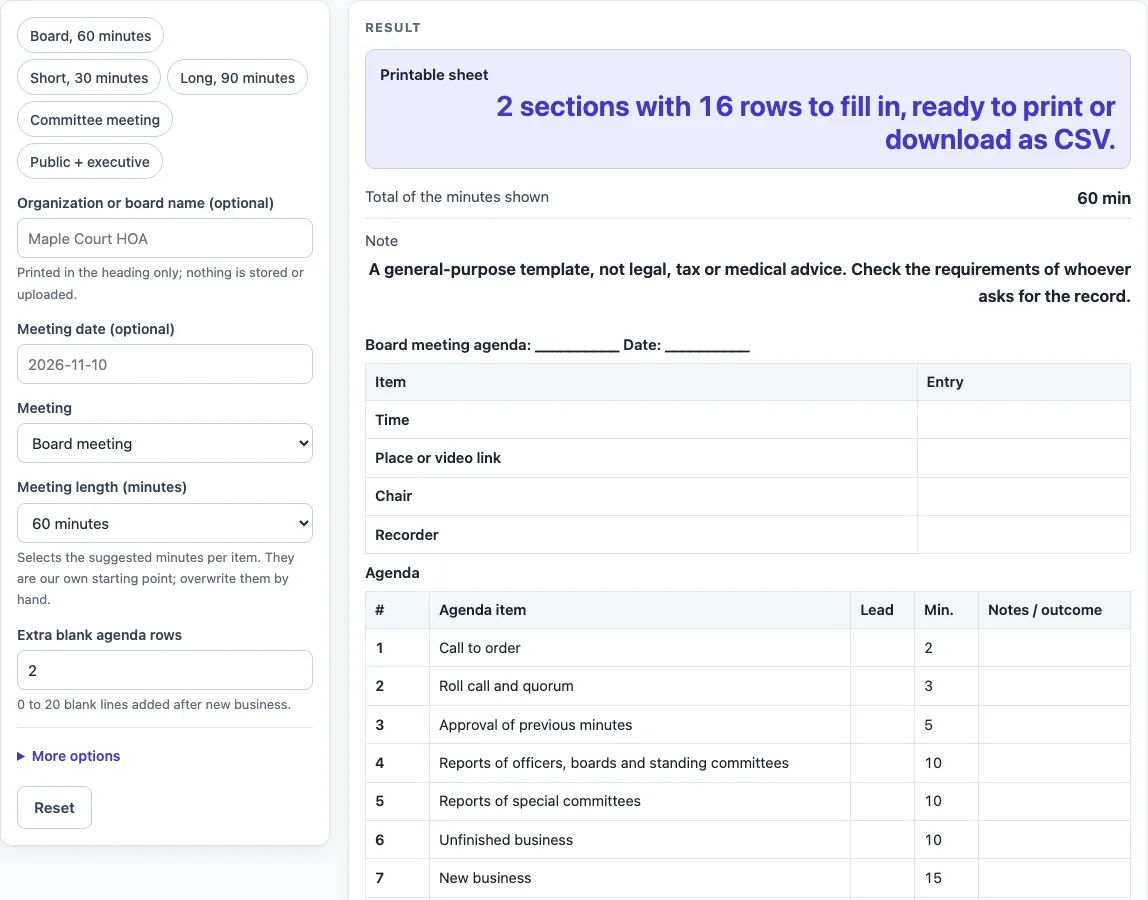
- Check the “Printable sheet” output. Its line reads “2 sections with 16 rows to fill in, ready to print or download as CSV.”
- Check “Total of the minutes shown”. It adds only the minutes on the sheet.
- Press the Print button for a black-and-white copy, or select “Download as CSV (opens in Excel)” to get every section in one file.
For a quick start, the presets are “Board, 60 minutes”, “Short, 30 minutes”, “Long, 90 minutes”, “Committee meeting” and “Public + executive”. Each one fills the controls for you, and you can change them afterwards.
What goes on a board meeting agenda?
A board meeting agenda lists the items in the order the meeting will take them up, with a time for each one. This template uses one common order, and the middle items follow the order of business in Robert’s Rules of Order Newly Revised, as quoted on the Wikipedia agenda page.
The default agenda runs in this order: Call to order, Roll call and quorum, Approval of previous minutes, Reports of officers, boards and standing committees, Reports of special committees, Unfinished business, New business, two blank “Other item” lines, Announcements and Adjournment. The “Unfinished business item” is on by default, so the unfinished business line appears unless you switch it off.
Some items are not part of that order of business. Call to order, Roll call and quorum, Announcements and Adjournment are common items added in this layout. Public comment and executive session are optional items that you can add with “Public comment item” and “Executive session item”. The page does not claim that any one source lists these items, and guides differ on the exact list. Adjust the order to match your own rules.
How should you divide the minutes in a board meeting agenda?
Each agenda item gets a suggested number of minutes, and the total row adds them up. In the default 60-minute sheet, the items add to 60: Call to order 2, Roll call and quorum 3, Approval of previous minutes 5, Reports of officers, boards and standing committees 10, Reports of special committees 10, Unfinished business 10, New business 15, Announcements 3 and Adjournment 2. The total row shows 60 minutes.
The minutes per item are a starting point of this template, not a standard. The total row counts only the minutes shown on the sheet. Optional items add their minutes on top of the meeting length. For example, the “Public + executive” preset uses a 90-minute length and totals 113 minutes, which is more than 90. When that happens, reduce the minutes on the printed sheet or in your CSV file so the total fits your meeting.
The “Committee meeting” preset gives 15 rows and 50 minutes. Start there if your group meets as a committee rather than a full board.
Sources (checked 15 October 2026): en.wikipedia.org
Worked examples
| Input | Result |
|---|---|
| Board meeting, 60 minutes | 11 agenda rows, 60 minutes |
| Board meeting, 90 minutes | 13 agenda rows, 113 minutes |
| Committee meeting, 30 minutes | 8 agenda rows, 26 minutes |
| Board meeting, 60 minutes | 29 agenda rows, - minutes |
Calculated by the tool above; open it with the same values to see each step.
Frequently asked questions
Is this board meeting agenda template a legal requirement?
No. It is a general-purpose template, not legal, tax or medical advice. Check what the person or group asking for the record requires.
Can I change the order of items?
Yes. The order and minutes are a starting point, and you can overwrite any time shown. Use the blank rows set by “Extra blank agenda rows” for items that are not in the list.
Is my agenda saved or sent anywhere?
No. Everything runs in your browser. Nothing you type is stored or uploaded, and no sign-up is needed. If you share the page link, typed text may be part of that link.
Why does my total go over the meeting length?
Optional items add their minutes on top of the meeting length. The “Public + executive” preset with a 90-minute length totals 113 minutes. Lower the minutes on the sheet to match your time.
Why did my extra rows drop to 20?
“Extra blank agenda rows” accepts whole numbers from 0 to 20. A larger number is cut to 20, and the warning reads “Extra blank agenda rows is limited to 20, so the sheet uses 20.” Text or a negative number gives an error instead.
How do I start with a committee meeting agenda?
Choose the “Committee meeting” preset. It gives 2 sections, 15 rows and 50 minutes. Then change the length, rows or optional items as needed.
Related tools
- Meeting Agenda Template for Excel: use this when you want an agenda layout for a general team meeting.
- Nonprofit Board Meeting Agenda Template: use this when your board belongs to a nonprofit and you want a related agenda layout.
- Meeting Minutes Template: use this to record what was discussed and decided after the meeting.
- Nonprofit Board Meeting Minutes Template: use this to write up minutes for a nonprofit board meeting.
- One-on-One Meeting Agenda Template: use this to plan a short meeting between two people.
- Weekly Status Report Template: use this to summarise progress for a team each week.
- Incident Report Template: use this to record a single event that needs a written account.
- Call Log Template: use this to keep a simple record of calls made or received.