
Baby Registry Checklist
Switch on the sections you want, add a Qty or Notes column and blank lines for your own items, then print the baby registry checklist or download it as a CSV file.
Baby Registry Checklist is a free tool that builds a printable baby registry checklist from ready-made sections of common baby items. It runs in your browser and needs no sign-up. You choose which sections to include, add your own blank lines, then print the sheet or save it as a CSV file.
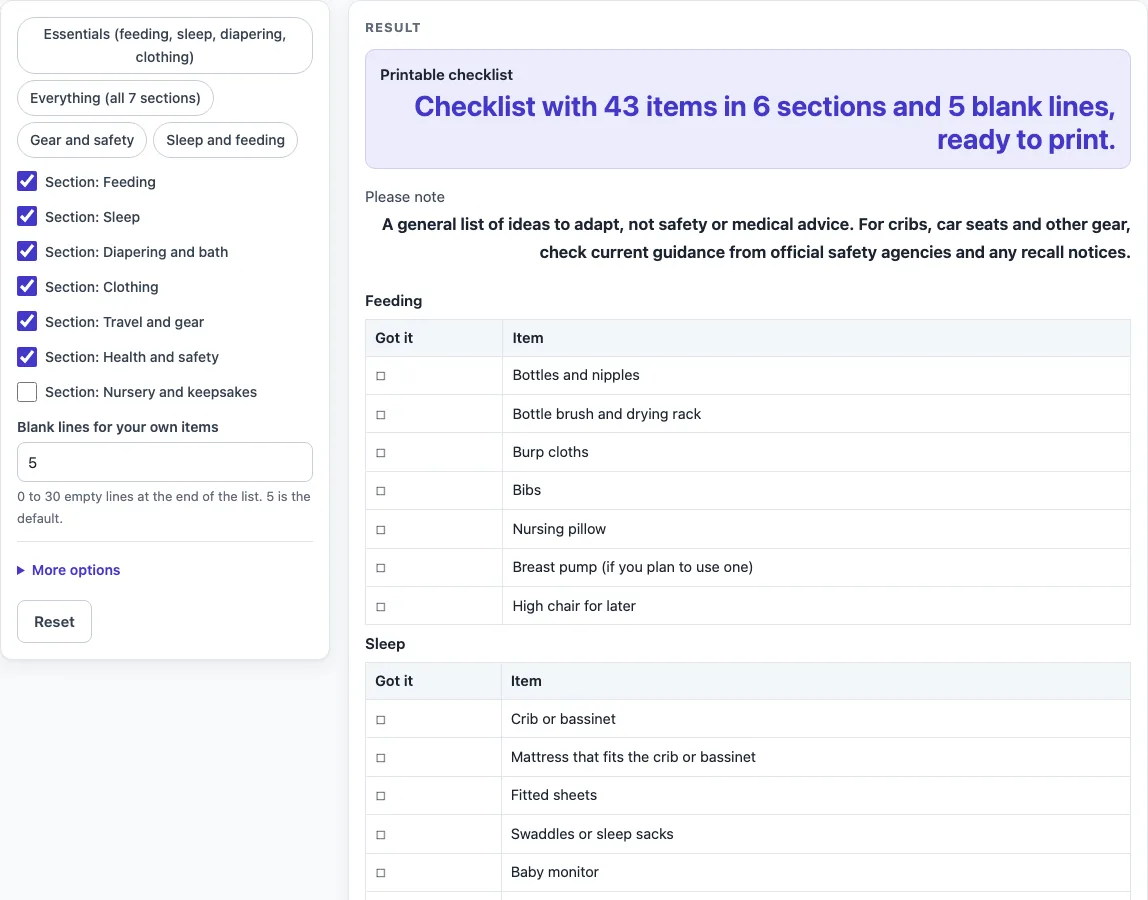
The list has seven sections: feeding, sleep, diapering and bath, clothing, travel and gear, health and safety, and nursery and keepsakes. Each section is a table with a “Got it” box, so you can tick off items as you receive or buy them. Nothing you type is stored or uploaded.
How to use the Baby Registry Checklist
- Choose your sections. Each section has a switch labelled “Section:
”. Six sections are on by default. “Nursery and keepsakes” is off, so switch it on if you want it. - Or start with a preset. “Essentials (feeding, sleep, diapering, clothing)” gives 31 items, “Everything (all 7 sections)” gives 49, “Gear and safety” gives 12, and “Sleep and feeding” gives 14. A preset only sets which sections are on, so you can change anything afterwards.
- Set the blank lines. In “Blank lines for your own items”, enter a number from 0 to 30. The default is 5. Enter 0 to remove the “Your own items” table.
- Add columns if you need them. Open More options and tick “Qty column” and/or “Notes column”.
- Check the sheet, including the “Please note” message, before you print.
- Print or download. Press Print to print the sheet, or press “Download as CSV (opens in Excel)” to save the same tables as a .csv file.
Typed text and settings can appear in the page link (the address after ?s=). Remove any private details from the form before you share the link. If every section is off and the blank lines are 0, the tool shows an error. Switch on at least one section or add some blank lines to fix it.
What should be on a baby registry checklist?
A baby registry checklist should group the things a family usually needs into clear categories, so that important items are not missed. This tool uses seven sections: Feeding, Sleep, Diapering and bath, Clothing, Travel and gear, Health and safety, and Nursery and keepsakes. Each section is a separate table, so you can keep the parts that fit your plans and leave out the rest.
The items are general ideas, not a shopping order. The tool does not name brands or models, give prices, or set safety rules. Treat each item as a prompt to compare with your own home and budget. Use the “Your own items” lines for anything the list does not cover. Use the Qty and Notes columns for sizes, colours or where you plan to buy.
Because each section is its own table, you can also split the work. One person can take the Feeding and Sleep tables while another takes Clothing and Travel and gear. Each table prints with its own heading, so the pages stay easy to read and you can tick off items one section at a time.
Which baby items do I need first?
Start with the sections that are on by default: Feeding, Sleep, Diapering and bath, Clothing, Travel and gear, and Health and safety. Together they make up the default sheet of 43 items. If you want only the core basics, the “Essentials (feeding, sleep, diapering, clothing)” preset covers four sections and 31 items.
Nursery and keepsakes is off by default because it is optional. Once you have a list, use the “Got it” column to mark what you already have. That makes the remaining gaps easy to see. For cribs, car seats and other gear, check current guidance from official safety agencies and any recall notices before you buy.
Worked examples
| Input | Result |
|---|---|
| 6 sections | 43 items and 5 blank lines |
| 4 sections | 31 items and 5 blank lines |
| 7 sections | 49 items and 5 blank lines |
| 2 sections | 12 items and 5 blank lines |
Calculated by the tool above; open it with the same values to see each step.
Frequently asked questions
Can I print only some sections?
Yes. Switch off any section you do not need, and the tool removes its whole table from the sheet. Then press Print, and only the sections that are on will appear.
Can I add a quantity or note for each item?
Yes. Open More options and tick “Qty column” and/or “Notes column”. These are empty cells for you to write in by hand. The tool does not count or total anything.
Is the checklist safety advice?
No. The result shows this message: “A general list of ideas to adapt, not safety or medical advice. For cribs, car seats and other gear, check current guidance from official safety agencies and any recall notices.” Use official safety agencies for safety questions.
What does the “Got it” column do?
It is the empty box column at the start of each table. Tick it when you have received or bought an item.
Does the tool suggest brands or prices?
No. The items are general ideas. The tool does not say which brand or model to buy and gives no prices.
Is anything I type saved?
Nothing you type is stored or uploaded. The page runs in your browser, is free, and needs no sign-up. Remember that typed text can appear in the page link, so check the form before you share it.
Related tools
- Sign Up Sheet Template: Printable sign up sheet for volunteers, potlucks and time slots.
- Sleep Log: Printable sleep log with bedtime, wake time, naps and notes.
- Food Diary Template: Printable food diary with meal, food and drink, amount and notes.
- Gratitude Journal: Printable gratitude journal pages with daily prompts.